

Community Manager
October 9, 2024
Pergunta

Feature Focus: Quick Set Anchor Point

  • October 9, 2024
  • 14 respostas
  • 5648 Visualizações

In After Effects Beta 25.1 Build 36, we are pleased to announce Quick Set Anchor, a more efficient way to change the anchor point on your 2D layers to any of 9-commonly-used-points — all the corners and centers of your layer’s edges. And it's available both from the Properties Panel and anywhere else by keyboard shortcut!
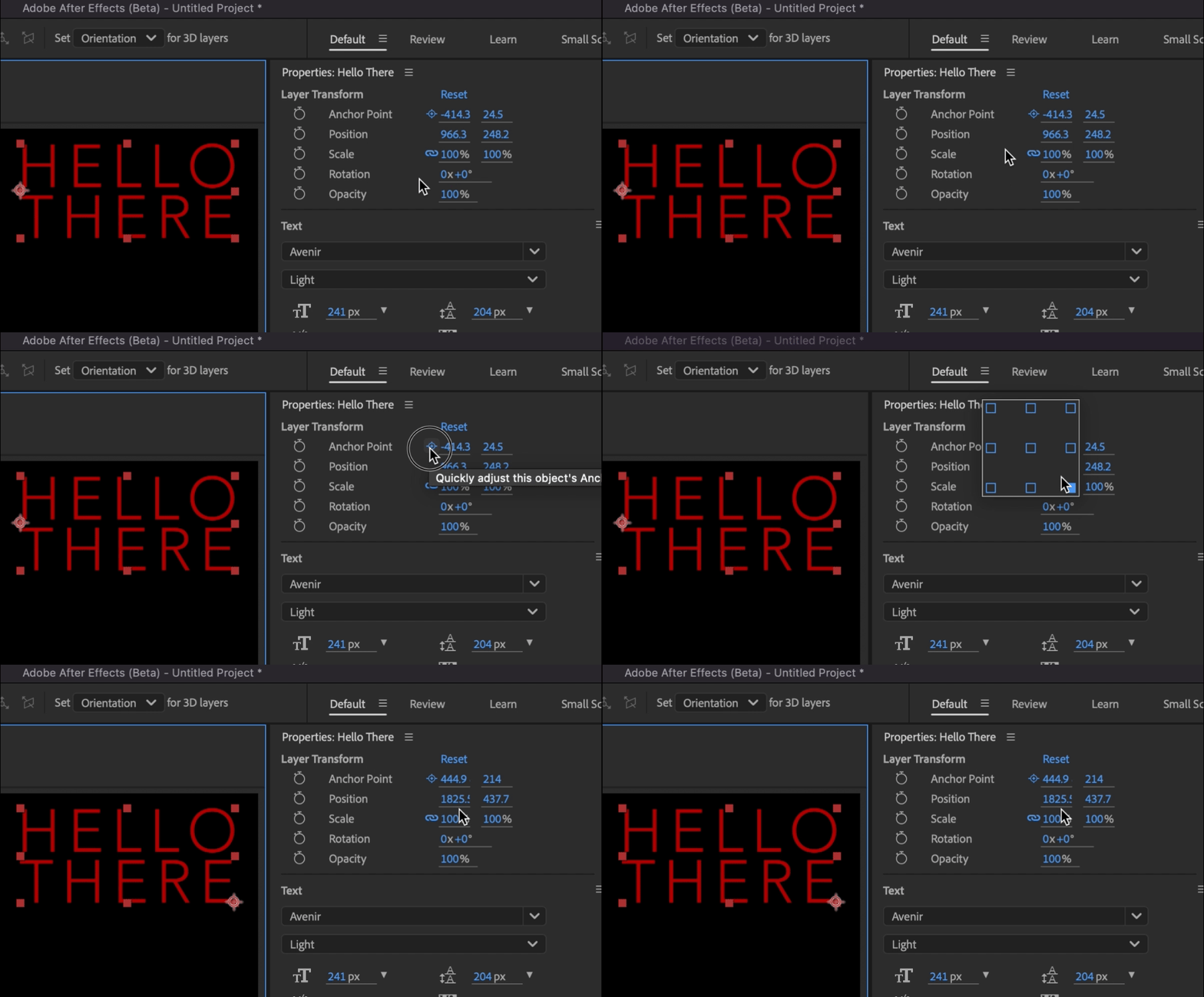
Quick Set Anchor can be launched by selecting a layer (or layers!) and clicking the new Anchor Point icon next to the Anchor Point property in the Properties Panel, creating a temporary pop-over Quick Set Anchor Dialog that allows you to click your preferred anchor point location, automatically close the dialog, and be on your way!


Besides the Anchor Point button in the Properties Panel, you can also bring up the Quick Set Anchor Dialog by using the keyboard shortcut Shift + Tab to create the temporary pop-over right below your mouse, ready for you to click your anchor point of choice without taking your eyes away from your comp content. Press the shortcut. Click. Move on. 
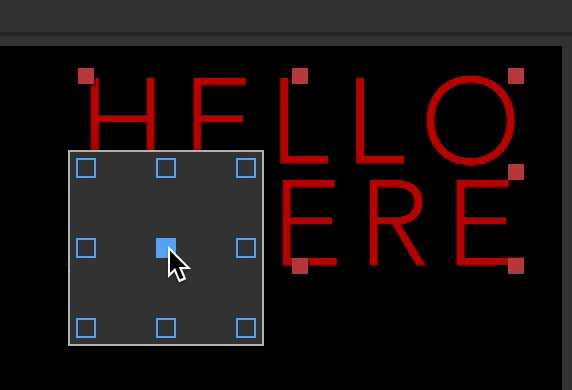
(This is just a screenshot, showing you how the Quick Set Anchor Dialog can appear anywhere. Don't wait for it to animate.)


What we would love to know from you:

  • How do you feel about the default Shift+Tab shortcut?
  • Do you prefer the Properties Panel or the Shift+Tab shortcut?
  • Do you want the same sort of functionality for 3D Layers? How do you imagine that looking?
  • Is there any confusion if you've already applied a rotation to your layer?


Known issues:

  • Currently we don’t support changing or removing the keyboard shortcut for Quick Set Anchor. Please let us know if this negatively affects your workflow.
  • Currently, Quick Set Anchor only works for 2D layers. Please let us know if extending this functionality to 3D layers is something that would help your workflow.

14 Respostas

Participating Frequently
June 27, 2025

Hmm, I'd like to have the chance to change the shortcut in the future because I don't really like using TAB. But that's something personal, probably others don't have a problem with that.

And yeah, I'd love to use this in 3D layers too.
During the years I've been working with AE, I've been using a script for that, and it also works in 3D space. So if this feature is going to be released natively but doesn't work in 3D, I'd still have to use the script. I think it wouldn't make sense for me to use the new feature in 2D and the script in 3D.

Thank you for these new features. I've been loving them!

Participant
January 24, 2025

For sure give us the option to change the shortcut cause shift+tab is from finger movement perspective super close and handy shortcut. Maybe use shift+tab shortcut for all future popups. For example shift+tab over anchor point gives anchor point controls. Shift+tab over text gives font choice, shift+tab over transparent background gives color control of checkerboard color...

If it's too much, for sure give option to change shortcut. And give it as option in properties panel as well.

mrjacobweber
Known Participant
January 24, 2025
  • Shift Tab seems fine.
  • It would be nice if the position keyframes recalibrated themselves based upon the new anchor point, so the object doesn't move. Others have said this before me, but see Motion V4 for a good example of how this works. 
  • There should always be options to change shortcuts and hotkeys. Too many items are stuck without hotkeys.
Known Participant
January 16, 2025

Another amazing new feature. Love that it has a shortcut but we should be able to change it. As for properties panel, it's also useful that it's there for quick access.

One thing I would recommend is better UI obviously. Maybe a clearer representation of center, corner and sides. It could also be very helpful if it shows the current anchor point position. So if it's let's say bottom left, that box is highlighted or shown as active in some way. This could potentially also help with rotated objects.


Perhaps something like this. Blue icon is active position, while the blue box is current selection. I think overall icons would help a lot with readability.


And for 3D perhaps if we hold click on the button, a popup appears and we select front-center-back? Regular click still selects the center ones.


Community Expert
December 4, 2024


  • How do you feel about the default Shift+Tab shortcut?

    I would prefer ⌥+⇧+⌘+Home for Quick Set Anchor Point to correspond to the existing ⌥+⌘+Home for Center Anchor Point in Layer Content.


  • Do you prefer the Properties Panel or the Shift+Tab shortcut?

    I prefer a keyboard shortcut, but would like see the option available in the Properties Panel.  The crosshair icon for "Quickly adjust this object's Anchor Point" helps new users to know the option exists as well as serves as a reminder to experienced users.  I would find it helpful to  see Layer > Transform > Quick Set Anchor Point below Layer > Transform > Center Anchor Point in the Layer pulldown menu and to have the crosshair icon next to Anchor Point property in the Timeline when the Transform properties are showing.


  • Do you want the same sort of functionality for 3D Layers? How do you imagine that looking?

    Yes, it would be nice to have the same functionality for 3D Layers.  I imagine this looking like a 3d box instead of a 2d square with clickable points that can be transformed in 3d space via a Mini 3D Transform Gizmo inside the 3d box to aid in selecting a point in z-depth if needed. 


  • Is there any confusion if you've already applied a rotation to your layer?

    I just tried using Shift+Tab to set the Anchor Point while a Preview is playing with rotation already applied.  The result is as expected. 


Participant
October 30, 2024
  • Shift+Tab is awesome
  • I prefer shift+tab
  • Yes, but no idea how that could be implemented
  • Yes it's confusing if you've applied a few rotations and keep changing the anchor point, but I don't think that's the fault of the tool. It makes sense to default to the original relative sides of the shape when changing the anchor point. I've used a similar plugin for years and in practice, I always set the anchor point before animating any properties, so this issue has never been a problem for me until I just intentionally tried to create it.


Shebbe
Community Expert
Community Expert
October 22, 2024

Adding my feedback as well. We need an option to modify existing keyframes when changing the location. For this reason alone I'll have to stick to the ancient Move Anchor Point script UI otherwise. The quick option is great, but maybe a native panel/properties section with some expanded options like modifying existing keyframes is the play ultimately.

Shebbe
Community Expert
Community Expert
October 19, 2024

I think Shift+Tab is a bad idea. There are many users that use FX Console with Shift+Tab as hotkey. Furthermore Shift+Tab is intended to jump back one value field when your typing cursor is active in such a field. Something that everyone needs regardless of using FX Console or not. Unless this behavior doesn't conlfict with it. Haven't tested yet.

JohnColombo17100380
Community Manager
Community Manager
October 19, 2024

Currently, the new Quick Set Anchor shortcut does not interfere with using Shift+Tab to navigate back through active text fields.

Shebbe
Community Expert
Community Expert
October 19, 2024

That's good to know, I would still say that at least a keyboard shortcut needs to be exposed in the shortcut editor for users to override it. Many that use it for FX Console including me will be forced to switch it otherwise.

Legend
October 16, 2024

Why not open the Quick Set Anchor Dialog on the CTRL+DBLCLICK event, which allows centering the anchor point?

Or maybe a Quick Set Anchor icon on the right.


And for the keyboard shortcut, maybe pressing the Y key twice or A key twice.


Shebbe
Community Expert
Community Expert
October 28, 2024

I agree, it would make sense to keep the keyboard shortcut in line with established usage. Even something like Alt + Y could work since that seems to be not occupied yet.

Participant
October 14, 2024

I use Shift+Tab shortcut for the FX Console plugin, so I would absolutely appreciate being able to change or remove this shortcut.