

Christine Goldby
Known Participant
December 9, 2021
Question

Introducing the Properties Panel in After Effects (Beta)

  • December 9, 2021
  • 39 replies
  • 174648 views

In our ongoing aim to make your After Effects experience better, we are excited to introduce the new Properties Panel to the beta today (22.2.0x29).


As always, we look forward to hearing your feedback here in the forum. Your responses help us know when features are ready to ship or if they need more polishing. Please speak up and help us build the product you need!


Properties Panel

Create motion graphics quicker and with greater ease inside the new Properties Panel. Cut down on your twirl-time by quickly accessing the properties you need the most. New designers coming from Photoshop and Illustrator should feel right at home with controls available where you are used to finding them.


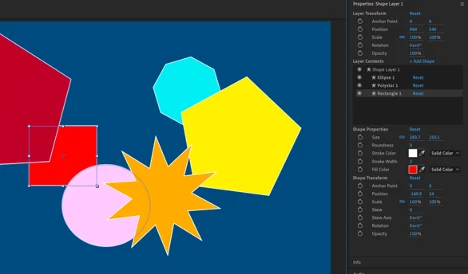
This first build brings an easier way of working with Shape layers. Select a shape either in the composition window or timeline, and you will find its properties shown in the panel for easy access. If you change a value in the panel, it will change in the timeline as well. Select multiple shapes on a layer to change their values at the same time.


Alongside the Shape properties, we’ve also added basic layer transforms for Anchor Point, Position, Scale, Rotation and Opacity. The values can be modified for multiple layers at once when selected together.


How to Use Properties Panel
Select a Shape layer in the timeline, or in the composition window double-click to select a specific shape within that layer. The Properties Panel, which will be at the upper right side of the panel stack, will display the properties for your selection. You may need to extend the bottom edge of the panel down to see all the controls, or you can scroll down instead.


  • Layer Transform controls at the top of the panel control the layer as a whole.
  • Layer Contents lists any selected Shape layer(s) plus all the Shapes included within them.
  • Shape Properties gives you quick access to the properties you need most frequently.
  • Shape Transform gives the Anchor Point, Position, Scale, Rotation and Opacity controls specific to the selected shape.


Tips

  • Double-click on any shape in the composition window to show its controls in the Properties Panel.
  • Double-click on any property in the Properties Panel to reveal it within the timeline.
  • The panel can be moved to wherever you find it most useful. Let us know where you end up using it most often!


For a longer introduction check out the attached video below.


Have fun with it!


Known Issues and Workarounds

  • If you have multiple fills/strokes within a single shape, the fill/stroke does not show up in the Properties Panel. You can still edit these items within the timeline window.
  • If you have multiple paths within a single shape, only the initial path shows in the Properties Panel. You can still edit the other paths within the timeline window.
  • Shape Modifiers applied to Shapes do not show in the Properties Panel.
  • Layers/Shapes cannot be renamed or reordered within the Layer Contents window.
  • If you have a lot of Shapes on one layer, the Layer Contents window may not auto-scroll to your selected Shape. You can use the scrollbar to get to it.
  • When scrubbing the Rotation angle, revolutions are not properly counted (rotating past 360 will start over at 0). You can type in values directly.
  • If you have multiple keyframes on a property, deleting one or more from the Properties Panel does not work correctly. Move to the timeline to delete instead.
  • Deleting a Shape Layer from either the timeline or Properties Panel throws an AE error. Just click OK and keep working.
  • Keyframing a gradient fill/stroke from the Properties Panel throws an AE error. Click OK, and go to the timeline to set your keyframes.
  • Resetting values in the Properties Panel will reset the values within the timeline, but the value still appears the same in the Properties Panel.


39 replies

PFuerst
Inspiring
December 14, 2021

I think it would also be great to have some sort of a "version system" in there.


Much like there is in Fusion or with Takes in Cinema. This way we could try out different settings and see what works best without the need to duplicate layers.

LAR5
Participating Frequently
December 14, 2021

...now all the property names in the timeline are gone. 😬
22.2.0x41
Thanks
I also reported it just now: https://community.adobe.com/t5/after-effects-beta-discussions/all-property-names-are-gone-in-the-timeline/m-p/12592590#M1680


JohnColombo17100380
Community Manager
Community Manager
December 15, 2021

Thanks @LAR5. This one should be fixed in the next available Beta build ( 22.2.0.45 ).


Cheers,

- John, After Effects Engineering Team

LAR5
Participating Frequently
December 16, 2021

Fixed it is - thanks John.

sskaz
Inspiring
December 13, 2021

This is a very nice start! I haven’t installed it but from watching the video…

  • Would love to see developed and expanded over time. Like turned into a C4D-like attributes manager and merged with Effects Controls. (I’d prefer jamming more things into a vertical panel instead of losing limited vertical space within the timeline panel.)
  • How are Shape Groups/nested group hierarchies handled?
  • Can the parameter labels (the Size, Position, Scale, etc. text) be selectable for copy and paste?
  • Would like to see the Layer Contents field be repsonsive/adaptive. It looks like a fixed height regardless of how many shapes there are.
  • Are Stroke options (Caps, Dashes, Taper, etc.) coming? Perhaps under a twirl down arrow?
Christine Goldby
Known Participant
January 14, 2022

Hi @sskaz , sorry - I lost your post over the holiday break.
These are all great suggestions, and I can certainly tell you that it will be expanded, this is just the introduction. Thank you for your ideas, keep watching for the updates!

LAR5
Participating Frequently
December 13, 2021

Go to next / previous keyframe works only when the keyframes are exposed on the timeline as well.
Of course, the cool thing about the Property Panel is, that the layers shouldn't be needed to be untwirled. Currently e.g. having keys on the position property and having the layer twirled up on the timeline - not showing the keyframes, the arrows next to the keyframe indicator on the Property Panel to go to the next / previous key won't do that and will just move the CTI to the start or the end of the work area.
Thanks!

James Landy
Inspiring
December 14, 2021

Problem verifed in-house and added to our bug queue.  Good one! Thanks for the report

prbmotion
Participating Frequently
December 13, 2021

I'm very excited for this update. I geek out about optimizing my workspace and workflow in Ae. This should improve it quite a bit

Participant
December 13, 2021

HALLELUJAH

Participant
December 10, 2021

I'd love to use it but rendering via media encoder fails for me in the latest version, so I've had to roll back to the previous release. I'm not alone in this issue either!

TimKurkoski
Community Manager
Community Manager
December 10, 2021

@brainfruit, sorry to hear that you're having problems. Your best way to get help is to post a new thread. If the problem you're having is with After Effects Beta, start a new thread in this forum. If the problem you're having is in the non-beta release of After Effects, please post in the main After Effects Forum.


Regarding Properties Panel, remember that it's only currently in Beta builds. You can install these builds alongside the non-beta releases, they do not interfere with each other. We're at the stage right now where we'd love to get your feedback about the shape and the feel of the Properties Panel. How does it work for you? What would you change? So please install After Effects Beta, try it out, and let us know what you think!

Participant
December 10, 2021

This is great!! When will there be a feature like illustrator where we can add gradient along paths?

Christine Goldby
Known Participant
December 13, 2021

Hi @tsuriel. It is a great feature request and we will add your vote.


You may also want to check out User Voice, it's a great place to add feature requests and add your votes to those posted by other users. 


Thanks for your feedback!

jackthegiantkiller
Inspiring
February 7, 2022

Hi Tsuriel, if you want any kind of feedback or response apparently this is place, as the After Effects team rarely responds on Uservoice and there are Top Ten requests that have been ignored for years on end.


maxbuzin
Participant
December 10, 2021

How to get the AE beta? Isn't showing for me here... only aero beta...

R Neil Haugen
Legend
December 10, 2021

That's not the place where you get the beta apps ... go to the left side tabs of the main CC app. Where it has the tabs for say video and such. There should be an option for Beta apps.


Neil


Everyone's mileage always varies ...
Mo Moolla
Legend
December 9, 2021

Hi Christine


This looks pretty interesting. I see the layout is almost goinh the EGP route.

I will have a go at this. 

Interested to see how much real estate is needed to house this property panel.

To me it seems I would need to set up a new Workspave apart from my VFX workspace which houses a lot of plugins and has almost no more room for another docked panel.

Would love to hear feedback from those who are on laptops and Macbooks with smaller screens


Mo