



TeresaDemel
Adobe Employee
Adobe Employee
March 10, 2021
Question

Multi-Frame Rendering is here! (AKA The multithreading you’ve been asking for)

  • March 10, 2021
  • 147 replies
  • 167359 views

Multi-frame Rendering is here for After Effects beta users. Right now, you will have access to Multi-Frame Rendering for export only. Keep your eye on this forum, as we will be rolling out new features until we launch.


Internally, we have been testing a representative sample of projects with a suite of hardware configurations, and we are excited to finally put this feature in your hands and get your feedback. Test your unique projects on your own hardware so we can ensure that our performance updates benefit all of our customers and meet speed and quality metrics before we launch.


Beta testing of Multi-Frame Rendering will last a little longer than some of our other features because we currently do not support Multi-Frame Rendering in Preview, Motion Graphics templates, Dynamic Link, Adobe Media Encoder and AERender Command Line Interface.


Check out the blog and FAQ post to learn the following:

  • What is Multi-Frame Rendering?
  • What factors influence performance?
  • Which effects have been optimized for Multi-Frame Rendering?


Start Testing!
We want to hear from you! Share your thoughts and ideas in this forum.

  • How much faster is Multi-Frame Rendering compared to Single-Frame Rendering with your comps on your machine?
  • Does our benchmark project perform at the expected speed on your system?
  • If you run into specific speed or quality issues with your project, share your project with us at mfrbeta@adobe.com.


Test Your Comps
Test your comps in Multi-Frame Render mode vs. Single-Frame Render

  • Use Ae Render Queue to export your comp in Multi-Frame mode.
  • Purge both the disk and memory cache, then
  • Use Ae Render Queue to export your project in Single-Frame mode. Note: Use the same output module for Single-Frame and Multi-Frame mode. Go to Preferences -> Memory and Performance -> Enable Multi-Frame Rendering (beta) and uncheck the box to use Single-Frame Rendering Mode


Leave a comment and the following information in this forum:

  • Your hardware specs: # cores in your CPU, GB of memory, GPU model and amount of VRAM
  • Single-Frame render speed (Use “Render Time” noted in your status bar)
  • Multi-Frame render speed


If you detect any problems with render speed or quality, submit your projects

  • Open your After Effects project
  • File -> Dependencies -> Collect Files -> Collect -> Save As (Name Your Folder)
  • After Effects will store your .aep file, footage, and text report (file log)
  • Zip up your project and send it to us at mfrbeta@adobe.com (or send a link to it hosted on your creative cloud storage if it’s too large to email).


Share the following information in your comment:

  • Your hardware specs: # cores in your CPU, GB of memory, GPU model and amount of VRAM
  • Single-Frame render speed (Use “Render Time” noted in your status bar)
  • Multi-Frame render speed
  • Mercury CPU or GPU Mode used


Test our benchmark project and see how your hardware compares
We would love to know how your hardware compares to the results we have gathered from our test suite:
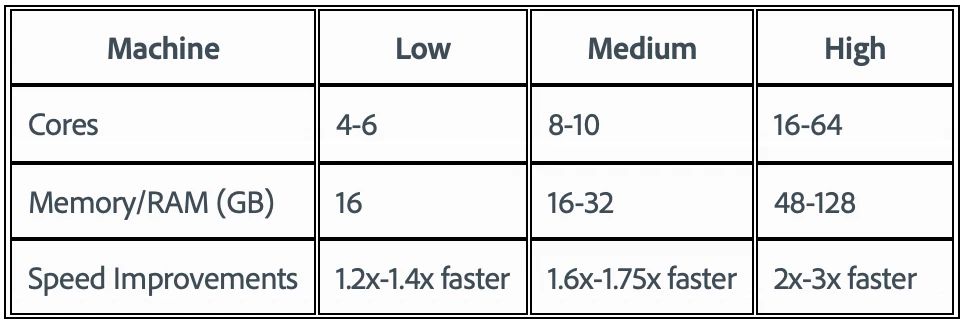
 

To test the benchmark project on your machine:

  • Download the benchmark project
  • Use Ae Render Queue to export the benchmark project in Multi-Frame mode.
  • Purge both the disk and memory cache, then
  • Go to Preferences -> Memory and Performance -> Enable Multi-Frame Rendering (beta) and uncheck the box to use Single-Frame Rendering Mode
  • Use Ae Render Queue to export the benchmark project in Single-Frame mode. Note: Use the same output module for Single-Frame and Multi-Frame mode.


Share the following information in this forum:

  • Your hardware specs: # cores in your CPU, GB of memory, GPU model and amount of VRAM
  • Single-Frame render speed
  • Multi-Frame render speed

147 replies

Jenkmeister
October 26, 2021

Earlier today we announced the availability of AE 2022 (build 22.0x111) which moves MFR from Beta to the Public release. This could not have happened without all of your support and help over the last 9-10 months in this beta. Your feedback and support has been invaluable!


Are there still some bugs to figure out? Yep. Do we have more we want to do here? Sure do. But based on both subjective and objective data, it was clear that MFR, Speculative Preview, the Composition Profiler, Render Queue notifications and all the other work we've been doing was ready to go to beyond Beta.


So what's next? We are working on 22.1 which we plan to ship before the end of 2021. We'll keep fixing MFR bugs, adding some features to speculative preview and the composition profiler, along with bringing MFR for Motion Graphic Templates when rendered in Premiere Pro or Adobe Media Encoder. Keep reporting any issues you have and we'll keep working on fixing them.


Oh and one more thing... https://community.adobe.com/t5/after-effects-beta-discussions/after-effects-beta-now-on-apple-silicon/td-p/12474342 - enjoy 🙂 

Participating Frequently
October 27, 2021

As someone who has been following this for years, I think I speak for a vast majority of After Effects users when I say thank you and your team for all your hard work! This has to be one of the most monumental updates this software has ever seen, and I can only imagine the countless hours, days, if not weeks of people's time and life that this will save.

On a seperate note, I can't be 100% sure how much influence the uservoice post had on getting the ball rolling for this endeavor, but it does feel like Adobe is finally listening to it's users in a tangible way - and I'd be remiss if I didn't take this opurtunity to both extend my appreciation for doing so, and also ask that you please keep it up!

Thanks again to you, Andrew Cheyne, Victoria Nece, and all other others who worked on this but aren't as exposed to the public eye. You've all done a bang-up job! 👏

Inspiring
October 22, 2021

I ran into a new issue in the very latest beta version. Scrubbing the timeline has become awfully slow and sluggish. 

This is even in a completely empty timeline. Notice the lag of the playhead behind the cursor:


It never was great, but in the regular after effects release it's way better than that:


It might be worth noting that I'm on an Apple XDR display, and not a single Adobe App except maybe Lightroom CC seems to like this huge resolution when it comes to UI responsiveness. After effects, Premiere and Lightroom Classic have always been the worst, to the point that I have to run premiere in 1/2 res UI mode. 


But this super laggy scrolling behavior in the latest beta wasn't there before, so please look into that.


Ah one more thing, it also has become suuper slow to respond to a space bar press to stop a current playback! 

Jenkmeister
October 22, 2021

Thanks for the reports. I'm not aware of any changes happening in AE itself that would be changing either the UI responsiveness or stopping playback in any of the recent beta updates. Can you confirm you're on 22.1x50? Have you made any changes to your OS or your hardware otherwise? 

Inspiring
October 22, 2021

Yup, I'm on that version and other than that, nothing has changed with the system. I didnt use the beta for a while so I skipped a few versions, can't say that this was introduced with the last update, but it's definitely noticable. 

It lags as if there were a ton of heavy effects or a lot of layers to scrub through, but even on a completely empty timeline. 

Participant
October 20, 2021

is it possible for me to jump on the beta team? Thanks!

Jenkmeister
October 20, 2021

Yep, the beta builds are availabe in the Creative Cloud Desktop app. Just look for the "Beta" section on the left.

thejohnnyluu
Participating Frequently
October 20, 2021

I was testing out one of my projects and noticed that Rendering was stalling at a particular point in my timeline. Using the Frame Render Time column I isolated the issue to a nested comp that had several text layers with animation expressions applied. Turning these text layers off changes the render time from several seconds down to a few miliseconds - quite dramatic.


Do you think there might be something going on with how expressions are being handled? Or maybe there's an issue with expression I'm using (I didn't write it)?

hellopaul4
Inspiring
October 20, 2021

Yes. I've found that text layers with expressions seem to cause dramatic slowdowns and non-redraws.

thejohnnyluu
Participating Frequently
October 20, 2021

It's frustrating because to do the text anmiations manually, although it would solve all the preview and render delay problems, would take significantly more time upfront and wouldn't be editable, as adjustable or as iterative - especially on multiple lines of text, and more signifanty if you wanted to try different fonts!


It would be nice to know if there are going to be any improvements to expression performance on text layers or if I just need to suck it up and accept the hit! 🙂

Calamari77
Inspiring
October 12, 2021

AMD Threadripper 3990x 64core, 256GB Mem, NVidia 3090 FE 24GB


Software Only:

Multi-Frame = 3:45

Single = 12:45


GPU Enabled:

Multi-Frame = 3:22

Single = 11:59


WOO HOO Great job Adobe!! This made my week. It's so nice to be able to finally stretch my CPU legs in AE. I'll try some of my other projects in this new version. Hopefully I'll have the same results.   


Participant
October 15, 2021

Mac Pro 7,1. 12 cores 96gb Ram Here , Radeon w5700x 16GB

Was excited to heard about this feature but AE only using only 13% of the cpu during the whole proccess...


Have you guys at Adobe thought about buying and implenting rendergarden from toolfarm as an standard render technology native to after effects?  If you havent you should since that solution really works. 


https://www.toolfarm.com/buy/rendergarden/


Jenkmeister
October 15, 2021

That doesn't seem right. We have 30,000 MFR renders happening in Beta per day with much improved performance. Can you a) confirm that MFR is enabled in Preferences -> Memory & Performance and b) tell me more about the project you were rendering? 

Jenkmeister
October 9, 2021

Thanks for the projects and feedback over the past week. Hopefully we've taken care of a bunch of those issues. Rolling out today is 22.1x24 which has a few more fixes I wanted to make sure folks know about:


  • Thanks to some of our beta users, we identified an issue that could affect smooth playback of cached frames in the composition window. This should now be fixed so please let us know if you're still seeing issues that sound like that.
  • The new Cinema 4D integration wasn't allowing C4D specific plugins to work when used in the AE workflow. This is now fixed.
  • If you use the date and time variables in the "output" section of the render queue, those variables weren't being replaced correctly. This is now fixed.
  • In the layer windows, when using Rotobrush, the propagation markers may not have been accurate when purging frames or changing effect parameters. This is now fixed. 
  • Multi-Frame Rendering could cause previews to extend past the available RAM allocated for a preview and as such cause a slowdown in AE's overall performance. MFR should now act a lot more like MFR-off when it comes to respecting RAM and stopping preview caching when detecting low memory conditions. 


Again, thank you for your continued support and feedback! 

Participating Frequently
October 3, 2021

Running a 3950x with RTX 3080.... It is barely utilizing any resources during media encoder render (using all hardware H.264 encoding with CUDA). My caches are on 2 different M.3 3500 Mb/S drives (one for cache, one for conformed cache). Disk drive usage is minimal. When RAM previewing it maxes out at about the same CPU usage, and usually hovers around only 2-3 concurrent frames. This is not the benchmark comp, but a real-life use case. 


Inspiring
October 4, 2021

Running a 16 core Mac Pro 2019, 192gb Ram, Dual Vega II graphics and the latest OSX and after effects versions, and for some reason, suddenly I can't get smooth playback anymore out of the beta. Even the simplest animations like a scale between two keyframes don't play back in realtime in an HD comp any longer. The same projects work flawlessly in the regular After effects v18.4.1. 


MFR enabled or disabled, no difference. Something very strange must have been broken with one of the last updates.

Please take a look at the attached video.

Jenkmeister
October 4, 2021

Was that with MFR disabled? The info panel isn't showing anything about concurrent frames so I'm not sure.

Jenkmeister
October 2, 2021

Thank you for your continued support, testing and feedback on Multi-Frame Rendering and all the features wrapped up in it. We continue to get closer and closer to moving this from beta into a stable release. We have a few more critical bugs we want to get addressed to make this as good as possible!


Today though, AE Beta 22.1x13 has been made available for download. We’d love it if you could download, install, and give it a go this weekend. Some specific changes to look out for:


  • Particle Playground is now supported by MFR and with that all 290 effects are MFR supported!
  • Another update to Cineware was added to bring about a bit more stability.
  • Fixes in Rotobrush have brought about not only more stability but increased performance during propagation of long clips.
  • Thanks to a project from one of our beta users, we found an area that the Composition Profiler wasn’t collecting data in. If you use Collapse Transforms on pre-comps containing 3D layers, the profiler should now show data for that scenario.
  • The Reshape effect got a couple more bug fixes for bad output. If you use that effect, please load up your project and let us know if you see anything still broken.
  • The Warp effect (not warp stabilizer) had a crashing bug fixed in it. If you use that effect, please load up your project and make sure everything is working.
  • Slowdown when playing back already rendered comps with MFR. There were some scenarios where it looked like MFR was re-rendering frames that were already rendered. There wasn’t anything re-rendering but reading the frames post-render had gotten slow, so we fixed that.
  • The AutoColor, AutoLevel and AutoContrast effects were fast, then got a bit slower a few weeks ago, but we fixed that so those are now fast again with MFR.
  • Unrelated to MFR but in this build, Motion Path Tangents in the layer window stopped appearing in a previous release. They are back now.
  • We found some scenarios where AE compositions when rendered from AME were crashing AE. We should have those fixed now.


Our goal is to get those remaining critical bugs sorted out this week so be on the lookout for more updates very soon!


Thanks again,

Sean

Participating Frequently
October 3, 2021

Thanks for the update, Sean.


It seems I'm still experiencing slowdown with already rendered areas on the timeline. It's a very simple project, so I'm not using a lot of layers or complex effects or anything. I'm happy to share the project though, if it helps.

Jenkmeister
October 4, 2021

Yes, please share the project at mfrbeta@adobe.com and we'll take a look. Thanks!

meshkoff
Participant
October 2, 2021

Thanks for listening to us, i think the whole community has been waiting for MFR to comeback for years.

Just one more question: when should MFR go from beta to stable?

Roland Kahlenberg
Legend
September 24, 2021

Is anyone keeping a Leaderboard of the performance of the different systems on the Benchmark Project? 
It'll be good to take a look at such records. 

Very Advanced After Effects Training | Adaptive & Responsive Toolkits | Intelligent Design Assets (IDAs) | MoGraph Design System DEV
hellopaul4
Inspiring
September 24, 2021

It'd also be interesting to see people's results over various releases - I found that the benchmark project was fractionally slower in recent releases compared to the first multi-frame-rendering release of AE, and that's running on a pretty fast machine - my fastest time was (I think) 3min 23secs.

Rene Andritsch
Community Expert
Community Expert
September 24, 2021

I also made that observation that it rendered a bit slower than in the beginning but on the other hand now the start up time is much shorter which probably makes the whole process faster in total.