



TeresaDemel
Adobe Employee
Adobe Employee
March 10, 2021
Question

Multi-Frame Rendering is here! (AKA The multithreading you’ve been asking for)

  • March 10, 2021
  • 147 replies
  • 167361 views

Multi-frame Rendering is here for After Effects beta users. Right now, you will have access to Multi-Frame Rendering for export only. Keep your eye on this forum, as we will be rolling out new features until we launch.


Internally, we have been testing a representative sample of projects with a suite of hardware configurations, and we are excited to finally put this feature in your hands and get your feedback. Test your unique projects on your own hardware so we can ensure that our performance updates benefit all of our customers and meet speed and quality metrics before we launch.


Beta testing of Multi-Frame Rendering will last a little longer than some of our other features because we currently do not support Multi-Frame Rendering in Preview, Motion Graphics templates, Dynamic Link, Adobe Media Encoder and AERender Command Line Interface.


Check out the blog and FAQ post to learn the following:

  • What is Multi-Frame Rendering?
  • What factors influence performance?
  • Which effects have been optimized for Multi-Frame Rendering?


Start Testing!
We want to hear from you! Share your thoughts and ideas in this forum.

  • How much faster is Multi-Frame Rendering compared to Single-Frame Rendering with your comps on your machine?
  • Does our benchmark project perform at the expected speed on your system?
  • If you run into specific speed or quality issues with your project, share your project with us at mfrbeta@adobe.com.


Test Your Comps
Test your comps in Multi-Frame Render mode vs. Single-Frame Render

  • Use Ae Render Queue to export your comp in Multi-Frame mode.
  • Purge both the disk and memory cache, then
  • Use Ae Render Queue to export your project in Single-Frame mode. Note: Use the same output module for Single-Frame and Multi-Frame mode. Go to Preferences -> Memory and Performance -> Enable Multi-Frame Rendering (beta) and uncheck the box to use Single-Frame Rendering Mode


Leave a comment and the following information in this forum:

  • Your hardware specs: # cores in your CPU, GB of memory, GPU model and amount of VRAM
  • Single-Frame render speed (Use “Render Time” noted in your status bar)
  • Multi-Frame render speed


If you detect any problems with render speed or quality, submit your projects

  • Open your After Effects project
  • File -> Dependencies -> Collect Files -> Collect -> Save As (Name Your Folder)
  • After Effects will store your .aep file, footage, and text report (file log)
  • Zip up your project and send it to us at mfrbeta@adobe.com (or send a link to it hosted on your creative cloud storage if it’s too large to email).


Share the following information in your comment:

  • Your hardware specs: # cores in your CPU, GB of memory, GPU model and amount of VRAM
  • Single-Frame render speed (Use “Render Time” noted in your status bar)
  • Multi-Frame render speed
  • Mercury CPU or GPU Mode used


Test our benchmark project and see how your hardware compares
We would love to know how your hardware compares to the results we have gathered from our test suite:
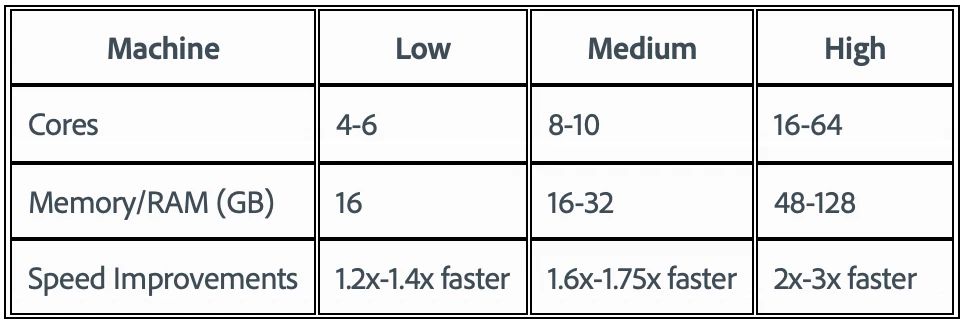
 

To test the benchmark project on your machine:

  • Download the benchmark project
  • Use Ae Render Queue to export the benchmark project in Multi-Frame mode.
  • Purge both the disk and memory cache, then
  • Go to Preferences -> Memory and Performance -> Enable Multi-Frame Rendering (beta) and uncheck the box to use Single-Frame Rendering Mode
  • Use Ae Render Queue to export the benchmark project in Single-Frame mode. Note: Use the same output module for Single-Frame and Multi-Frame mode.


Share the following information in this forum:

  • Your hardware specs: # cores in your CPU, GB of memory, GPU model and amount of VRAM
  • Single-Frame render speed
  • Multi-Frame render speed

147 replies

Participating Frequently
August 20, 2021

Will this be also supported in aerender?

Jenkmeister
August 20, 2021

Multi-Frame Rendering works with aerender now, it will turn on if the preference is enabled in the AE UI. I'm literally writing the code today to allow aerender to turn it on and off independently though. So, yes 🙂 

Participating Frequently
August 21, 2021

Awesome 😎  - any updates on the "AEGetParamPt failed" error?

hellopaul4
Inspiring
August 19, 2021

Hmmm...I was hoping to see some improvement in rendering speed with the latest AE updates, but running that same test on version 22.0.0 (Build 58) gave slightly slower results than before, despite up to 13 frames being renderd simultaneously. My previous best time was 3m 23s a few months back; on the latest version it's increased by 6secs to 3m 29s. I wonder if it's simply because my PC was very new back then, and a few months of Windoze updates and other software installs has slowed it down, as seems to be the way of things? It'd be interesting if a few people who ran the original test would run it again to see how their results may have changed.


  • AMD 5950X 16-core (in 'auto-overclock' mode)
  • 128GB Patriot RAM at 3200MHz (the RAM is specced at 3600MHz, but my system refuses to run it that fast)
  • Asus ROG STRIX RTX3090 with 24GB VRAM
  • GPU rendering on, multi core on
Jenkmeister
August 12, 2021

Dynamic Composition Analysis going live in AE Beta 22.0x52

After many months of testing internally, we are excited to roll out another piece of the Multi-Frame Rendering feature to beta. Starting with AE Beta 22.0x52, MFR will now utilize a feature we call Dynamic Composition Analysis. It's a fancy name, but it's also a fancy feature. 🙂


With Dynamic Composition Analysis, MFR will now adjust the number of concurrent frames being rendered based on the complexity of the frames in the composition and the available system resources. Rather than a fixed, maximum, number of concurrent frames, you'll see the concurrent frame count move up and down throughout the render to ensure the composition is rendering as fast as possible at all times. This may mean the concurrent frames drops below the amount you've seen over the past few months (that's an indication that MFR can render faster overall by rendering less frames at the same time). You may also see concurrency levels go above what you've been seeing. (On 64 core machines with simple projects, we've seen as high as 92 concurrent frames.)


All that to say, you should now see your renders finish faster. It may not be orders of magnitudes faster, but it should be faster. Please let us know if it isn’t for you and your project.


We still have a few more optimizations coming in the next few weeks, including the fix for the delay everyone is noticing with preview, so stay tuned!


Thanks!

Sean

Kes Akalaonu
Inspiring
August 12, 2021

How does this affect playback and the Speculative Preview update from yesterday?

Jenkmeister
August 12, 2021

Playback will also take advantage of Dynamic Composition Analysis in the same way export does. Speculative Preview is, by design, limited to a small amount of concurrent frames (by default 1/8th of your CPU Core count) and won't use DCA. 


piggypeeler
Participant
July 28, 2021

Exported Apple Pro Res 444

Threadripper 64 core / 256gb ram / rtx3080ti / Windows 10 64bit

Single Frame:  15:50

Multi Frame:  4:40

Community Manager
July 23, 2021

Hello Beta Users,

Starting today with build 22.0x32, we have updated AE Mocha plugin to support Multi-Frame Rendering. We cannot wait to hear your feedback and experience using this plugin.

Please let us know any issues you run into at mfrbeta@adobe.com

Rene Andritsch
Community Expert
Community Expert
July 24, 2021

@Joy Raisinghani my first test resulted in several difficulties. When scrubbing in the new version I get an “Unknown Error” before being able to scrub properly. Maybe due to the MFR initiation. Then trying to track a rather simple patch the track aborts prematurely. No problems in AE 17.7.0. I will send a screen capture video and a link zo the project file to the provided e-mail address.

Jenkmeister
July 20, 2021

Starting today in After Effects 22.0x28, when Multi-Frame Rendering is enabled in After Effects, any composition or speculative preview can now take advantage of Multi-Frame Rendering. The same performance improvements you've seen with Render Queue and AME to AE export, is now available in Preview. Please try it out and let us know how it's working for you!


One thing to know: Depending upon your project complexity and your system hardware, you may find a delay when starting a preview while MFR warms up. This is the same delay you experience with Render Queue Exports today. If that is a workflow blocker, simply turn off MFR until you're ready to export. Over the next few weeks we'll be rolling out improvements to Preview and Export that will reduce or remove that delay completely. We'll post here as those changes are available. 


In addition to MFR Preview, we have also updated the following plugins to support MFR:

  • Keylight
  • Bulge
  • Minimax
  • Color Balance HLS
  • Levels
  • Levels (Individual Controls)
  • Bilateral Blur
  • Cartoon
  • Basic 3D
  • Linear Color Key


More effects are being ported everyday, so if your favorite effect isn't ready yet, it should be soon. 


We've also rolled up our announcements so far into one blog post here: https://blog.adobe.com/en/publish/2021/07/20/a-faster-after-effects-is-now-available-for-testing-new-multi-frame-rendering-features-in-public-beta.html


Thanks again for all your support, testing and contributions to After Effects!

Sean


Rene Andritsch
Community Expert
Community Expert
July 21, 2021

@jenkmeister17177426 Dear Sean, due to the multi-frame rendering in the Composition Preview (if enabled) is there currently a short delay when hitting the space bar for playback because it is initiated?

Thanks for implementing this great feature!

René


Jenkmeister
July 21, 2021

Yes, there can be a delay due to the complexity of the project as MFR prepares for rendering it. We are in the final stages of removing that delay and hope to have that update into public beta in the next few weeks.

Inspiring
July 19, 2021

Mac Pro 2010

2 x 3.33 GHz 6-Core Intel Xeon

12GB RAM

Radeon RX 580 8GB

macOS Mojave 10.14.6

AE Beta 22.0


Single frame speed = 27 minutes

Multi frame speed = 11 minutes 55 seconds


I've attached a screenshot showing CPU usage while rendering single frame and then multi frame. No prizes for guessing which order I did it in. The mac was responsive throughout. Very impressed!

Inspiring
July 19, 2021

^^^ TYPO ^^^ That should be 128GB of RAM, not 12GB.


Why can't we edit posts?

Participating Frequently
July 12, 2021

Hi Sean and team,

On a slightly unrelated note, can you advise me on an ideal operating drive setup for After Effects?


I came across a video mentioning that it's better to set your media cache on a separate drive from your operating system. stating that the best setup is:


SSD1 Internal: Operating System

SSD2 Internal: Media Cache

SSD3 External: Project and Media Files


I'm using an iMac, so I can't add a second internal SSD. Is it advisable for me to partition my OS drive or is it necessary for me to get a thunderbolt 3 external SSD (or will a 10Gbps drive be sufficient)? Baring in mind, this is only for performance improvement.


My specs are:

iMac 2019 Intel i9

72GB RAM


Thanks in advance!

500GB SSD

Jenkmeister
July 16, 2021

There may be better opinions / information from the community as a whole, however... Partitioning a drive won't give the same performance benefits as more than 1 physical drive. The same physical drive partitioned doesn't allow for the same concurrency as multiple physical drives. So a thunderbolt 3 external drive will likely perform much better than a partitioned internal drive if you're trying to read/write to the same physical disk.


What you want to do is create a configuration where media files can be read from one drive while at the same time media cache or other exported files can be written to on a second physical drive. That's going to allow those operations to happen concurrently, speeding your workflow up.


Jenkmeister
June 29, 2021

Thank you for all your feedback and support for the new features we rolled out last week. It’s been wonderful to see how well speculative preview, render queue notifications and MFR via AME is working for you all.


There are a few things happening today that we wanted to make sure you knew about:


  1. AE Beta builds have transitioned to Version 22.0. This is part of an effort to align our version numbers across our video apps and align to the Creative Cloud release year (e.g. AE 2022). You'll see Premiere, Media Encoder, etc. moving to Version 22.0 as well. 
  2. There is a change in today’s build, 22.0x6 that represents the last of the changes required for third-party developers to officially support Multi-Frame Rendering with their plugins. If you have had early access to a third-party plugin with MFR support, it may not work with builds starting today – please follow up with the developer to get an updated plugin if needed.
  3. Shadow/Highlight is now enabled for MFR. More MFR supported plugins should be rolling out regularly now until all are migrated.


Thanks,

Sean

Known Participant
June 24, 2021

This is sooooo awesome!

I just got my Creative Cloud annual renewal notification email this morning and for the first time I feel good about it!

Speculative preview is speeding me up so much! Multiframe rendering is x5 faster and now I can encode H264 with media encoder!


YES!