



TeresaDemel
Adobe Employee
Adobe Employee
March 10, 2021
Question

Multi-Frame Rendering is here! (AKA The multithreading you’ve been asking for)

  • March 10, 2021
  • 147 replies
  • 167361 views

Multi-frame Rendering is here for After Effects beta users. Right now, you will have access to Multi-Frame Rendering for export only. Keep your eye on this forum, as we will be rolling out new features until we launch.


Internally, we have been testing a representative sample of projects with a suite of hardware configurations, and we are excited to finally put this feature in your hands and get your feedback. Test your unique projects on your own hardware so we can ensure that our performance updates benefit all of our customers and meet speed and quality metrics before we launch.


Beta testing of Multi-Frame Rendering will last a little longer than some of our other features because we currently do not support Multi-Frame Rendering in Preview, Motion Graphics templates, Dynamic Link, Adobe Media Encoder and AERender Command Line Interface.


Check out the blog and FAQ post to learn the following:

  • What is Multi-Frame Rendering?
  • What factors influence performance?
  • Which effects have been optimized for Multi-Frame Rendering?


Start Testing!
We want to hear from you! Share your thoughts and ideas in this forum.

  • How much faster is Multi-Frame Rendering compared to Single-Frame Rendering with your comps on your machine?
  • Does our benchmark project perform at the expected speed on your system?
  • If you run into specific speed or quality issues with your project, share your project with us at mfrbeta@adobe.com.


Test Your Comps
Test your comps in Multi-Frame Render mode vs. Single-Frame Render

  • Use Ae Render Queue to export your comp in Multi-Frame mode.
  • Purge both the disk and memory cache, then
  • Use Ae Render Queue to export your project in Single-Frame mode. Note: Use the same output module for Single-Frame and Multi-Frame mode. Go to Preferences -> Memory and Performance -> Enable Multi-Frame Rendering (beta) and uncheck the box to use Single-Frame Rendering Mode


Leave a comment and the following information in this forum:

  • Your hardware specs: # cores in your CPU, GB of memory, GPU model and amount of VRAM
  • Single-Frame render speed (Use “Render Time” noted in your status bar)
  • Multi-Frame render speed


If you detect any problems with render speed or quality, submit your projects

  • Open your After Effects project
  • File -> Dependencies -> Collect Files -> Collect -> Save As (Name Your Folder)
  • After Effects will store your .aep file, footage, and text report (file log)
  • Zip up your project and send it to us at mfrbeta@adobe.com (or send a link to it hosted on your creative cloud storage if it’s too large to email).


Share the following information in your comment:

  • Your hardware specs: # cores in your CPU, GB of memory, GPU model and amount of VRAM
  • Single-Frame render speed (Use “Render Time” noted in your status bar)
  • Multi-Frame render speed
  • Mercury CPU or GPU Mode used


Test our benchmark project and see how your hardware compares
We would love to know how your hardware compares to the results we have gathered from our test suite:
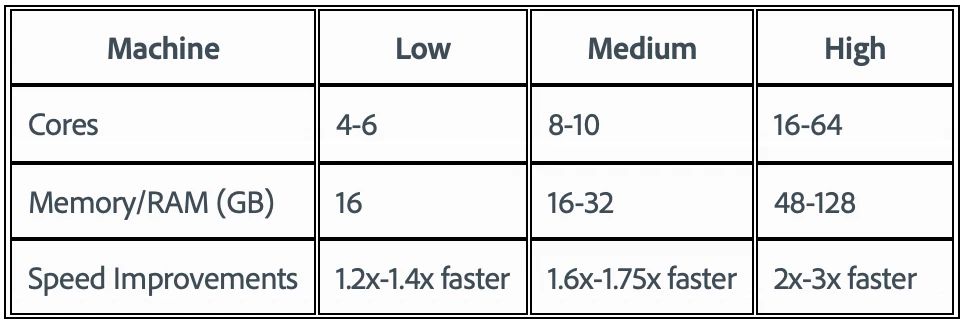
 

To test the benchmark project on your machine:

  • Download the benchmark project
  • Use Ae Render Queue to export the benchmark project in Multi-Frame mode.
  • Purge both the disk and memory cache, then
  • Go to Preferences -> Memory and Performance -> Enable Multi-Frame Rendering (beta) and uncheck the box to use Single-Frame Rendering Mode
  • Use Ae Render Queue to export the benchmark project in Single-Frame mode. Note: Use the same output module for Single-Frame and Multi-Frame mode.


Share the following information in this forum:

  • Your hardware specs: # cores in your CPU, GB of memory, GPU model and amount of VRAM
  • Single-Frame render speed
  • Multi-Frame render speed

147 replies

Participant
June 24, 2021

Jaw dropping!  

From 25minutes and 58 seconds (Single Frame) to 9 minutes and 4 seconds!!!  (Multi frame)

Processor: Intel(R) Xeon(R) CPU E5-2680 @ 2.70GHz (2 processors) total 16 cores (32  Hyperthreading)
Total Memory: 256 GB


Nvidia GTX  1070 8Gb

Jenkmeister
June 22, 2021

Hello All!


Today is an exciting day as we are making 3 new features available: Speculative Preview, Render Queue Notifications and AME Export of AE Composition using Multi-Frame Rendering. You’ll need to download AE Beta 18.4x37 or newer to access these features.


To help manage feedback and discussions, we've created new posts for each of these features. Please use those forum posts for discussion of the individual features. You'll also find quick intro videos for each feature in those forum posts. 


Speculative Preview Now Available in 18.4x37

Render Queue Notifications Now Available in 18.4x37 

Adobe Media Encoder Export of AE Compositions using Multi-Frame Rendering Now Available in 18.4x37 


We'll have more updates on MFR preview soon so stay tuned. Not long now!


Thanks!

Inspiring
June 23, 2021

Super sweet, keep up the great work! Finally some fresh breath in After effects' old corpse!

Jenkmeister
May 28, 2021

OpenEXR MFR Support

Today’s AE beta, 18.4x11, contains an update to the native support AE has for OpenEXR, including Cryptomatte, IDentifier and EXtractor. These 3 plugins as well as the underlying OpenEXR file reader have been updated to support multi-frame rendering and a new caching mechanism that speeds up the performance of reading and parsing the EXR file format. Additional bug fixes in the EXR file reader (e.g. images being cropped unexpectedly) are also in this update. 


If you are a regular user of the EXR file format in AE, please download the latest beta and give it a go. Please let us know any issues you run into at mfrbeta@adobe.com


Thanks!

Sean

Jenkmeister
May 20, 2021

Hello Beta Users,


It’s been a rather busy month as we’ve been working on support for preview, AME encoding, render queue notifications, finalizing the SDK for our plugin developers, migrating more effects, and much more. Thank for you continuing to run the benchmark (and your own projects) and reporting your results back to us – it continues to validate the data we see in our own testing and gives us confidence MFR is going to work across our entire user base.


In the next few weeks, we’ll start to roll out some of the above mentioned features into our Beta Program including:

  • Rendering AE compositions in Adobe Media Encoder (AME) – No big surprise here, but AME will soon render AE compositions using MFR, which will speed up export to formats that the native Render Queue does not support. H.264 anyone? 🙂 
  • Speculative Preview – While AE is idle (e.g., you’ve stopped to admire your beautiful design, checking email, or getting coffee, etc.), the composition that has focus (and any pre-comps in that comp) will begin automatically rendering in the background. You’ll see green cache marks appearing as frames are rendered and you will not lose your place in the preview window. This should allow you to then scrub around the composition with frames already rendered, speeding up your design/preview iteration loop.
  • Render Queue Notifications – Soon you’ll be able to receive notifications when a Render Queue job completes (or fails) as well as when your entire queue of jobs complete. Initially, you’ll be able to receive notifications in the Creative Cloud Mobile app along with the Creative Cloud Desktop app.


What about Preview and the rest of the effects I need?

Preview is coming along but there is some work that we need to finish first to ensure MFR previews (along with exports from the Render Queue), start quickly and don’t break your design flow. When that work is done, we’ll enable Preview. We know that is the feature you’re most looking forward to, and we want it as much as you do.


The rest of the built-in effects are coming along nicely however we’ve prioritized the above features (and some we haven’t yet talked about) to ensure we get them tested for as long as possible. Effects take work to port to MFR but the testing is easier and we can automate most of it, so we will finish up the effects once the features are all released into Beta.


Speaking of effects, Auto Contrast, Auto Levels and Shadow/Highlight will support MFR shortly. Why these? They use certain features of the AE Effect SDK that require special work to support MFR so they have been great test cases for us. We are also getting ready with updates to the CC effects, Keylight, EXR and Mocha AE plugins with full MFR support. You should also start to see more third-party effects supporting MFR this summer.


As we roll out the above features and updated effects, we’ll announce here on the Beta forums to make sure you know what’s available. We need your help to make MFR great for all our customers and we appreciate any time you can give to make that happen!


Thanks again for all your support.

Known Participant
May 20, 2021

Dope!

EYEIDEA
Inspiring
May 16, 2021

I cannot post my results 😞


The system says there is "post flooding"

EYEIDEA
Inspiring
May 16, 2021
So excited about multi-thread rendering for Ae!
Thank you Adobe Ae team!
 
My hardware specs:
• 2019 Mac Pro 11.3 (20E232)
• 3.2 GHz 16-Core Intel Xeon W160 GB 2933 MHz DDR4
• AMD Radeon Pro Vega II 32 GB
• Project and support files on internal 4TB PCI SSD Sonnet raid card
 
My Adobe test project (AEPulseBenchmark.aep) results:
• Single-Frame render speed: 13:16
• Multi-Frame render speed: 05:21
 
My own project: 3840 x 2400 29.97 rendered to ProRes 422 w/o audio TRT: :10
• Single-Frame render speed: 03:51
• Multi-Frame render speed: 02:46
 
Adobe test project:  59.7% faster
My project:  28.1% faster


Patrick_moootion
Participant
May 10, 2021

Hey! Nice to see that progress!

My system: AMD Ryzen 9 5950x (3,4GHz -> no overclocking) 16 core/32 Threads, 64GB RAM, Nvidia Quadro RTX 5000 16GB VRAM
My results:
Multiframe no GPU: 5:17
Multiframe GPU: 5:19
Singleframe no GPU: 15:27
Singleframe GPU: 14:51
3 times faster, thats great!!

Can you tell when it will be out in a regular release?

Jenkmeister
May 10, 2021

We don't have a specific date for public release just yet. We still want to roll out support for preview, media encoder, premiere pro rendering AE compositions, and a bunch of other things, into the beta and make sure it is working well before we push all of this to all customers. But hopefully sometime in the second half of 2021. 

Patrick_moootion
Participant
May 11, 2021

Thank you for your fast reply! Thats nice to hear!
Would be great to see it in release this year!

Rene Andritsch
Community Expert
Community Expert
May 10, 2021

I rendered a longer project (about 11 minutes) where I can still see the time gains in rendering but the CPU was only working at approximately 50% capacity with the Multi-Frame-Rendering – see screenshots below. What could be the reason for just running at half the capacity?


System: MacBook Pro (15 Inch, 2018)
2,9 GHz Intel Core i9
32 GB 2400 MHz DDR4
Radeon Pro 560X 4096 MB
Intel UHD Graphics 630 1536 MB
MacOS Big Sur 11.3.1


Thank you for any feedback.


Jenkmeister
May 10, 2021

A few reasons:

* Effects that don't yet support Multi-Frame rendering effectively block all frames being rendered to ensure correctness in the output/no crashes. 

* If you were using the Cinema 4D renderer which doesn't support MFR yet. 

* If you're in GPU mode, AE may not yet take advantage of all the CPUs while we balance against available GPU VRAM. 


If you're able to share your project with us (send it to mfrbeta@adobe.com), we'd be happy to take a look at it and see what's going on. 

Participant
April 30, 2021

Hi there! I've been using the Beta almost exclusively on a current project thats using EXRs from c4d/redshift. I'm utilizing cryptomattes and a number of other basic native plugins (hue/sat, levels mostly), all of which are not compatible with MF rendering. Aologies if this has already been asked, but will more plugins be made compatible with MF rendering eventually? I remember this being the main downfall with MP rendering back in the day.


Currently my speeds are the same speed as rendering in AE 2021 with this project, mainly to do with the above, but no stability issues so far and this is pretty heavy comp with lots of passes and cryptomattes. Bot Beta and AE 2021 appear to hit my cpu at 100% here and there.


I am on a core i9 10980xe, 128gb 3600 gskill ram, two 2080tis all watercooled. My upgrade to 128gb was a big helper with the 18/36 cores, highly suggest anyone over 14 cores to get 128gb.


Also, will there ever be an option to read 3D camera metadata from EXR sequences that redshift spits out? Currently Fusion can read and extract the camera position data from exr sequences and I "think" Nuke has a workaround. Would be an awesome feature to add.

Participant
April 30, 2021

Actually, just my luck, the second I sent this the Beta spit out a bad frame. Looks like screen tearing, so I am going to go back to 2021 for now at least.

Jenkmeister
April 30, 2021

We are working on the OpenEXR, Cryptomatte, Extrator, Identifier set of effects currently to have them be MFR supported. Hopefully in the coming weeks we'll have that available.


And yes, the plan is all effects that ship with AE will be supported by MFR. We are currently focused on finishing the various feature work (preview, AME support, etc.) so that we have more time with the features being in beta before we ship. A small amount of effects are being worked on right now but we'll return to porting those that remain once the features are done. 

Participant
April 27, 2021

Now I am faced with a choice, whether I need to buy Xeon E5 2678 v3 (12 cores 24 threads 3300MHz with turboboost unlocked) or Xeon E5 1650 v3 (6 cores 12 threads, 3800MHz with turboboost unlocked). But judging by this great news, now the choice is obvious towards 2678 v3. Or not?

hellopaul4
Inspiring
April 27, 2021

Any reason you're looking at a Xeon, which seem to be overpriced and underpowered for After Effects, compared to the AMD processors? Or are you stuck on a Mac platform? (Just out of interest, I specced up a Mac Pro system with -probably - similar performance to my new PC, and the PC was ~£5500 and the Mac was £12,500).

Participant
April 27, 2021

I'm going to buy used Xeon on Aliexpress, its very cheap there. Now i use old 2013 year Macbook, but going to switch to Windows. Buying XEON, ECC RAM and MB on Aliexpress is much cheaper then buying modern new AMD from shop for similar performance. And my budget is not very big.

Known Participant
April 25, 2021

Wow! This is THE feature as far as I'm concerned. I'm thrilled that this is becoming a reality for AE. Great job devs! It's also encouraging that user requests are being prioritised.


My Spec

PC Windows 10 Home

AMD Ryzen 5 3600 - 6 Cores 3.6 Ghz

32 GB Ram

Nvidia GTX 1080ti 

Seperate SSD for Cache


Benchmark - Single Frame Render:

18min 56s

Multiframe

13min 59s


I noticed that it was rendering 6 frames concurrently for almost the whole job.

Love it! Can't wait for this feature to make its way to RAM preview. Good Job Adobe!