



TeresaDemel
Community Manager
Community Manager
March 10, 2021
Question

Multi-Frame Rendering is here! (AKA The multithreading you’ve been asking for)

  • March 10, 2021
  • 147 replies
  • 167361 views

Multi-frame Rendering is here for After Effects beta users. Right now, you will have access to Multi-Frame Rendering for export only. Keep your eye on this forum, as we will be rolling out new features until we launch.


Internally, we have been testing a representative sample of projects with a suite of hardware configurations, and we are excited to finally put this feature in your hands and get your feedback. Test your unique projects on your own hardware so we can ensure that our performance updates benefit all of our customers and meet speed and quality metrics before we launch.


Beta testing of Multi-Frame Rendering will last a little longer than some of our other features because we currently do not support Multi-Frame Rendering in Preview, Motion Graphics templates, Dynamic Link, Adobe Media Encoder and AERender Command Line Interface.


Check out the blog and FAQ post to learn the following:

  • What is Multi-Frame Rendering?
  • What factors influence performance?
  • Which effects have been optimized for Multi-Frame Rendering?


Start Testing!
We want to hear from you! Share your thoughts and ideas in this forum.

  • How much faster is Multi-Frame Rendering compared to Single-Frame Rendering with your comps on your machine?
  • Does our benchmark project perform at the expected speed on your system?
  • If you run into specific speed or quality issues with your project, share your project with us at mfrbeta@adobe.com.


Test Your Comps
Test your comps in Multi-Frame Render mode vs. Single-Frame Render

  • Use Ae Render Queue to export your comp in Multi-Frame mode.
  • Purge both the disk and memory cache, then
  • Use Ae Render Queue to export your project in Single-Frame mode. Note: Use the same output module for Single-Frame and Multi-Frame mode. Go to Preferences -> Memory and Performance -> Enable Multi-Frame Rendering (beta) and uncheck the box to use Single-Frame Rendering Mode


Leave a comment and the following information in this forum:

  • Your hardware specs: # cores in your CPU, GB of memory, GPU model and amount of VRAM
  • Single-Frame render speed (Use “Render Time” noted in your status bar)
  • Multi-Frame render speed


If you detect any problems with render speed or quality, submit your projects

  • Open your After Effects project
  • File -> Dependencies -> Collect Files -> Collect -> Save As (Name Your Folder)
  • After Effects will store your .aep file, footage, and text report (file log)
  • Zip up your project and send it to us at mfrbeta@adobe.com (or send a link to it hosted on your creative cloud storage if it’s too large to email).


Share the following information in your comment:

  • Your hardware specs: # cores in your CPU, GB of memory, GPU model and amount of VRAM
  • Single-Frame render speed (Use “Render Time” noted in your status bar)
  • Multi-Frame render speed
  • Mercury CPU or GPU Mode used


Test our benchmark project and see how your hardware compares
We would love to know how your hardware compares to the results we have gathered from our test suite:
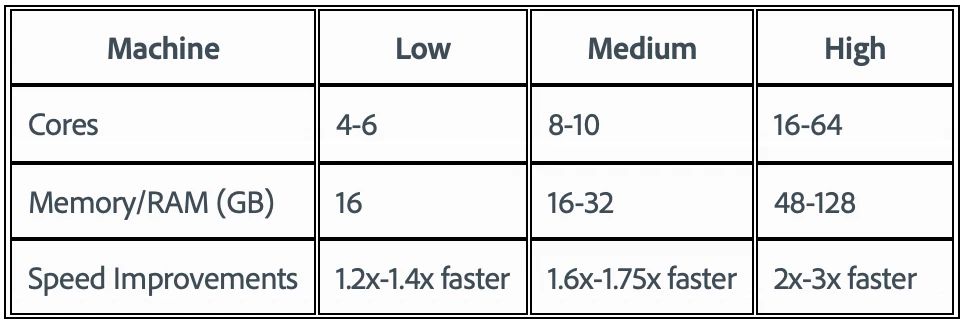
 

To test the benchmark project on your machine:

  • Download the benchmark project
  • Use Ae Render Queue to export the benchmark project in Multi-Frame mode.
  • Purge both the disk and memory cache, then
  • Go to Preferences -> Memory and Performance -> Enable Multi-Frame Rendering (beta) and uncheck the box to use Single-Frame Rendering Mode
  • Use Ae Render Queue to export the benchmark project in Single-Frame mode. Note: Use the same output module for Single-Frame and Multi-Frame mode.


Share the following information in this forum:

  • Your hardware specs: # cores in your CPU, GB of memory, GPU model and amount of VRAM
  • Single-Frame render speed
  • Multi-Frame render speed

147 replies

Participant
April 24, 2021

I have a new configuration, that I've just tested and it's pretty impressive.

AMD Ryzen 9  5950X 16 core
96GB Memory
NVIDIA GeForce RTX 3070 8GB DDR6

Single-Frame - 9:44
Multiframe - 3:52
OC processor - Multiframe: 3:31

Participant
April 23, 2021

Very, very poor performance
I rendered only the first 119 frames (5 seconds)


without multi-threating uses about 30% cpu power and renders in 6 min 59 sec average frame time 2,8x
with multi-threating uses from 40 to 99% cpu and renders in 6 min 17 seconds, average frame time 3,2x


Used Mercury Software Only on both of them


My main specs are

CPU 2990WX 32C/64T

RAM: 32GB


Community Manager
April 23, 2021

Hello.

Thanks for trying out the new Multi-Frame Rendering feature. Could you please share AE logs with us so that we can investigate this further. 

From the 'Help' menu, you can 'Enable logging'.

Render using Multi-Frame and Single frame.

Get the logs from the help menu by going to 'Reveal logging file'


Thanks,


Participant
April 23, 2021

Hi there,


I attached the log files
I also would like to point out that I noticed that when frame 31 is reached, there is a huge drop in speed/performance. not quite sure why.

Inspiring
April 19, 2021

I have some Inspire 2 DNG raw footage to process and I wanted to see how the multi-frame render handled that as its typically very very slow to render out these clips through AE but gives you the best quality. Its able to render 8 frame simultaneously which is probably a decent speedup but the CPU is looking a bit underutilized. I also had to turn off Mercury because with that only the concurent frames number was only 2. 


128GB Ram

24 Core Threadripper 3960x

2080ti 

SSDs and all that. 


Inspiring
April 19, 2021

I realize this is fairly edge case use but its one that typically pushes me to other software such as Resolve. 

AnimoMotion
Participating Frequently
April 19, 2021

My home-built PC running Win 10 Pro


CPU: AMD 5950X 16 Core Processor 3.4 GHz

GPU: NVidia Zotac Gaming (No OC) GeForce RTX 3080 - 10GB VRAM

RAM: G.SKILL Trident Z Neo Series 128GB (4 x 32GB) DDR4 3600


Multi Render 4m 03s

Single Render 2m 13s


Um? So something very odd there!

I definitely unchecked the Beta Preferences for Enable Multi-Frame Rendering for the Single core render. 

Any thoughts? Happy to run again!


Thanks

hellopaul4
Inspiring
April 19, 2021

Did you Purge all memory/caches between tests?

AnimoMotion
Participating Frequently
April 19, 2021

Ah had the same realisation a few mins ago, thought I had but double-checked.

Corrected timings - 


CPU: AMD 5950X 16 Core Processor 3.4 GHz

GPU: NVidia Zotac Gaming (No OC) GeForce RTX 3080 - 10GB VRAM

RAM: G.SKILL Trident Z Neo Series 128GB (4 x 32GB) DDR4 3600


Multi 4m 06s

Single 12m 39s


Interesting to see how efficient the Cache is though! Even Single core roasts through using the Cache. 


Known Participant
April 19, 2021


AMD RYZEN 9 5900X - 12 Cores
32Gb RAM – 3600MHz
RTX 3080  – 10GB Vram - EVGA XC3 Ultra Gaming
Windows 10 64Bit Pro


CUDA - Multi threaded rendertime: 4.57
CUDA - Single threaded rendertime: 10.14

Software only - Multi threaded rendertime: 5.02
Software only - Single threaded rendertime: 10.32

Participant
April 15, 2021

Intel(R) Core(TM) i9-9920 CPU @ 3.50GHz – 12 CORES

128Gb RAM – 3000MHz

NVIDIA GeForce RTX 2080 SUPER

Windows 10 64Bit Pro

SSD Samsung 970 Evo Plus


AE BETA : Multi-Frame : 06:33m

AE BETA : single-Frame : 12:38m

Participating Frequently
April 11, 2021

My machine is pretty much right out the dark ages... 


Mac Pro Late 2013

3.5Ghz 6-core

64 G RAM

Dual Firepro 700D


Single: 27 Min, 35 Sec

Multi: 17 Min, 48 Sec 


So quite a big boost in render times.


I tried it out on a project I'm working on currently, not really any FX ecept some drop shadow & a lot of paint, but a gazillion AI layers... so far I have only successfully got it to render out once, and it knocked a 49 minute render down to 25 minutes, so quite a significant boost in speed.. However, 90% of the time it stalls/hangs mid-render at a random spot. Anyone have idea why this may be the case? 

Jenkmeister
April 12, 2021

Are you able to zip up and send us your project (mfrbeta@adobe.com)? If not, go to the Help Menu and choose Enable Logging & Restart AE. Render out the project until it gets stuck and stop the render. Then go to Help Menu -> Reveal Logging files and find the After Effects Log.txt file and send that to us (mfrbeta@adobe.com) - hopefully we can see what's going on.

Participating Frequently
April 12, 2021

Hi, thanks for the response.


Increasing the cache size & moving where the cache is situated sems to have resolved the issue somewhat (3 successful renders this morning, although had a couple of fails yesterday). I tried an output with preview on, to see if I could spot where issues were occuring, and it seems to be happening where I have layers arranged in 3D space. Interestingly render times have slowed down a bit with an increae in cache size. Also interesting to note that the multithreading render runs slower over some areas of the comp than the single threading does.


I'm not sure logging would work as AE doesn't crash per se, it merely...  stops rendering or writing frames. Yuo can stil pause the render queue & restart it etc. Regardless, I have not had a misfire since enableing logging.


I have to deliver thisn project in a couple of days, once that's done I will bundle up the project files and send through to see if you can replicate my problem. 


Thanks.

Rene Andritsch
Community Expert
Community Expert
April 9, 2021

AEPulseBenchmark AE Beta 18.2.0 (Build 17):
Hardware: MacBook Pro (15 Inch, 2018)

OS: MacOS Big Sur 11.2.3
CPU: 2,9 GHz Intel 6-Core i9
RAM: 32 GB 2400 MHz DDR4
GPU: Radeon Pro 560X 4096 MB | Intel UHD Graphics 630 1536 MB


Mercury Software
Single-Core: 25 min 15 sec
Multi-Core: 20 min 25 sec

Metal
Multi-Core: 17 min 36 sec

The startup time is much much shorter compared to AE v 18.0.x. Single core is 28 seconds slower than im my test in February. Multi-Core Mercury Software improved by 2 seconds. No error with Metal now and significantly faster by 2 min 49 sec.

Felix Dames
Inspiring
April 7, 2021

AEPulseBenchmark - UPDATED for AE Beta 18.2.0 (Build 17):


OS: Windows 10 Pro 64 bit Version 20H2 (Build 19042.867)
CPU: AMD Threadripper 1950X 16 Cores / 32 Threads @ 3.6 GHz - 4.2 GHz Turbo
RAM: 32 GB G.Skill Trident-Z RGB @ 3200 MHz CL 14 Quad Channel
GPU: nVidia GeForce GTX 1080 GDDR5 8GB Studio Driver ver. 456.71
System Drive: Samsung NVMe M.2 SSD 960 EVO 500GB
AE Cache Drive: Samsung NVMe M.2 SDD 970 PRO 512GB


Rendered File Container: AVI
Codec: None (Uncompressed)


MFR Mercury Software: 08 min 30 sec (AE Beta Version 18.1.0 Build 31)

MFR Mercury Software: 08 min 15 sec (AE Beta Version 18.2.0 Build 17)
MFR Mercury GPU (Cuda): 08 min 08 sec (AE Beta Version 18.1.0 Build 31)

MFR Mercury GPU (Cuda): 07 min 53 sec (AE Beta Version 18.2.0 Build 17)


Looks like you make some good progress with the latest AE Beta Version 18.2.0 (Build 17).

Rendering time decreased approximately about 15 seconds!

Rendering startup time also decreased significant!

Well done so far keep up the good work 😉


Felix

Rene Andritsch
Community Expert
Community Expert
April 6, 2021

@jenkmeister17177426 First of all thank you for the great interview with Puget and explaining indepth how it works and what AE users can expect.

Maybe this will be obsolete once all effects are ported to Multi Frame Rendering but as there are also a lot of 3rd party effects that will take some time to be adjusted it might be helpful to get a different warning icon in the Effects Panel if the effect does not support MFR. This would help to identify possible MFR slowdowns immediately. At the moment it is the same icon like when getting a warning about bit depth. A different color would already do …

hellopaul4
Inspiring
April 7, 2021

I've had exactly the same thoughts as you!