



New in Beta: Welcome to Smooth Zoom in After Effects!
We're excited to introduce Smooth Zoom in After Effects (Beta) version 25.2.0.113, a major improvement to zooming in After Effects that allows for precise, fluid magnification in the Composition, Layer, and Footage panels.
What’s New?
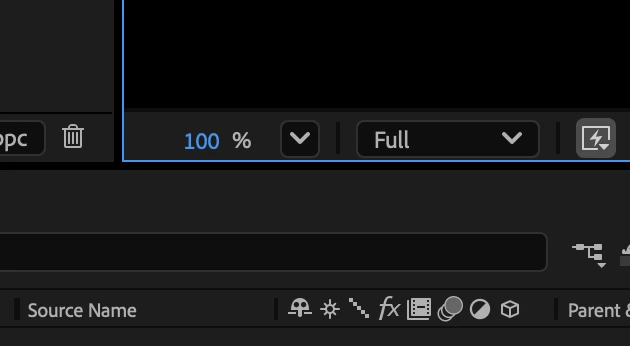
Since the earliest versions of After Effects, zooming was limited to fixed magnification levels (33.33%, 50%, 100%, 200%, etc). That’s no longer the case! With Smooth Zoom, you can now adjust magnification to any valid value with decimal-point precision using a new hot text control in the viewer.
All zooming tools in After Effects have been upgraded to incorporate this new capability:
- Precise hot text Magnification control directly in the viewer.
- Scroll wheel zooming with smoother, more precise adjustments.
- Redesigned Zoom Tool behavior for a more intuitive experience.
Additional Enhancements
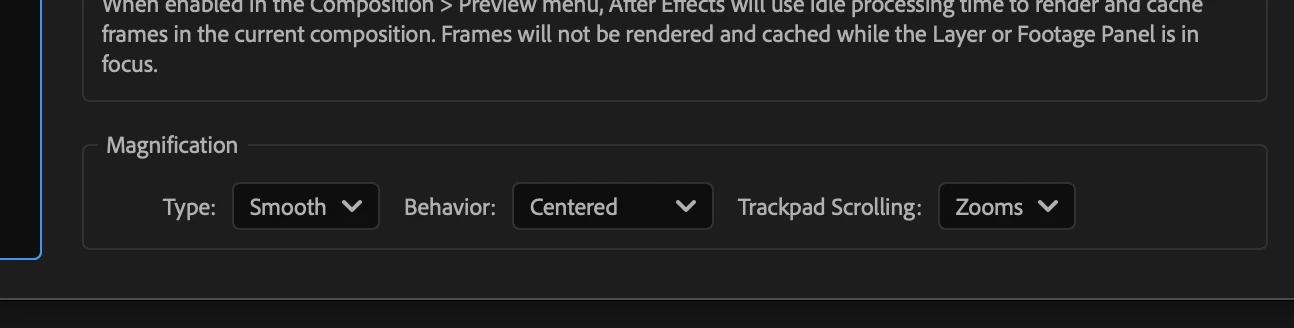
You can find new settings under Preferences -> Previews -> Magnification :
- Type: Choose between Smooth and Legacy.
- Behavior: Follow Cursor or Centered.
- Trackpad Scrolling: Zooms or Pans.
Legacy Mode reverts to the original fixed increments when using various zooming methods if preferred.
Behavior : Follow Cursor magnifies the viewer based on the cursor's current location.
Behavior : Centered Always zooms to the center of the panel.
You can toggle between Follow Cursor and Centered behaviors dynamically by holding down the Alt/Option key while zooming. The view stays locked onto the intended area—whether zooming to the center or under the cursor.
- Trackpad & Touch Enhancements:
- Pinch to Zoom feels more natural and responsive.
A new mode Trackpad Scrolling : Pans allows two-finger drags to pan the viewer, mimicking the Hand Tool. The pan direction respects OS settings and can be reversed if desired (Natural Scrolling Trackpad setting).
Increased Maximum Zoom Levels: AE now allows zooming beyond previous limits if the image buffer size permits (e.g., if the maximum zoom allowed for the current composition size is 5000%, it can now be reached instead of the 3200% limit being imposed before due to the fixed magnification level).
Zoom Snapping & Speed Control:
- Zoom will snap to the prior common zoom values for accuracy (eg. 33%, 50%, 100%, 200% etc).
- Hold Shift to speed up zooming, Ctrl (Windows) / Cmd (Mac) to slow it down.
We Need Your Feedback!
We’d love to hear how Smooth Zoom fits into your workflow. Specifically:
- Should the default Zoom Behavior be Follow Cursor or Centered?
- Do you like the new Trackpad Scrolling: Pans functionality as the default?
- Is Legacy Mode necessary, or would you be ok if it were removed?
Give it a try and let us know what you think in general!
 AdChoices