Community Manager
February 18, 2025
Question

New in Beta: Welcome to Smooth Zoom in After Effects!

  • February 18, 2025
  • 13 replies
  • 6104 views

We're excited to introduce Smooth Zoom in After Effects (Beta) version 25.2.0.113, a major improvement to zooming in After Effects that allows for precise, fluid magnification in the Composition, Layer, and Footage panels.


What’s New?

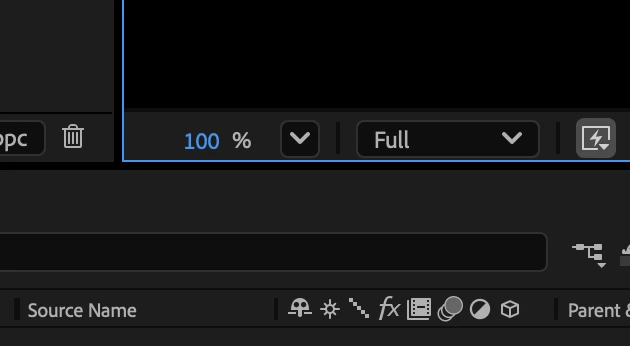
Since the earliest versions of After Effects, zooming was limited to fixed magnification levels (33.33%, 50%, 100%, 200%, etc). That’s no longer the case! With Smooth Zoom, you can now adjust magnification to any valid value with decimal-point precision using a new hot text control in the viewer.


All zooming tools in After Effects have been upgraded to incorporate this new capability:

  • Precise hot text Magnification control directly in the viewer.
  • Scroll wheel zooming with smoother, more precise adjustments.
  • Redesigned Zoom Tool behavior for a more intuitive experience.


Additional Enhancements
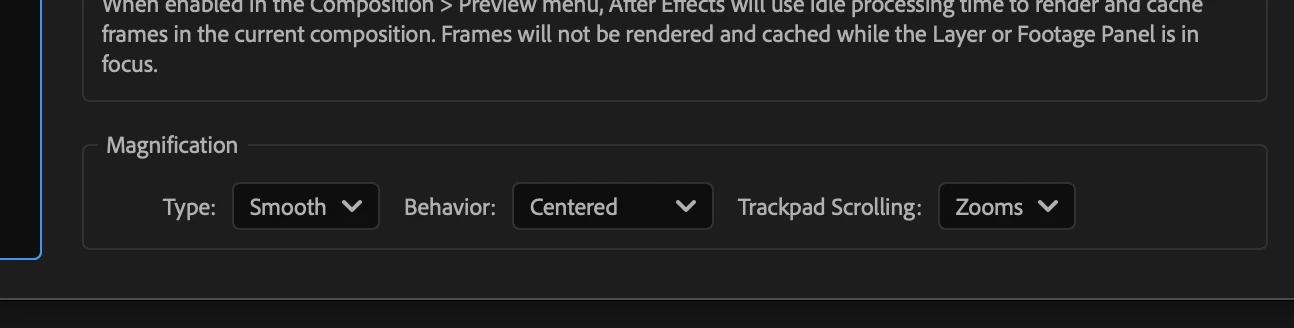
You can find new settings under Preferences -> Previews -> Magnification :

  • Type: Choose between Smooth and Legacy.
  • Behavior: Follow Cursor or Centered.
  • Trackpad Scrolling: Zooms or Pans.


Legacy Mode reverts to the original fixed increments when using various zooming methods if preferred.
Behavior : Follow Cursor magnifies the viewer based on the cursor's current location. 

Behavior : Centered Always zooms to the center of the panel. 

You can toggle between Follow Cursor and Centered behaviors dynamically by holding down the Alt/Option key while zooming. The view stays locked onto the intended area—whether zooming to the center or under the cursor.


  • Trackpad & Touch Enhancements:
  • Pinch to Zoom feels more natural and responsive.
    A new mode Trackpad Scrolling : Pans allows two-finger drags to pan the viewer, mimicking the Hand Tool. The pan direction respects OS settings and can be reversed if desired (Natural Scrolling Trackpad setting).


Increased Maximum Zoom Levels: AE now allows zooming beyond previous limits if the image buffer size permits (e.g., if the maximum zoom allowed for the current composition size is 5000%, it can now be reached instead of the 3200% limit being imposed before due to the fixed magnification level).


Zoom Snapping & Speed Control:

  • Zoom will snap to the prior common zoom values for accuracy (eg. 33%, 50%, 100%, 200% etc).
  • Hold Shift to speed up zooming, Ctrl (Windows) / Cmd (Mac) to slow it down.


We Need Your Feedback!
We’d love to hear how Smooth Zoom fits into your workflow. Specifically:

  • Should the default Zoom Behavior be Follow Cursor or Centered?
  • Do you like the new Trackpad Scrolling: Pans functionality as the default?
  • Is Legacy Mode necessary, or would you be ok if it were removed?


Give it a try and let us know what you think in general!
 

13 replies

Participating Frequently
February 20, 2025
  • Smooth zoom is an improvement in every way over Legacy EXCEPT the need to switch tools to zoom, which is IMO a baffling decision considering how often zooms happen. 
  • Instead, I would ask for using CMD+mouse scroll as a shortcut for zoom. This is far more standard and a better UX than fully switching tools.  
  • I can't imagine a situation where centered zoom would be preferred over following the cursor.


JohnColombo17100380
Community Manager
Community Manager
February 20, 2025

Thanks for this feedback, @Brent Walker.  You don't need to switch tools to zoom—scroll wheel zoom is always available and so is pinch-to-zoom on trackpads, both of which default to centering on the mouse cursor. Holding Z also works as a hotkey to temporarily engage the Zoom tool. Let us know if this addresses your concerns.

- John, After Effects Engineering Team 

Participating Frequently
February 20, 2025

odd - my scroll wheel is just scrolling vertically. I've been using the Z trick, but my hand automatically returns to the cmd/option/shift position we're all already used to so that's a much easier transition to make and is more in line with the other tools I use anyways.

After digging in a little more after your reply and before hitting Post, switching trackpad scrolling from pan to zoom solves my issue. I still think that (if using a trackpad) 'pans' is a vastly more efficient experience than 'zooms' (does anyone use the hand tool? I can't remember ever doing so on purpose), so having the CMD to zoom would still be relevant, and a good choice to include

sskaz
Inspiring
February 19, 2025
  • Default zoom behavior should be follow cursor. And I like that using keyboard shortcuts ( < > , . and Command +/-) keys still zooms to center.
  • Trackpad Scrolling set to pan is definitely throwing off my years of muscle memory. Though it makes sense (at least for new users) to match how it works in other apps. I work on a laptop but primarily use a mouse, and when using my mouse wheel I prefer the old/zoom behavior, but when using my laptop trackpad, I prefer scrolling (and using two-finger pinch for zooming).
  • Legacy mode: I can’t imagine a scenario where the old way is needed.


Echoing @Shebbe's comments:

  • The multi-axis movement seems to be throwing things off. (Photoshop’s is locked to x-axis movement only and feels very precise and smoother.) Maybe locking it to whichever axis was used first would help.
  • Mouse wheel zooming is far too slow. The shift-speed feels much nicer. (Is this tied to OS level scrolling? If so, might make sense to decouple it.)


Other bits

  • When behavior is set to follow cursor, the “anchor point” shifts when zooming both in and out. It’s especially noticeable when you start by zooming in and then start zooming out.
  • Should these settings be under Display instead of Preview? (But this is a deep rabbit hole to fall into, like “shouldn’t ‘Show Internal Wireframes’ and ‘Viewer Quality’ be Display settings and not Previews?”)
Shebbe
Community Expert
Community Expert
February 19, 2025

Your suggestion to lock zoom to whichever axis is used first could work even better than my ideas!


I also agree that the preference sections feel unintuitive. I had to go back to this thread to find where the zoom settings were placed when first trying it.

Shebbe
Community Expert
Community Expert
February 19, 2025

This is great! The additional preferences are incredibly welcome. I really hope this is being passed on to the Premiere team because their current implementation is not quite there.


I have 2 points of feedback.


1. Using the zoom tool (Z) is very jumpy. If you compare it with Mocha's zoom behavior for example this is a huge difference. This is likely due to the mouse move range required to zoom in/out is too sensitive in AE's implementation. It also feels like Mocha uses a method based on distance from origin point where you started zooming rather than what feels to be a constant rate regardless of where you start or end.

Another contributing factor is perhaps the fact that 'multi-axis' zooming is allowed. These changes become too sensitive for human hand and mouse / pen accuracy causing constant jumps from detecting zoom intent as zoom out or in. Moving the mouse at a certain angle precisely on that threshold causes sever jumps in and out. I think locking to horizontal or vertical only solves this. Perhaps also paired with a user option to choose the direction.


Regardless, I hope this zoom method can be made much smoother.


2. The default speed for scroll zooming feels way too slow. Having it sit more between it's current speed and the SHIFT speed would feel more appropriate imo.

Inspiring
February 19, 2025

Agreed on point #2. Feels way too slow, almost like what I'd expect by holding CTRL or something to be more precise

Mike McCarthy
Community Expert
Community Expert
February 20, 2025

What is the smallest increment that the scroll changes the zoom for you guys? (When at or near 100%)  Mine adjusts by 5%.  I suppose if you are used to 25-50-100-200 then that will 'feel' slow by comparison, but I can get from full frame to close enough for detail work with a single finger roll. (I have a Logitech G604, so it might depend on the specific mouse too.)  I wouldn't want it any faster or it would lose precision.