


Loic.Aigon
Legend
January 11, 2018
Answered

Looping symbol

  • January 11, 2018
  • 1 reply
  • 617 views

Hi,

First of all, I have just started Animate CC a few days ago. I am trying to do some animation I thought I would be easy to achieve but I am banging my head against wall for a long tile without success.

I also looked at every single tutorial and in this forum without much luck. So I am here desperate looking for your help.

If you have any online tutorial you think could explain it all to me, feel free to pointy me to it because I couldn't find any.

Ok, so all I am trying to achieve is some items (files icons) to move on top of a carousel (such as airports's).

I can get to move the items from left to right and even get them to loop but I never get a smooth result where files would move for ever.
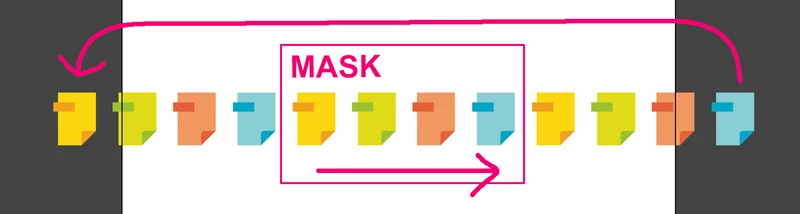
What is the best approach here to get a smooth looping set of symbols to move from left to right and looping ?

Here is the file I am working with. I hope it can help understanding what I am doing wrong.

Thanks in advance for your great help

Loic

    This topic has been closed for replies.
    Correct answer kglad

    he failed to make that movieclip of icons wide enough so the looping fails to appear seamless.  (and that's a better description of the problem: it's not seamless.)

    Loic.Aigon​:

    for that effect, the 'looping' movieclip needs to be at least twice the width of the stage so the stage is always 'filled' with your looping movieclip.  because your stage width is 550, that means your movieclip needs to be, at least, 1100 px in width.

    however, you're also scaling that movieclip to about 30% width and therefore need a movieclip, at least, 3667px in width. here's one way to do that:

    http://www.kglad.com/Files/forums/boucle_v000.fla

    1 reply

    Legend
    January 11, 2018

    Describe exactly how the result is not "smooth".

    kglad
    Community Expert
    kgladCommunity ExpertCorrect answer
    Community Expert
    January 11, 2018

    he failed to make that movieclip of icons wide enough so the looping fails to appear seamless.  (and that's a better description of the problem: it's not seamless.)

    Loic.Aigon​:

    for that effect, the 'looping' movieclip needs to be at least twice the width of the stage so the stage is always 'filled' with your looping movieclip.  because your stage width is 550, that means your movieclip needs to be, at least, 1100 px in width.

    however, you're also scaling that movieclip to about 30% width and therefore need a movieclip, at least, 3667px in width. here's one way to do that:

    http://www.kglad.com/Files/forums/boucle_v000.fla

    Loic.Aigon
    Legend
    January 11, 2018

    That's splendid kglad

    Exactly what I was trying to achieve. I will have a closer look at what you have done tomorrow. I understand the concept of doubling the length but I will double look at your fixes so I can learn and progress

    Thanks a lot for the effort Much appreciated.

    Loic