


Inspiring
September 14, 2021
Answered

Haven't been able to run Audition for several months!

  • September 14, 2021
  • 2 replies
  • 4799 views

Can someone please adress this serious issue? I haven't been able to open Audition for months cause of this.  This is serious! I have deleted and installed this application with the same result. All I get is this error message. W10 is all up to date as usual. I haven't changed anything. This happened after a so called update months ago and it is still not working. I'm seriously considering leaving Adobe.
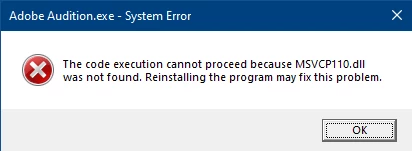
 

This topic has been closed for replies.
Correct answer _durin_

Okay, we were able to eventually hack a solution, although I still don't know WHY the problem is occurring.  Effectively, the Microsoft Visual C++ Runtime installers weren't installing the version of 2 DLL's needed by Audition.  The MSVCP110.DLL and MSVCR110.DLL were both failing to install to the Windows\System32\ directory though all other versions were installed as expected.  Ultimately, he needed to manually download and copy these files, after verifying the DLL files were digitally signed by Microsoft, and then Audition would launch without issue. 

2 replies

_durin_
Community Manager
_durin_Community ManagerCorrect answer
Community Manager
September 17, 2021

Okay, we were able to eventually hack a solution, although I still don't know WHY the problem is occurring.  Effectively, the Microsoft Visual C++ Runtime installers weren't installing the version of 2 DLL's needed by Audition.  The MSVCP110.DLL and MSVCR110.DLL were both failing to install to the Windows\System32\ directory though all other versions were installed as expected.  Ultimately, he needed to manually download and copy these files, after verifying the DLL files were digitally signed by Microsoft, and then Audition would launch without issue. 

SteveG_AudioMasters_
Community Expert
Community Expert
September 14, 2021

You need to go to Microsoft and download the redistributable C++ library containing the dll, and install it. This has nothing to do with Adobe, and everything to do with something stupid that Microsoft seem to have done - a lot of people have run into this problem. You should find the appropriate package (the 64-bit version) here. If for any reason this doesn't work, then the only alternative is to uninstall Audition with the Adobe CC cleaner app, and reinstall again. The cleaner app gets rid of all sorts of odd things, and generally re-installations go better if the uninstallation is done with it.

perrybrusAuthor
Inspiring
September 14, 2021

@SteveG_AudioMasters_

Thanks for letting me know. I haven't received any official information trough the CC installer or anything from Adobe about this. That's surprising. The page your sharing has alot of links, to know exactly what file to download is impossible. Should I look for the filename that the error message is referring to? Namely the MSVCP110.dll? Haven't seen it there. Is it an .exe file?

When it comes to the cleaner app I guess your talking about this? https://helpx.adobe.com/creative-cloud/kb/cc-cleaner-tool-installation-problems.html

Wow, that's quite an daunting operation for the cleaner tool. Don't know how that will affect my corporate licens. This is an innstallment from work with thousands of users on the same CC licens. I'm allowed to add and remove CC apps of course, but I have no idea what the licens data is or anything like that. Playing around in DOS on this machine is scary business too. Don't even know if I have the proper rights. If this is a widespread error and dealt with by many Adobe users, are they really all running this complex operation to solve it? Right now just quit using Audition and find another similar software seems like my best solution. I'm just baffled by all of this.

perrybrusAuthor
Inspiring
September 16, 2021

@Trent5F95 

Thank you for your post!


As I said, I had no ideas whether the licence was the problem here.  Clealry, it should not be!


@emmrecsThanks for the input here. In my case the license itself seems to be in order as I'm able to open all of the other Adobe apps I have installed on the same license. The issue seems technical of some sort. I really hope the Adobe developers are able to have a look at it and share some light on the situation.