


renespee
Participant
January 14, 2023
Question

Adobe Bridge is showing error after update

  • January 14, 2023
  • 2 replies
  • 331 views

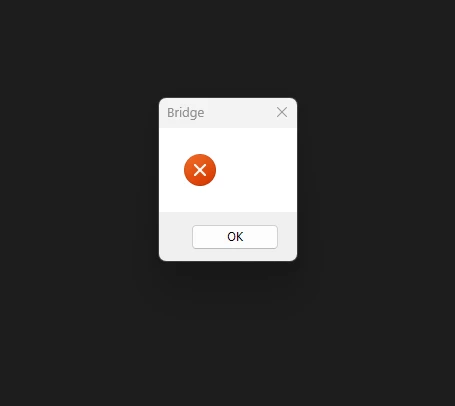
Sinds de laatste update van Bridge kan ik deze niet meer openen. bij aanklikken krijg ik een zwart scherm met daarin een kader met het woord Bridge, een roodbolletje en OK. na verwijderen en opnieuw installeren verandert er niets. Wie kan mij helpen.
 

{Title edited by Moderator}

This topic has been closed for replies.

2 replies

Mohit Goyal
Community Manager
Community Manager
March 7, 2023

Hi all,


We're happy to announce the release of Adobe Bridge Beta (13.0.3.686). This update includes the fix for this issue. To see the list of all fixed issues in this Beta release, click here


Please update or install Bridge Beta via the Creative Cloud Desktop app.


Steps to install/update


InstallGo to the Creative Cloud desktop app and select Beta apps in the left sidebar of the Apps panel. Then select install for your beta app.


Update: Go to the Creative Cloud desktop app, click on Update in the left sidebar of the Apps panel and Check for updates. Then click update for your beta app.


Let us know if this Beta release resolves the problem for those affected, and share your feedback.


Thanks,

Mohit

Ranjisha Sengupta
Legend
January 20, 2023

Hi there,


Thanks for reaching out. We're here to help.

You are seeing this issue after the application update, right? Do you see this error message at the launch? Also, please check if more than one version of Bridge is installed in the system.

What is your device specification?


Try resetting bridge preferences:

  • Start Adobe Bridge and immediately press Ctrl+Alt+Shift (Windows) or Command+Option+Shift (Mac OS) until the Reset Settings dialog box appears.
  • Select all three options--Reset Preferences, Reset Standard Workspaces, and Purge Entire Thumbnail Cache--and then click OK.

Here are a few troubleshooting steps, have a look: https://helpx.adobe.com/bridge/kb/troubleshoot-errors-freezes-bridge.html#:~:text=Adobe%20Bridge%20c...


Let us know how it goes.


Regards,

Ranjisha

renespee
renespeeAuthor
Participant
January 20, 2023
I can't open bridge,
with shift/control/alt, I have only 2 options, then stopped Bridge.
sorry for my english
renespee
renespeeAuthor
Participant
January 20, 2023
See my badge for the problem