

moshmosh007
Known Participant
July 23, 2018
Question

Adobe Output Module for Bridge CC 2018

  • July 23, 2018
  • 33 replies
  • 11718 views

hi! i am using the Adobe Output Module for Bridge CC 2018

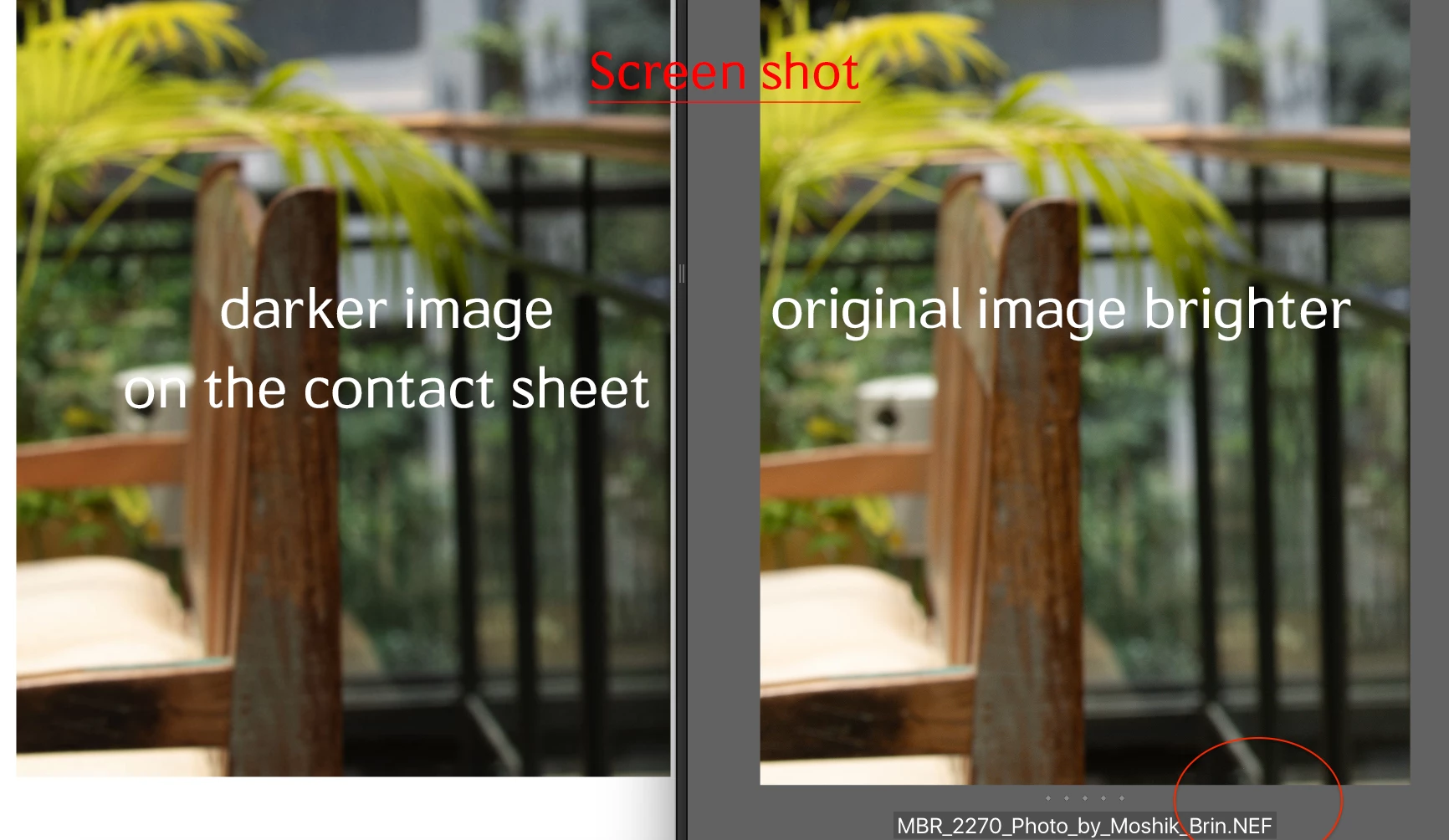
when i am creating the contact sheet, the pictures on the contact sheet are darker then the original image. that is the same issue with all formats (nef, dng, jpg, psd) all defined as sRGB color profile . any idea why the images are darker. and how can i fix it?
This topic has been closed for replies.

33 replies

Silvermeth
Participant
June 19, 2019

I had the similar problem - pdfs with oversaturated/dark output. Now its okay after I updated Adobe Bridge CC 2019 from creative cloud. Thanks for the fix!

Participant
May 9, 2019

I've been having this exact problem myself. I assume everyone who uses it has. It is essential that they solve this. It can't be that complicated surely.... I will try to use Bridge CC17 in the meantime.

Participant
May 3, 2019

so red its insane as an output

Participant
May 3, 2019

I have the same issue. is this still not fixed?

jeffreya27069151
Participant
April 8, 2019

Any update on this issue?

I work in a photo studio with 4 other photographers. We all have CC. All 5 of us are having the same issues of darker PDF contact sheets. WE have been following this thread for some time now. We tried everything mentioned in this forum. Exporting Jpegs, exporting high res, exporting preserve color: no difference. This happened after we did a program update. it is actually been an issue as clients are seeing dark images and not all understand the proof is not the final. We are loosing on our client orders from our all our shoots. We tried Lightroom as a workaround, but the contact sheet as easy to customize the cells, add text, and orientation/paper size, etc. (we all run Mac, most on High Sierra, 1 older Mac has El Capitan, and 1 Mojave, running either power Mac, Mac Pro, and newer MacBook Pro- the output in the new Bridge has no different regardless on which system is used)

I see that Adobe is working on this issue, but was hoping to get a time frame? are we looking in a couple weeks, months, or next year? Just so my team can figure out a solution in the mean time.

Participant
April 9, 2019

My workaround whilst they get their s**t together is to use Bridge CC 2017 which you can easily download through the app

Participant
May 3, 2019

good idea but how silly this is still not fixed

Participant
March 22, 2019

Hello,

I'm have the same issue. It is a Mac problem! I don't have the problem on a pc with up to date version of bridge/photoshop or on macs with older versions...

Hope this helps...

Legend
March 22, 2019

There is no reason to post in multiple threads. Adobe has acknowledged this issue and is working on it.

Participating Frequently
January 23, 2019

I have been using Bridge CC 2017 for making PDFs. I just updated to 2019 again and the PDFs still come out dark and oversaturated. Here is a screen shot. Adobe please fix this. 2018 Bridge has the same issue. I'm running Mac OS 10.12.6 on a 2015 MacBook Pro and on a 2012 Mac Pro tower... Same results on both.

Adobe Employee
January 24, 2019

Dear Users,

We are aware of this issue for some set of files and are working on the fix for future versions of Adobe Bridge.

Request you to share some sample input images for our investigation with abseth@adobe.com

Regards,

Abhishek Seth.

moshmosh007
Known Participant
January 24, 2019

hello Abhishek.Seth i have just send you 2 samples with the original and pdf files + screenshots, please let me know you got it

Participating Frequently
January 17, 2019

Yep, same issue here. Dark and oversaturated PDFs no matter what file format or output settings i use. My files are CMYK JPEGs with a Fogra39 profile assigned to them. Bridge 2019 produces a bad result but 2017 with the output module works fine. I'm attaching a file to this post. The left hand image contains an Adobe RGB 1998 profile. The right hand image contains a Fogra39 profile. If i tick "preserve embedded profiles" I get this bizarre result. The left hand image is darker than the original file whereas the right hand image is just bewildering. 

Legend
January 17, 2019

The developers have been notified about this. So far, an answer is not forthcoming.

Participant
January 11, 2019

Sane issue here since CC2019. We are also using Output module to send contact sheets to customers and it is veeery complicated to declare, why contact sheets look darker than the actual images.

@Adobe: Please fix this afap!

JSdesign
Participant
January 10, 2019

Having the exact same issues as most posters here: over saturated, darker images. Am using CS6 until this is fixed. Enough people having the problem (since many months ago) that you'd think this would be handled more promptly.