

moshmosh007
Known Participant
July 23, 2018
Question

Adobe Output Module for Bridge CC 2018

  • July 23, 2018
  • 33 replies
  • 11718 views

hi! i am using the Adobe Output Module for Bridge CC 2018

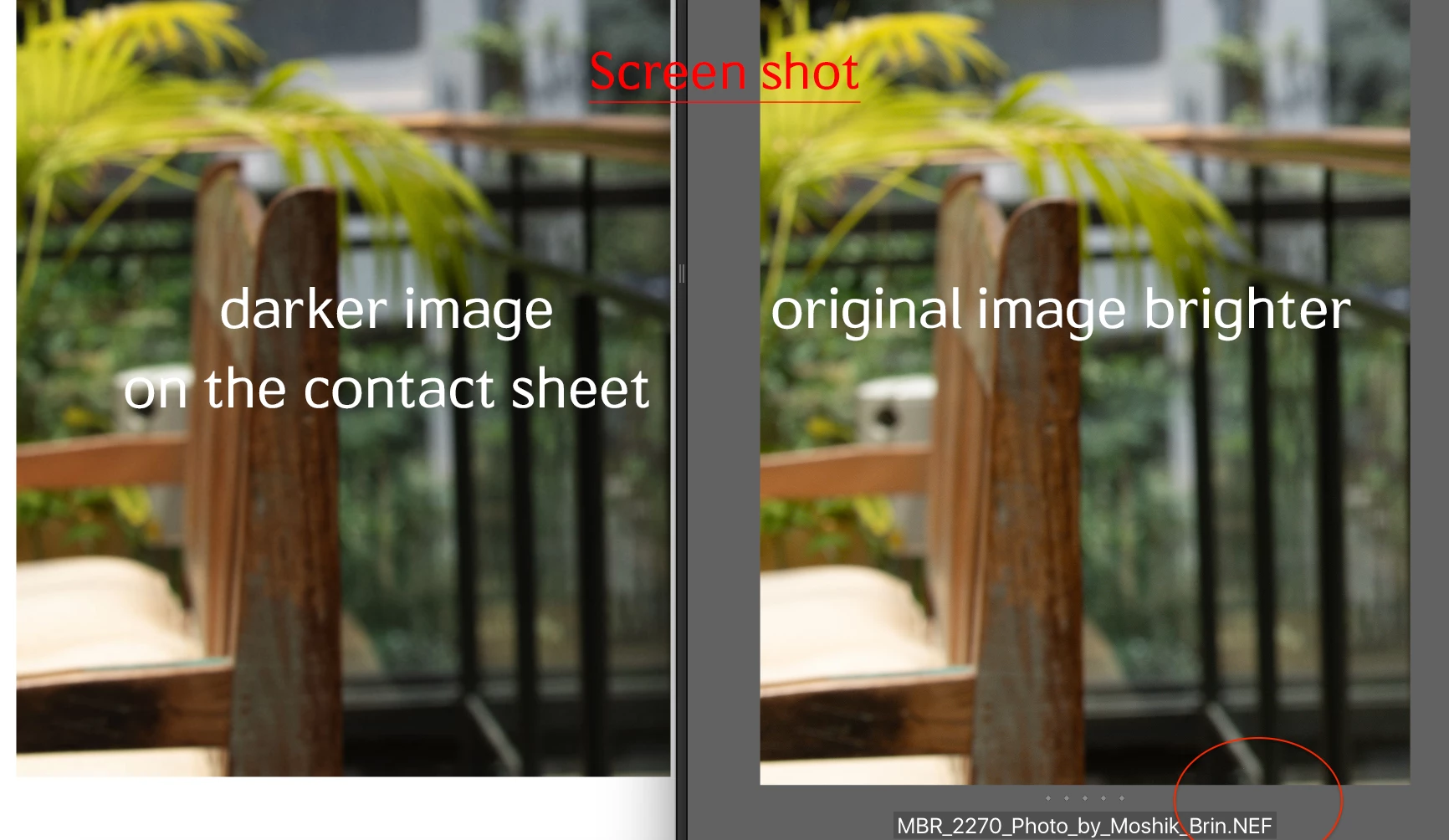
when i am creating the contact sheet, the pictures on the contact sheet are darker then the original image. that is the same issue with all formats (nef, dng, jpg, psd) all defined as sRGB color profile . any idea why the images are darker. and how can i fix it?
This topic has been closed for replies.

33 replies

Participating Frequently
January 7, 2019

Hi All,

Thank you all for sharing your valuable feedback. For this issue our team is looking into it . Once addressed we will update on this thread. 

Thanks,

Avinash

Participating Frequently
December 6, 2018

Like most of you, the issue persists in Bridge 2019 (9.0.1.216) for me and no word from Adobe after 3+ months (for me. longer for the OP and others)!

Why is acknowledgement of the issue so tough?

sveinungb52937376
Participating Frequently
December 6, 2018

I have had a long chat session and a call from Adobe customer support.

Ended up in them requesting that I continue using v8.0 (not 8.1 or 9...) until they fix the pdf-color issue.

See link to download page earlier in this thread.

So they acknowledge there is a known problem. But maybe not in public...

6. des. 2018 kl. 03:18 skrev geedee6 <forums_noreply@adobe.com>:

Adobe Output Module for Bridge CC 2018

created by geedee6 <https://forums.adobe.com/people/geedee6> in Bridge - View the full discussion <https://forums.adobe.com/message/10795930#10795930>

Like most of you, the issue persists in Bridge 2019 (9.0.1.216) for me and no word from Adobe after 3 months!

Why is acknowledgement of the issue so tough?

If the reply above answers your question, please take a moment to mark this answer as correct by visiting: https://forums.adobe.com/message/10795930#10795930 and clicking ‘Correct’ below the answer

Replies to this message go to everyone subscribed to this thread, not directly to the person who posted the message. To post a reply, either reply to this email or visit the message page:

Please note that the Adobe Forums do not accept email attachments. If you want to embed an image in your message please visit the thread in the forum and click the camera icon: https://forums.adobe.com/message/10795930#10795930

To unsubscribe from this thread, please visit the message page at , click "Following" at the top right, & "Stop Following"

Start a new discussion in Bridge by email <mailto:discussions-community-bridge@adobe-v8.hosted.jivesoftware.com> or at Adobe Community <https://forums.adobe.com/choose-container.jspa?contentType=1&containerType=14&container=4703>

For more information about maintaining your forum email notifications please go to https://forums.adobe.com/thread/1516624 <https://forums.adobe.com/thread/1516624>.

This email was sent by Adobe Community because you are a registered user.

You may unsubscribe <https://forums.adobe.com/unsubscribe.jspa?email=post%40sbraathen.no&token=bde96b5f9c2c9fb7db7ce34938d23a38d982ba770069a378fafb08fb73a0c8cd> instantly from Adobe Community, or adjust email frequency in your email preferences <https://forums.adobe.com/user-preferences!input.jspa>

Participant
December 4, 2018

My change is a drastic exposure change.  In prior versions I could make my adjustments to RAW and simply create a contact in bridge that reflects the changes.  In 2019 I finally have this problem.  I tried converting my RAW's to jpegs, then creating the contact from the jpegs.  Same results.  Obviously this not an isolated anomaly, but a fairly wide spread problem.

sveinungb52937376
Participating Frequently
December 4, 2018

It seems like we are quite a few experiencing this Bridge issue.

I tried ArtCreative HL <https://forums.adobe.com/people/ArtCreative+HL>´s tip with changing monitor profile. With no luck for me…

BUT I found a site with a downloadable version of Bridge 8.0 (early cc2018). The problem assumably started with 8.1.

This version works for me, without doing any drastic color or saturation changes to the pictures when making a pdf contactsheet.

Link:

https://www.digitalriser.com/download-adobe-bridge-cc-2018-offline-installer.html <https://www.digitalriser.com/download-adobe-bridge-cc-2018-offline-installer.html>

The pdf turns out right even though there still is a color/saturation shift in the preview in Bridge.

Sveinung

4. des. 2018 kl. 19:21 skrev pauls53250128 <forums_noreply@adobe.com>:

Adobe Output Module for Bridge CC 2018

created by pauls53250128 <https://forums.adobe.com/people/pauls53250128> in Bridge - View the full discussion <https://forums.adobe.com/message/10792479#10792479>

My change is a drastic exposure change. In prior versions I could make my adjustments to RAW and simply create a contact in bridge that reflects the changes. In 2019 I finally have this problem. I tried converting my RAW's to jpegs, then creating the contact from the jpegs. Same results. Obviously this not an isolated anomaly, but a fairly wide spread problem.

https://forums.adobe.com/servlet/JiveServlet/downloadImage/2-10792479-1638904/900-525/ScreenShot2018-12-04at10.09.58AM.png <https://forums.adobe.com/servlet/JiveServlet/showImage/2-10792479-1638904/ScreenShot2018-12-04at10.09.58AM.png>

If the reply above answers your question, please take a moment to mark this answer as correct by visiting: https://forums.adobe.com/message/10792479#10792479 and clicking ‘Correct’ below the answer

Replies to this message go to everyone subscribed to this thread, not directly to the person who posted the message. To post a reply, either reply to this email or visit the message page:

Please note that the Adobe Forums do not accept email attachments. If you want to embed an image in your message please visit the thread in the forum and click the camera icon: https://forums.adobe.com/message/10792479#10792479

To unsubscribe from this thread, please visit the message page at , click "Following" at the top right, & "Stop Following"

Start a new discussion in Bridge by email <mailto:discussions-community-bridge@adobe-v8.hosted.jivesoftware.com> or at Adobe Community <https://forums.adobe.com/choose-container.jspa?contentType=1&containerType=14&container=4703>

For more information about maintaining your forum email notifications please go to https://forums.adobe.com/thread/1516624 <https://forums.adobe.com/thread/1516624>.

This email was sent by Adobe Community because you are a registered user.

You may unsubscribe <https://forums.adobe.com/unsubscribe.jspa?email=post%40sbraathen.no&token=bde96b5f9c2c9fb7db7ce34938d23a38d982ba770069a378fafb08fb73a0c8cd> instantly from Adobe Community, or adjust email frequency in your email preferences <https://forums.adobe.com/user-preferences!input.jspa>

Joely10623436
Community Expert
Community Expert
November 16, 2018

moshmosh007​ i guess, Bridge is converting your images without asking?

sveinungb52937376
Participating Frequently
November 25, 2018

I have spent a couple of hours chating with Adobe support.

They seem to be aware of this issue. BUT not actually admitting it in any public way.

What they wanted to get me to do was using cc2017 with the add-on Output module installed: https://helpx.adobe.com/in/bridge/kb/install-output-module-bridge-cc.html <https://helpx.adobe.com/in/bridge/kb/install-output-module-bridge-cc.html>

For me this did not help. The tab occurs in Bridge cc2017 after installing the module but will not be active. Nothing happens when I click the tab.

I really hope Adobe fixes the Output tab in cc2019 version very soon…

16. nov. 2018 kl. 22:51 skrev Toughmedia <forums_noreply@adobe.com>:

Adobe Output Module for Bridge CC 2018

created by Toughmedia <https://forums.adobe.com/people/Toughmedia> in Bridge - View the full discussion <https://forums.adobe.com/message/10755202#10755202>

moshmosh007 <https://forums.adobe.com/people/moshmosh007> i guess, Bridge is converting your images without asking?

If the reply above answers your question, please take a moment to mark this answer as correct by visiting: https://forums.adobe.com/message/10755202#10755202 and clicking ‘Correct’ below the answer

Replies to this message go to everyone subscribed to this thread, not directly to the person who posted the message. To post a reply, either reply to this email or visit the message page:

Please note that the Adobe Forums do not accept email attachments. If you want to embed an image in your message please visit the thread in the forum and click the camera icon: https://forums.adobe.com/message/10755202#10755202

To unsubscribe from this thread, please visit the message page at , click "Following" at the top right, & "Stop Following"

Start a new discussion in Bridge by email <mailto:discussions-community-bridge@adobe-v8.hosted.jivesoftware.com> or at Adobe Community <https://forums.adobe.com/choose-container.jspa?contentType=1&containerType=14&container=4703>

For more information about maintaining your forum email notifications please go to https://forums.adobe.com/thread/1516624 <https://forums.adobe.com/thread/1516624>.

This email was sent by Adobe Community because you are a registered user.

You may unsubscribe <https://forums.adobe.com/unsubscribe.jspa?email=post%40sbraathen.no&token=bde96b5f9c2c9fb7db7ce34938d23a38d982ba770069a378fafb08fb73a0c8cd> instantly from Adobe Community, or adjust email frequency in your email preferences <https://forums.adobe.com/user-preferences!input.jspa>

Participant
November 25, 2018

Did you put the two files in the two separate folders when installing the module?

Participant
November 16, 2018

Not sure if this will help but I have the same issue with the over contrasted and over saturated contact sheet images from the Output module. However, I changed to creating the contact sheets from TIFF files and it seems to work much better maintaining images as they are and not changing the contrast / saturation. I also just did a quick test converting a JPEG to a TIFF and that seemed to work too.

sveinungb52937376
Participating Frequently
November 16, 2018

Thank you for your kind and quick response!

I just tried your tip, with same result as before with jpegs.

I hope Adobe will find a fix soon to this.

Best regards

Sveinung

Participant
November 16, 2018

Sorry to hear that! I was really hoping it might help. It is only a short-term work-around anyway and the problem needs to be sorted properly, hopefully soon.

Cheers,

Felix.

sveinungb52937376
Participating Frequently
November 16, 2018

This should have been addressed by, or at least replied to by Adobe by now! They know of this, surely.

Having the same issue in OSX High Sierra. Both inn 8 and no change in the latest 9...

It just suddenly apeared a few months ago (Maybe it was in the 8.1.0. upgrade )

Can´t find archive with version 8.0.1 to install, so I can get correct looking contact sheet.

AAAAARGH!!!!!!!!

hyunl58315487
Participant
November 9, 2018

The bug definitely started between versions 8.0.1 and 8.1.0. We have both installed in the office and the PDF output from version 8.0.1 looks accurate and the PDF output from 8.1.0 is too dark. I have tried changing all the settings suggested above in 8.1.0 but I still can't get it to match 8.0.1. The dark output doesn't look like incorrect profiling. It actually looks like a gamma adjustment of 0.9. Very strange.

Participant
November 12, 2018

I'm having the same issue using Bridge 9.0.1 on macOS Mojave 10.14. Thumbnails are oversaturated. Come on Adobe, please fix this!

Known Participant
November 5, 2018

Update: Having pre-selected the images I wanted for my contact sheet in Bridge. I went to PS 2019 under File is Automate and there was the Contact Sheet II plugin

sveinungb52937376
Participating Frequently
November 27, 2018

Yes, but if you have like 20-30 pictures or more you end up with very much manual work. And not one contact sheet with all pictures in one document.

Sveinung

27. nov. 2018 kl. 03:01 skrev jbm007 <forums_noreply@adobe.com>:

Adobe Output Module for Bridge CC 2018

jbm007 marked simondo9's reply on Adobe Output Module for Bridge CC 2018 as helpful. View the full reply

Marked as helpful:

Update: Having pre-selected the images I wanted for my contact sheet in Bridge. I went to PS 2019 under File is Automate and there was the Contact Sheet II plugin

Following Adobe Output Module for Bridge CC 2018 in these streams: Inbox

This email was sent by Adobe Community because you are a registered user.

You may unsubscribe instantly from Adobe Community, or adjust email frequency in your email preferences

Known Participant
November 5, 2018

I just want to use the original CONTACT SHEET PLUGIN, not learn more time consuming longer ways to end up at a dead end PDF I don't want instead of a .jpg. I want to simply choose how many images in a row or a column. I want control over each image in layers for exposure. I want to flatten and produce a jpg as the contact sheet plug in did and then press print for a quick colour accurate proof. I'm getting increasingly frustrated with Adobe and will look at Elements and check other competition to Adobe who seem to care little about creating delays and downtime in their customers  workflows. This morning I would happily go back to an older version of PS  I just need to simply contact sheet and print a jpg proof!

greggl22812466
Participant
October 23, 2018

I found if you convert your files to sRGB the pdf color will be correct!

ulrichh31581974
Participant
October 23, 2018

My photos have an embedded color profile (sRGB) and the colors in the PDF will definetely not appear correct but much too oversaturated and reddish, sorry.

Participant
October 26, 2018

I'm having the same issue in  Bridge CC 2019.  The output module over saturates the images to the point that I cannot use it.  After checking color space in PS and bridge, re-checking "used embedded profile" and restarting, there is no change. My monitor is calibrated.  Finally pulled up CS6 and ran the contact sheet with out any issues and sent to my client. Help Please!