

moshmosh007
Known Participant
July 23, 2018
Question

Adobe Output Module for Bridge CC 2018

  • July 23, 2018
  • 33 replies
  • 11718 views

hi! i am using the Adobe Output Module for Bridge CC 2018

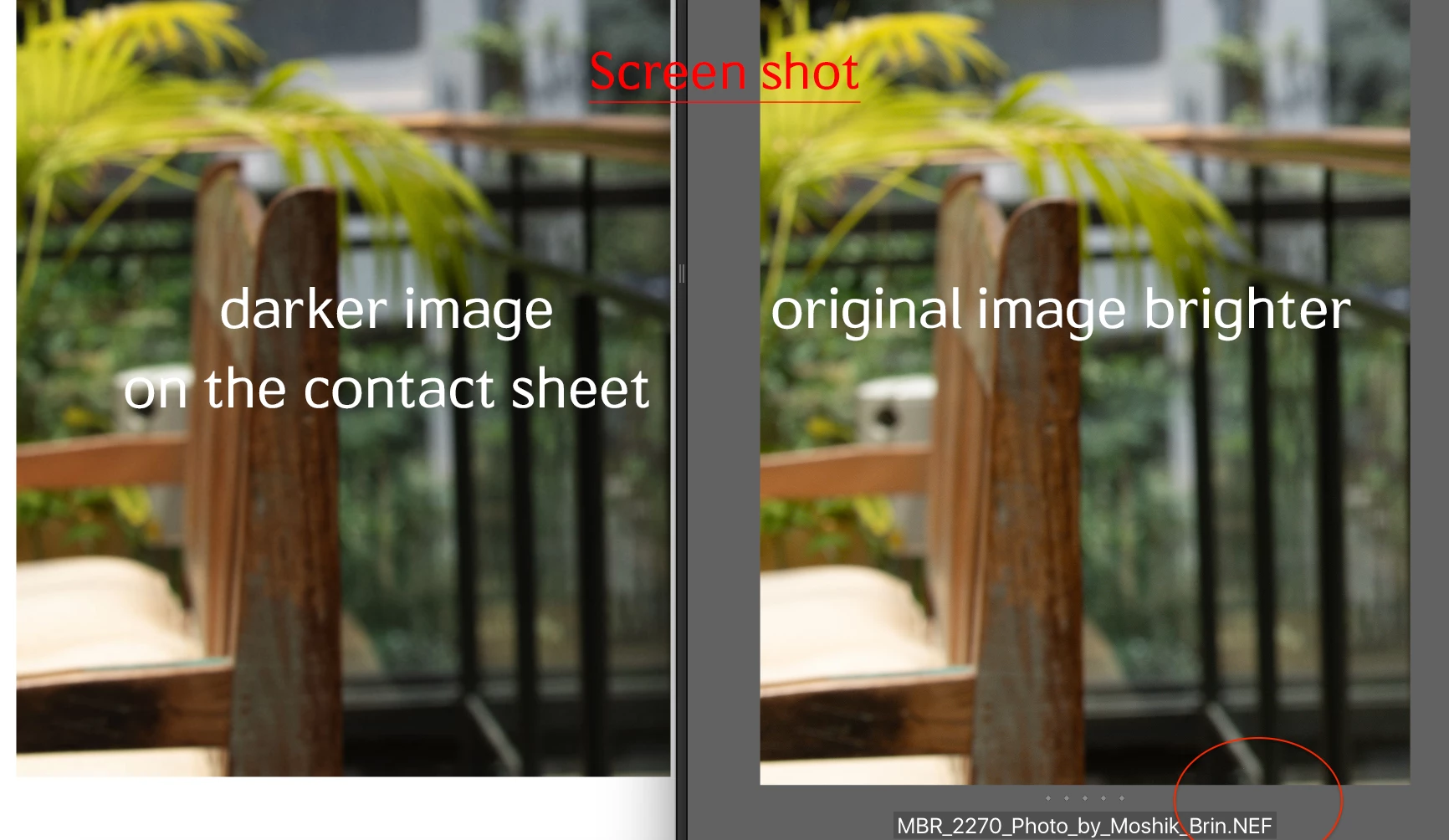
when i am creating the contact sheet, the pictures on the contact sheet are darker then the original image. that is the same issue with all formats (nef, dng, jpg, psd) all defined as sRGB color profile . any idea why the images are darker. and how can i fix it?
This topic has been closed for replies.

33 replies

Participating Frequently
September 17, 2018

You can have multiple versions of bridge installed.

jbm007
Community Expert
Community Expert
September 20, 2018

I everyone here using color management software to calibrate their monitors?

Does not include Lumigraphics in the poll. LOL

moshmosh007
Known Participant
November 27, 2018

there is no connection to monitor calibration. the PDF file is simply showing the images darker than the originals. ACR edit and crop are not appeared either. its the same monitor, same software different brightness. same no practical solution

(and no!  contact shit script from PS is not a solution! neither downgrading the workflow with Bridge 2017 )

i dont understand why jbm007​ you have closed this issue as solved as its not.
Sheena KaulAmy_WongWoojintheblairLumigraphics​​ Toughmedia

Participating Frequently
September 17, 2018

I just downloaded Bridge CC 2017 and it works perfectly. You can install older versions in the Creative Cloud app.

Hopefully they will fix it soon.

Participating Frequently
September 17, 2018

I only tried Acrobat Pro to see if the color and contrast looked the same, which it did. The functionality of Acrobat is geared towards documents and sucks for making image pdfs. I just made 10 different pdfs from the Bridge 2018 with every range of settings possible... Including syncing my CC color settings under the edit menu in Bridge. The PDF always looks darker than the original (Adobe RGB) and sometimes (with SRGB) it has way oversaturated colors. I use the Bridge Output module daily... Looks like I have to downgrade to 2017.

Adobe please fix this.

moshmosh007
Known Participant
September 10, 2018
Participant
September 8, 2018

Having the same issue. I can’t seem to find a work around and don’t have the time to export jpgs of each and every shoot to create a contact sheet that Bridge is supposed to do. This has not happened in previous versions of Bridge. you always seem to fix one thing but break 15 others in the process.

Participating Frequently
September 7, 2018

I just used image processor to process my psds to jpegs... Then I made a pdf with Acrobat using "Combine Files into a single PDF"

Color and contrast looks perfect... The formatting is not as good as the Bridge... I like the automation for file names and margins.

Participating Frequently
September 8, 2018

Great - if you have Acrobat (Pro)...

Participating Frequently
September 7, 2018

I am having the exact same problem. Checking Preserve Embedded Profile helps but it is still darker when i open my psd and put it next to the pdf in acrobat. I just updated recently. It used to work fine and look exactly the same in 2017...

Legend
September 7, 2018

I did some testing and show a VERY slight color shift with both sRGB and aRGB JPEG files. I'm filing a bug but I don't see a huge change. The L*A*B values in Photoshop are WAY different which is expected.

For example, Blue shifts from #0000FF to #0000FE and middle grey from #818181 to #808080 (measured onscreen.)

This wouldn't likely be enough to be visible unless you have pretty sharp eyes.

Participant
September 6, 2018

Having this same problem- on the contact sheet, images look darker and have higher saturation.  My stopgap solution is making contact sheets in photoshop and throwing a curve and hue/sat on to correct before exporting the pdf, but this is tedious.

ADOBE, the rest of this is addressed to you:  PLEASE FIX!  I can't explain to non tech-savvy clients that it just looks bad on the contact sheet and that their real files are fine.  Need this to just work like it used to...

Tried multiple image formats (RAW, TIFF, JPEG) as sources for the contact sheet.

Tried with and without "Preserve Embedded Color Profile" checked in the output preferences; checked was the better of the two, but both look wrong.

Tried in photoshop using Contact Sheet II and sRGB, Adobe1998, and working RGB color profiles. 

bridge cc version 8.1.0.383

photoshop cc version 19.1.6

2017 imac running High Sierra version 10.13.6

Participant
August 21, 2018

Having the exact same issue, images appear about a stop to a stop and a half darker when exported to PDF, even appear slightly more saturated as well.

Made the Adobe Staff suggested adjustment by activating the "Preserve Embedded Color Profile" with no change.

When I send out the PDF's to clients I have to inform them images don't appear as they really are.

Any help in resolving this issue would be greatly appreciated.

Thank you.