
Participating Frequently
November 8, 2023
Question

Bridge Crashes on Startup - ParseValue Error

  • November 8, 2023
  • 7 replies
  • 2664 views

Since the latest macOS Sonoma update, my Adobe Bridge Application crashes upon startup, giving me this error:
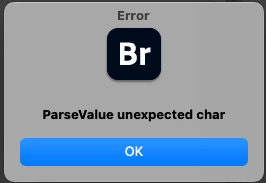
 

I have uninstalled, deleting all preferences and cache multiple times, but nothing works to clear this error.

This topic has been closed for replies.

7 replies

Community Manager
February 23, 2024

Hello,  


The fix is now available in production released version 14.0.2.191. We would love for you to try it out and share feedback.   


For a complete list of fixed issues, please refer https://helpx.adobe.com/bridge/kb/fixed-issues.html 


Regards,   
Bridge Team 

Community Manager
February 7, 2024

Hello, 


We have released a new Adobe Bridge 2024 Beta build (14.0.2.181) which fixes this issue. We would love for you to try it out and share feedback. 


For a complete list of fixed issues, please refer to community post announcement. 


Regards, 
Bridge Team 

Rahul Saraogi
Participating Frequently
December 6, 2023

Hello @Jessica274900604ibj @jo-annl48530853 @defaultzc82n6gsi98q @David23363678ti1x - are you still facing this issue? We are actively working on this issue but to better investigate the issue, we need the asked information. Also, 

1. Are you available for a screen sharing session? If yes, could you please share your preferred time?

2. Can you please check if signing out and signing back in CCD and then launching Bridge is resolving the issue for you?


Thanks,

Bridge Team

Participating Frequently
December 7, 2023

Issue just started for me too MacOs : Sonoma 14.1.2 and beta Bridge (latest)


Of course now I've learned to use Bridge all day and its gone 😞

Rahul Saraogi
Participating Frequently
December 7, 2023

Hello @DVLOS 


Apologies for the inconvenience caused, but to better investigate the issue, could you please share the following with sharewithbr@adobe.com?


1. Are you available for a screen sharing session? If yes, could you please share your preferred time?

2. Can you please check if signing out and signing back in CCD and then launching Bridge is resolving the issue for you?

3. Machine details (hardware, os)

4. Have you recently installed or upgraded any software on your system. For e.g. VPN, any security software, etc. If yes, could you please check if disabling it is resolving the issue for you or not?

5. Are you managing softwares or your own or is their IT department handling it?

6. Since when you have started facing this issue?

7. Are you facing this issue on Bridge 2022, Bridge 2023 and Bridge 2024 all? Please mention the versions on which you are facing this issue

8. Please collect the logs using Adobe Log Collector tool
9. Are you trying to access the data on an external drive
10. In addition to the logs generated by Adobe Log Collector tool, please share the following Bridge specific settings

  • Windows location
    • Appdata - C:\Users\<username>\AppData\Roaming\Adobe\Bridge 2024 (all the content in this folder)
    • Registry entry - Computer\HKEY_CURRENT_USER\Software\Adobe\Bridge 2024
  • Mac location
    • Appdata - /Users/<username>/Library/Application Support/Adobe/Bridge 2024 (all the content in this folder)
    • Registry entry -  /Users/<username>/Library/Preferences/com.adobe.bridge14.plist


Thanks,

Bridge Team

Rahul Saraogi
Participating Frequently
November 23, 2023

Hello,


Thank you for reaching out to us. We really apologize for the inconvenince caused. To better investigate the issue, it is a request to all the users facing this issue to kindly share the following information at sharewithbr@adobe.com


1. Machine details (hardware, os)

2. Have you recently installed or upgraded any software on your system. For e.g. VPN, any security software, etc. If yes, could you please check if disabling it is resolving the issue for you or not?

3. Are you managing softwares or your own or is their IT department handling it?

4. Since when you have started facing this issue?

5. Are you facing this issue on Bridge 2022, Bridge 2023 and Bridge 2024 all? Please mention the versions on which you are facing this issue

6. Please collect the logs using Adobe Log Collector tool
7. Are you trying to access the data on an external drive
8. In addition to the logs generated by Adobe Log Collector tool, please share the following Bridge specific settings

  • Windows location
    • Appdata - C:\Users\<username>\AppData\Roaming\Adobe\Bridge 2024 (all the content in this folder)
    • Registry entry - Computer\HKEY_CURRENT_USER\Software\Adobe\Bridge 2024
  • Mac location
    • Appdata - /Users/<username>/Library/Application Support/Adobe/Bridge 2024 (all the content in this folder)
    • Registry entry -  /Users/<username>/Library/Preferences/com.adobe.bridge14.plist


We might reach out to you to get more information but it would be helpful if you can share the asked details as early as possible.


Thanks,

Bridge Team

Participating Frequently
November 27, 2023

Thank you @Rahul Saraogi  - I've provided the requested information and sent it to sharewithbr@adobe.com - please note that the Mac Bridge 2024 folder requested is too large. I've asked in the email where I can upload that file because it won't let me send via email.

Thank you,

Laura

Adobe Employee
November 29, 2023

Hello @Laura317134739ke0 


Thank you for sharing the details. You can upload/share the data using any hosting/file transfer service like OneDrive, WeTransfer, etc.


Thanks,

Bridge Team

David23363678ti1x
Participant
November 22, 2023

Both myself and a colleague are having the same problem and we both use Windows PCs.

If you ignor the error screen and don't click "OK " everything carries on running as normal. However having the error message in the background is annoying and needs to be resolved.


Participating Frequently
November 22, 2023

I'm sorry you're having the same issue too. I wish my Mac would allow Bridge to run with the error message up, but unfortunately, nothing can be selected unless the alert is closed, which immediately crashes the whole program.

Participant
November 20, 2023

I am also having the same issues not able to use ebridge at all. Adobe please help

Participating Frequently
November 10, 2023

Issue still persists with Bridge v14.0.1 update.

Participating Frequently
November 13, 2023

I am having the same issue. Have not been able to use Bridge because of this error.