
Participant
April 16, 2019
Question

Cant eject hard drive because Bridge is holding it hostage.

  • April 16, 2019
  • 14 replies
  • 5728 views

I try to eject the hard drive from Bridge and nothing happens.

I have to close Bridge entirely to be able to eject the hard drive from finder once Bridge has been open and browsed said hard drive.

I've been searching the forums for a similar problem/solution, but haven't found anything.

Can anyone point me towards a solution to this? I really like using Bridge over finder, but this but drives me up the wall.
    14 replies

    Participant
    August 8, 2025

    Its august 2025, this problem is still not fixed. Had this issue since like 2003 or since I can remember.

    Bridge keeps external drives/cards hostage. Getting really tired of having to quit Bridge in order to eject the drive using Finder. Please Adobe, we are paying customers, fix this instead of innovative new features.

    Participant
    August 3, 2025

    Still an issue in 2025, Mac OS Sequoia and Bridge 2025 latest version
    Extremely annoying

    Participant
    September 12, 2023

    Just jumping in with a fix that worked for me:

    Disable Bridge and Creative Cloud from Login Items


    I'm ejecting cards from bridge and finder like a boss now.

    Hope it works for someone else as I know the pain.


    Known Participant
    May 24, 2023

    For what it is worth, this is still broken in May 2023 😐

    Participant
    June 15, 2023

    Yep, June 2023 and read the entire thread and still no fix.  The first time it happened, I quit bridge and was able to eject the card.  Beginning to happen consistently and it's starting to be annoying.  

    Participating Frequently
    July 21, 2022

    My presumption is that no one from Adobe really gives a damn how many times someone bumps a topic. But I'll add my two cents here. I've been dealing with the same problem forever and I even called into customer service to complain.


    Pardon the long post, but this isn't the first time I've had ongoing issues with adobe products or the first time this has apparently happened by the length of this thread.


    First, I don't know if you can call it customer service, talking to an adobe rep is like talking to AI. I tell the rep that bridge hijacks my external drives and I can't unmount. I tell him all the things I did to try to remedy the situation including deleting preferences, uninstalling, the usual nonsense. This guy proceeds to walk me through the fix and basically tells me to do all the same things again. Each time I repeat, "did that, did that, did that already". Finally the flustered rep pushes me onto level II techs I guess. That guy says, no problem, let me remote into your machine and I'll fix the problem for sure (very confident). I let him remote in, this guy proceeds to start clicking into my personal folders, he's just bouncing around without a clue of where to look or what to do. Doesn't seem like he's comfortable with Macs, I tell him on the phone, hey buddy, I have proprietery files on this computer, how about not clicking into all my folders." he responds "oh, sorry, looking for the search bar" - it's a Mac, you realize it's a mac, look up at the right....


    He clicks and unclicks and clicks for 35 minutes. He tells me he doesn't believe that Bridge is causing the problem. Has no clue what he's doing. I hang up, kill the remote connection and call up to complain. dead issue.


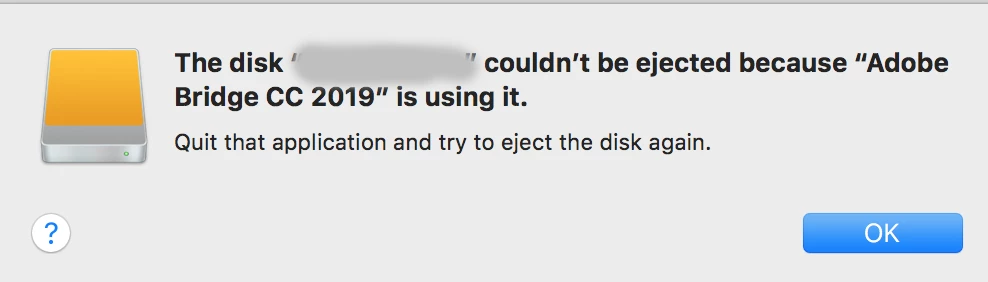
    look at the screen capture of the desktop notification window. Either I'm blind, don't understand english or that says "ADOBE BRIDGE" won't let the drive eject.


    Maybe people should post all these their thread comments on social media and news outlet websites. People should know the only application that works flawlessly is their ecommerce payment system that takes your credit card info......


    or maybe someonen from adobe will read this and actually pass it along for a fix. Hey you guys were great about scripting a social media scheduler.... not sure what the hell that has to do with graphics but if you can do that, you can fix bridge.

    Participating Frequently
    July 21, 2022

    I still nave the problem too. The latest version of Bridge and PS. 2022. I just shut down Bridge and then eject. I must admit I'd rather an Adobe programmer work on the 'Save as...' multiple arcane filename list (which affects me every time I save as...), rather than this storage eject issue, which I can work around. 🙂

    Participant
    February 25, 2022

    This has been an issue for years Adobe.  You are raking in cash every month, why has this not been fixed?  Having to close Bridge everytime I have to eject an SD is really getting old.  This is one reason I switch to Davinci Resolve.  They address issues quickly and everything runs smooth.  This post is from almost three years ago.

    Known Participant
    May 24, 2023

    Davinci Resolve could be the prgramn that finally forces Adobe to start listening & fixing things. Adobe Premiere Pro now looks like it is being abandoned in large numbers by a lot of high profile pro filmmakers/YouTubers in favour of DR. Adobe seems to be frantically trying to kiss their a**es by inviting them out to meet with them for feedback, to get them to come back and stop saying how cr*p Adobe is. I have now finally binned Premiere to just use DR instead. If other software companies find a way to fill in the blanks on the other programs Adobe has the market cornered on, and deals with the ongoing development, updates & customer support in the same way Black Magic do with DR, then Adobe is in BIG trouble

    Participating Frequently
    February 17, 2021

    Still a problem, Feb 17, 2021. Bridge CC 10.0.4.157, Windows 10. Keeps links to USB sticks in any port, and an external USB  Drobo 5S. So annoying to have to close Bridge before ejecting any of these USB devices.

    May 12, 2021

    it's May 2021, has there been a long term solution to this problem, as I am still facing this problem and totally agree that it is quite annoying?

    jbm007
    Community Expert
    Community Expert
    May 12, 2021

    Haven't seen any pigs flying have  you ....................

    Alessandro Fresco
    Participating Frequently
    October 1, 2020

    Bump

    Participant
    September 29, 2020

    I've had this problem for at least a year, and it's still going strong in september 2020 (v10.1.0.163). It's annoying to the point that it makes Bridge hardly worth using.

    Jools808080
    Known Participant
    July 3, 2020

    For whatever reason, I can't see the latest replies to this thread (even after re-logging). So, just to re-iterate: The option to launch Bridge at login seems to be the source of the problem. I just tested it and when disabling this in Bridge I could eject my external drive directly from Bridge.


    My testing approach

    Step 1: 
    Bridge had autostarted. I connected a USB key. Didn't interact with the USB key (didn't copy anything to or from the key). Ejected from Bridge successfully. 
     
    Step 2:
    Reconnected USB key, copied a file to the key. Tried ejecting the USB key from Bridge, but got no response from the application. Tried to eject the USB key from Finder, but the error from the OP screenshot appeared. 
     
    Step 3: 
    Deactivated "Start Bridge at login" option from Bridge preferences. Restart. Launched Bridge manually. Connected USB key. No interaction. Ejected successfully from Bridge. 
     
    Step 4:
    Re-connected USB key. Copied files to the USB key via Bridge. Ejected USB key from Bridge successfully. 
     
    Conclusion
    It appears that the Autostart function is interfering here. 
     
     
    Disclaimer
    As mentioned in my opening paragraph, I can't see the thread I had with user jbm007 anymore. Maybe it was removed? If this is a duplicate post, please feel free to remove it. 
    Jools808080
    Known Participant
    July 3, 2020

    Correction:

    This only worked once. An hour later I tried again and we are back to Bridge holding the USB key hostage.