


oprie_ma
Inspiring
March 2, 2023
Question

File criteria doesn't work - Dateigröße-Kriterium in Sammlung funktioniert nicht

  • March 2, 2023
  • 1 reply
  • 251 views

English below:


Hallo,


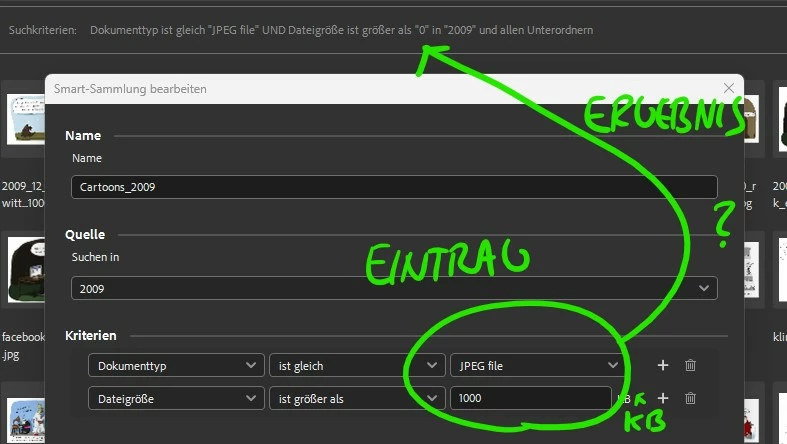
ich versuche eine Smart-Sammlung mit den Kriterien Dokumenttyp (JPEG) und Dateigröße (Größer als 1000 KB) zu erstellen und beide Kriterien müssen passen. Im Ergebnis steht unter Dateigröße "0" (siehe Bild) - gebe ich z.B. "9000" ein, steht da "8" ... Ich möchte einfach nur, dass alle Bilder, die nicht JPEGs sind und unter 1 MB ignoriert werden.

Ich arbeite mit Windows 11 und der neusten Version, also 13.0.2.636


Danke!


I'm trying to create a smart collection with the criteria Document Type (JPEG) and File Size (Larger than 1000 KB) and both criteria must match. The result is "0" under file size (see image) - e.g. if I enter "9000" it says "8" ... I just want all non-JPEG images under 1MB to be ignored.

I work with Windows 11 and the latest version, i.e. 13.0.2.636

Thanks!


This topic has been closed for replies.

1 reply

Adobe Employee
March 10, 2023

Hi @oprie_ma ,


We're happy to announce the release of Adobe Bridge Beta (13.0.3.686). This update includes the fix for this issue. To see the list of all fixed issues in this Beta release, click here


Please update or install Bridge Beta via the Creative Cloud Desktop app.


Steps to install/update


InstallGo to the Creative Cloud desktop app and select Beta apps in the left sidebar of the Apps panel. Then select install for your beta app.


Update: Go to the Creative Cloud desktop app, click on Update in the left sidebar of the Apps panel and Check for updates. Then click update for your beta app.


Let us know if this Beta release resolves the problem for those affected, and share your feedback.


Thanks,

Shubham Verma