
Reinhardt & Sommer
Inspiring
July 9, 2024
Answered

XMP Bug Bridge

  • July 9, 2024
  • 4 replies
  • 774 views

Hello,

I've recently been experiencing an error in Bridge on my Mac that I've never had before.

I always overwrite the metadata of my images in Bridge:

Tools>Replace metadata (German translation)


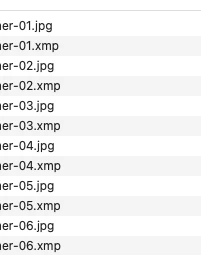
Now the metadata is no longer written directly into the JPGs but is displayed as a separate xmp file next to the JPG in the Mac Finder.


I use

MacMonterey
12.7.5
M1Ultra

Bridge 2023
Bridge 2024

in the current version.

Thanks in advance

This topic has been closed for replies.
Correct answer Reinhardt & Sommer

found the solution:

https://community.adobe.com/t5/bridge-discussions/how-to-stop-creating-xml-files-for-regular-jpeg-images/td-p/14652635


Cam Raw is the troublemaker

4 replies

Community Manager
October 14, 2024

Hi, 


The fix for the issue is available in the latest updates of Adobe Bridge 15.0 and ACR 17.0.  

We would love for you to try it out and share your feedback. 

For more details about the release, please refer to: 


Regards, 
Bridge Team 

Adobe Employee
August 16, 2024

Hi,


Thank you for reporting the issue. We apologize for the inconvenience caused.

The additional XMP file you observe is created when changing or applying metadata to any JPG/JPEG file containing Content Credentials. This behavior change was recently introduced due to Content Credentials support in Camera Raw release (version 16.3). We're actively working to investigate this issue and will keep you posted on updates around this.

Please refer to helpx article: https://helpx.adobe.com/bridge/kb/xmp-file-jpeg.html for more details and a workaround. 


Thanks,
Bridge team

Legend
August 16, 2024

This is definitely a bug (deviation from JPEG standard), since XMP files aren't supported in common usage. This means that, say, adding a copyright or trying to remove location info for posting online would fail. FAIL.

Reinhardt & Sommer
Reinhardt & SommerAuthorCorrect answer
Inspiring
July 16, 2024
Reinhardt & Sommer
Inspiring
July 16, 2024

Hello,

does anyone here have an idea?


How do I ensure that the meta data is written back into the JPG and does not appear as an external file?

Thanks