
Participating Frequently
January 27, 2019
Question

Having a couple of issues - first time using in anger

  • January 27, 2019
  • 1 reply
  • 368 views

Am in the final stages of creating a course (using a trial version at the moment of Captivate 11).

It was originally created by someone else and I have taken it over (been v interesting to say the least).

Two issues that are stumping me:

1.     Have used the glossary Widget and when I run the Project all works fine but when I publish it the glossary does not work and a blank page appears where the glossary should be. I thought it was to do with flashplayer but that is enabled. Am using Windows 10 btw. Any ideas?

2.     The second is all to do with the Quiz Summary template.

a.     Am I right in assuming that that will only display when the quiz has been completed and the slide will not open? This appears to be happening but then I appear to jump to a particular slide but can't work out where that is set.

b. I thought I had managed to edit to capture a pass fail by using
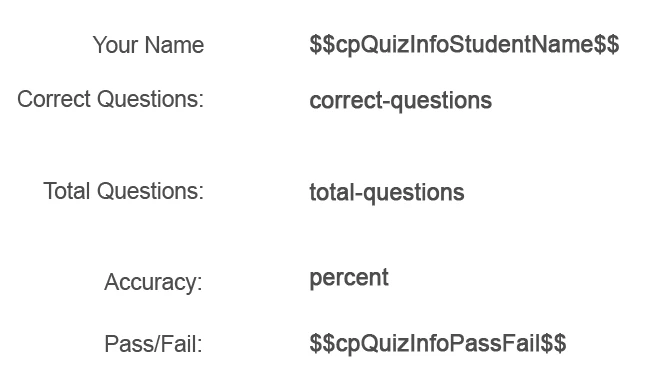
But when quiz has been completed $$cpQuizInfoPassFail$$ returns False

c.     Master Slide has four buttons but previous author has only left 'Continue' - how do I get the others back?? I've looked everywhen but to no avail!!

Anyone have any ideas on these issues?

Thanks in advance Mark U

This topic has been closed for replies.

1 reply

RodWard
Community Expert
Community Expert
January 27, 2019

In answer to your questions:

  1. The Terms and Definitions in the Glossary widget must not contain certain characters otherwise the glossary widget will not appear at runtime.  The usual characters to avoid are anything that might also be used in programming code.  So I recommend you go through the text you have entered into the glossary and remove any punctuation characters other than commas and full stops.  See if it then works.
  2. If the cpQuizInfoPassFail variable returns false it thinks you have failed the quiz.  Completing a quiz is achieved by getting to the end of the quiz.  So check the scoring to see whether enough points were achieved to pass.
Marku071Author
Participating Frequently
January 27, 2019

Rod

Have just been through the glossary and removed one set of ' and a : but to no avail. Before I go any further, do these characters include - and / as I have quite a few of these...…. Don't want to go through and find it has no benefit. Do you have by any chance a list of characters not to use?

Cheers

Mark U

Lilybiri
Legend
January 27, 2019

You cannot use any combination characters. Americans do not have any of those. Some examples:

French: é è à ç

Spanish: ñ

German: ü

FOr the score slide: it ihas been totally changed compared with the socre master slide, at least if this is a correct copy. Are you sure it is not a custom scoe slide? A default score/results slide will always appear when you have quiz slides, at the end of the quiz.  If you allow questions to be skipped, that may be without having completed all questions. Depends on the setup of the quiz slides, where you don't give any detals.

The Continue button is the most essential button. The Review button will only appear if Review is checked in the Quiz Preferences. The Retake button will only appear when there is more than 1 attempt on quiz level.

Iwas afraid of your topic title, I am not angry hen I see someone jumping into the water before learning to swim, not when Isee a youngster get into a car without having a fdriver licesne, I am just afraid.... Kidding

Have a look at::

Creative with Quizzing System Variables - eLearning

BTW Check the version number please, most recent is 11.0.1.266.