

Inspiring
January 11, 2023
Answered

How to create a quiz slide (knowledge check) with 3 rows?

  • January 11, 2023
  • 1 reply
  • 703 views

Hi,

I am looking for a way to create a quiz slide (just knowledge check) where learners can click to confirm one or more options out of 3 answers each.
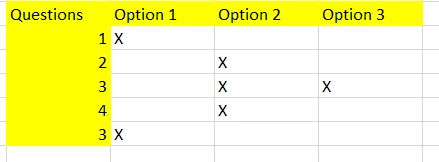
Is there anything like that?

    This topic has been closed for replies.
    Correct answer Lilybiri

    Thank you.

    Yes, that is what I need. Which KC type would I choose? 


    Multiple Choice. Since KC slides don't have scored answers (I know that you don't care about the scores) you cannot use Partial score and the Partially correct messages doesn't exist. That is the reason why I showed you a screenshot of a Quiz slide. Even though the score is not important - you can always hide the results slide. 


    And look at the screenshot I posted, you'll need to edit the Properties as in that screenshot. 

    To me it would be best to show all the questions, even those with only one correct option, with those Properties. If you keep some with one correct answer, you give away some unnecessary information since the radiobutton is typical for one correct answer. Hope you understand my logic?

    1 reply

    Lilybiri
    Legend
    January 11, 2023

    Is that inserted image just an overview, or do you want to create a KC slide with that layout? I am bit confused because you have two questions with number 3.

    Or do you want to have 5 question slides, where the first one is considered correct when Option 1 is clicked, the third one when Option 2 and 3 are clicked etc?


    Inspiring
    January 11, 2023

    Whoops. Sorry about 2 times #3!

    One slide with 3 rows and radio buttons. But I might actually go for just a "dummy" slide where learners can click the buttons and then we simply go to the next slide showing the correct answers...we don´t use the score etc. anyway.

    Lilybiri
    Legend
    January 11, 2023

    I can offer you a workflow if your question is clear to me:

    • You want a MCQ slide with multiple correct answers possible, so I would use a checkbox, not a radio button.
    • Learner will decide when clicking the Submit button.
    • What do you want to appear as feedback message, if the chosen option is correct, if two options should be chosen and it is only partially correct, if the chosen option is not correct. All those options are built in for KC slides. Do you need more?
