


EngilityTrain
Inspiring
January 28, 2016
Answered

Relative Path isn't working in Captivate 9

  • January 28, 2016
  • 1 reply
  • 1785 views

Hello,


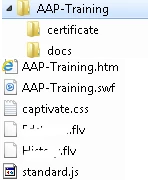
I've been using the relative path (docs/document.pdf) to open resource documents such as PDF files in a new window in my captivate projects and they always worked until I upgraded to Captivate 9. The path is not working any more, and opens up a default web browser window instead. Not sure if I'm missing anything. The "docs" folder to call the PDF document is located in the published folders (see image below). I appreciate any advice.
    This topic has been closed for replies.
    Correct answer EngilityTrain

    Okay, it's been 4 days and I have not received a reply. I contacted the support and I was given the following instructions, in case if you are interested: 


    In order to link the document, select the action as " open url or file " and in the path just put the name of the document [document.pdf]. Make sure the document is in the published folder. So lesson learned, keep the documents directly inside the published folder, not any subfolders [docs/document.pdf].

    1 reply

    EngilityTrain
    EngilityTrainAuthorCorrect answer
    Inspiring
    February 3, 2016

    Okay, it's been 4 days and I have not received a reply. I contacted the support and I was given the following instructions, in case if you are interested: 


    In order to link the document, select the action as " open url or file " and in the path just put the name of the document [document.pdf]. Make sure the document is in the published folder. So lesson learned, keep the documents directly inside the published folder, not any subfolders [docs/document.pdf].

    camillaergo
    Known Participant
    February 7, 2016

    Thank for posting your reply. I am having a horrendous time with relative paths not working at all. At least now I know what to do about documents! I've had to come up with a total hack to deal with linking projects/modules in the course I am developing though.

    Known Participant
    February 8, 2016

    We are having the same problem in Captivate 9 - Relative Path not working.  Apparently this problem occurred in Captivate 7 and they fixed it.  See link to forum discussing it - Captivate 7 and relative file path syntax

    Hopefully someone from Captivate will let us know about when they will have a fix