


TVP_C5944
Known Participant
October 16, 2020
Answered

Rotate object using Javascript without it resetting to original position first

  • October 16, 2020
  • 3 replies
  • 3356 views

Hi,

I've created an interaction which invites the user to guess a percentage but rather than simply have them enter a number, I wanted it to have them press and hold buttons to adjust the displayed percentage up or down - I found some code on another thread which does this job perfectly.


Now I'd like to add a graphical representation of the percentage level - a meter that fills up or empties according to the percentage (see below). I've created an image to represent this and need to animate it to simulate the meter filling up/emptying.
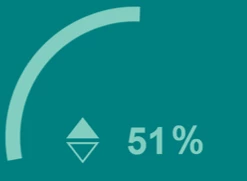


There seems to be a couple of ways of achieving this as far as I can tell - either some sort of WAAPI/CSS/jQuery animation or by triggering an advanced action as part of my existing code.


I haven't been able to get the first options to work - whether that is down to my own ignorance, inability to understand or organisational restrictions I don't know. The second option of triggering and Advanced Action does work, but only to a point.


The problem occurs when I go from increasing the percentage to reducing it (or vice versa). When I switch from one action to the other, the image resets to it's original starting point before then rotating as it is supposed to do.


So, using the above image as an example, I can hold the down the Up arrow button and the percentage will increase to the displayed 51% and the arc bar grows at the same by rotating clockwise through about 100 degrees. If I then hold down the Down arrow button, the % figure starts decreasing, but the arc bar resets to the 0% position before rotating anti-clockwise when clearly I need it to start at 100 degrees and rotate from there.


It doesn't appear to be the Javascript that is causing it, because I mapped the same actions to buttons on the slide and the same thing happens.


Why is this happening and is there some sort of work around?


I thought it might be possible for the script to identify the 'current' rotation and instantly apply that rotation before the animation starts, but I haven't been able to find how to do that.


If it's relevant, I'm using Captivate 2019 (11.5.1.499)...


Thanks for any help offered!



Correct answer Stagprime2687219

I imagine there are a number of ways you might have crafted this.

I think I would try to tackle this with CSS transforms and a variable.

++rotVal;

$("#barc").css({transform: "rotate("+(rotVal)+"deg)"});


Where  "bar" is the name of my progress bar that is animating (keep the "c" at the end) and  "rotVal" is the rotation value.


If I apply the above script to an up button, it should rotate clockwise by 1 degree and if I apply the same to a down button but change the ++rotVal;  to become  --rotVal;  it should rotate counter clockwise by 1 degree.


Hopefully this will help provide the insight you need in some way.

3 replies

Participant
April 25, 2024

I have created a slider that dynamically changes a variable. I have used it to vary a number of things such as a gauge indication, change colors of a shape, move objects across the slide, etc.  This is done iusing JavaScript in Captivate.

Participant
July 8, 2025

Do you have an example to show or the code you used? This sounds really cool. 

Stagprime2687219
Legend
July 9, 2025

@andrewr2356618 - This is an old post so I am not sure what sort of response you will get but if you're interested in learning some more about sliders with Captivate - you can check out a couple of examples I put out there some time ago. For each example - I am giving you the last link in the series which will have links to the previous ones.


The first example is a five part series about implementing sliders to change variables.

https://elearning.adobe.com/2018/05/set-variables-interactive-sliders-part-5-additional-resources/


The second example is a two part series that uses sliders to adjust RGB values for the color of a box as part of a game. Part one is the game and part two shares the code.

https://elearning.adobe.com/2019/07/fun-color-sliders-part-2-code/

This one also links to the five part series above.


Please note that these are examples for Captivate Classic and not for v12.x

Stagprime2687219
Stagprime2687219Correct answer
Legend
October 19, 2020

I imagine there are a number of ways you might have crafted this.

I think I would try to tackle this with CSS transforms and a variable.

++rotVal;

$("#barc").css({transform: "rotate("+(rotVal)+"deg)"});


Where  "bar" is the name of my progress bar that is animating (keep the "c" at the end) and  "rotVal" is the rotation value.


If I apply the above script to an up button, it should rotate clockwise by 1 degree and if I apply the same to a down button but change the ++rotVal;  to become  --rotVal;  it should rotate counter clockwise by 1 degree.


Hopefully this will help provide the insight you need in some way.

Stagprime2687219
Legend
October 19, 2020

I tried to do a quick mockup of this working.

I just used two images for the effect.

The first is a mask set the same as my background - though that is not necessary.
The mask has an arc shaped cutout. (Made with PowerPoint)
The second image is just a wedge set behind the mask with the same radius as the arc.

As the wedge rotates - it fills or empties the arc-shaped cutout.


Participant
May 23, 2025

I've only just seen this and wanted to say it's very impressive, thanks for sharing.

Lilybiri
Legend
October 16, 2020

Can you insert a Preview of the advanced action used?

TVP_C5944
TVP_C5944Author
Known Participant
October 17, 2020

Of course, although as it's a single action Standard Action, it's not very exciting! 🙂


The parameters are:

Effect Start - 0 sec

Effect Duration - 0.1 sec

Rotation - 2


The other action (for reducing the % figure) is identical except the Rotation parameter is set to -2

Lilybiri
Legend
October 17, 2020

But you were talking about JS?