July 14, 2011
Question

SCORM 1.2 and Saba - Reporting a 0 Score for Track Slide views

  • July 14, 2011
  • 3 replies
  • 5901 views

Good morning,

We have just transitioned over to our new LMS, Saba.  To say the transition has been rocky would be an understatement.   So, here is what I am dealing with:

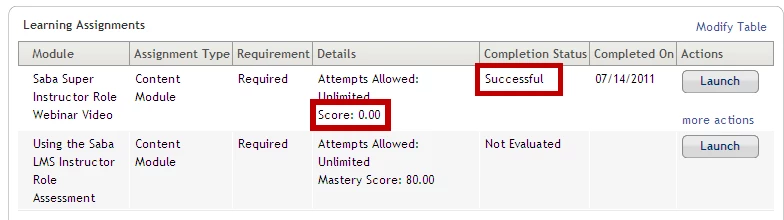
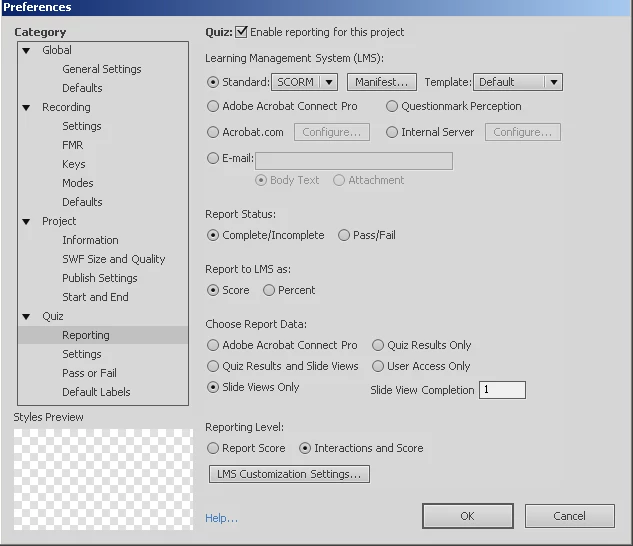
I have a very basic reader course where I want to grant someone credit once they have viewed all slides.  I am using SCORM 1.2 and setting either "User Access Only" or "Slide Views Only."  If I use slide views, I set it to 1, it sends a 0 score to the LMS, even if the user views all slides.  I have been able to create a fix by assigning a point value to a click box or button at the screen where I want the user to get credit.  However, this does not seem to be what was intended.

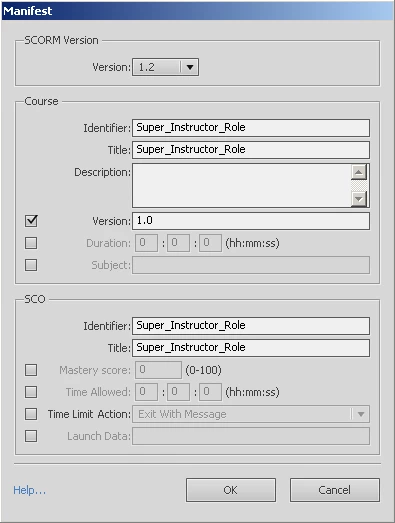
Below are screen shots of my publishing commands, Saba screens, and communication report between Saba and CP.
Content Communication Log with Saba

Content Communication Log
July 14, 2011 5:34:43 AM PDT
Command Received = LMSInitialize
Content Item: Super_Instructor_Role

July 14, 2011 5:34:43 AM PDT Response data (Data sent by Saba LMS to content) =
cmi.core.student_id = EEFIELDS1
cmi.core.student_name = Fields, Eric 
cmi.core.credit = credit
cmi.core.entry = ab-initio
cmi.core.lesson_mode = normal
cmi.launch_data = 
cmi.suspend_data = 
cmi.core.lesson_location = 
cmi.core.lesson_status = not attempted
cmi.core.score.raw = 
cmi.core.score.min = 
cmi.core.score.max = 
cmi.core.total_time = 00:00:00
cmi.comments = 
cmi.comments_from_lms = 
cmi.student_data.mastery_score = 
cmi.student_data.max_time_allowed = 
cmi.student_data.time_limit_action = exit,message
cmi.student_preference.audio = 0
cmi.student_preference.text = 
cmi.student_preference.language = 0
cmi.student_preference.speed = 0


July 14, 2011 5:34:45 AM PDT
Command Received = LMSCommit

Data sent by content to Saba LMS:
cmi.core.lesson_status = completed
cmi.core.lesson_location = 0
cmi.core.exit = 
cmi.core.score.raw = 0
cmi.core.score.max = 0
cmi.core.score.min = 0
cmi.core.session_time = 00:00:01
cmi.suspend_data = A1Enone%24nP000AA000AA
cmi.student_preference.audio = 0
cmi.student_preference.language = 0
cmi.student_preference.speed = 0
cmi.student_preference.text = 0
cmi.comments = 

July 14, 2011 5:34:45 AM PDT Response data =
error=0


July 14, 2011 5:34:59 AM PDT
Command Received = LMSFinish

Data sent by content to Saba LMS at the time of exit:

July 14, 2011 5:34:59 AM PDT Response data =
error=0

Any help would be greatly appreciated.

Thanks,

Eric Fields

Sr. eLearning Consultant

Coventry Health Care

3 replies

Participating Frequently
April 25, 2025

Hi Eric,

You're not alone reporting slide views as completion in SCORM 1.2 with Saba LMS has tripped up many developers. The issue seems to be that Saba expects an actual score or interaction to recognize course completion properly, even if "slide views only" is enabled. Your workaround using a clickable button to trigger a score is valid and quite common.

To ensure consistent reporting, consider setting cmi.core.lesson_status to completed and avoid sending cmi.core.score.raw = 0 unless necessary. You might also benefit from structured support CMI Level 5 Assignment Help can guide learners and developers facing similar LMS frustrations.

Let me know if you want SCORM debugging tips or publishing settings for Captivate/Storyline.

Inspiring
September 20, 2011

I posted this in another thread as well. Hope this helps somebody.

Hi there,

We are just implemeting Saba right now and testing on our captivate projects. I thought someone out there might find this information useful.

I am using Captivate 5. My courses usually don't have quiz questions. I do have a lot of non scored interactions so I don't want to use page views as an indication of successful completer as I could run into problems. Instead I place a button on the last page. In the reporting tab for the button I check off "Include in Quiz", "Add to Total" and "Report Answers". I also check the "advanced interactions" in the project menu to ensure no other interactions are set to score.

I then go to Preferences, and the Reporting section. I enable reporting for the project. Chose Standard, SCORM, Complete/Incomplete, Percent, Quiz results only, Report Score. The important thing is I learned is to turn off bookmarking or I run into problems. Go into LMS Customization and check "never send resume data".

It's maddening, but Saba does not work well when you use bookmarking. We were able to get the course to succesfully complete and go to transcript when book marking was on... as long as the user did not fast forward to the 1.5 seconds after the scored button. IF they did that, the course would never report sucessful and move to transcript.  No matter how many times you open the course and click thaat darn button. Very frustrating. And even if I moved the button's pause to right at the end, there's always a little bit of time left on the timeline that the user could advance to, and then... failure. I could not find a fix for this other than turning the bookmarking off. Granted, not many users would do this, but for the ones that do, they would need the administrator to set up the course again for them. Big hassle.

Since then I've read 2 other posts saying the same thing-- bookmarking in Captivate + Saba = BAD

I hope this helps someone out there! And if anyone has come across this issue and found a fix, post it here!

RodWard
Community Expert
Community Expert
July 14, 2011

I would suggest you try using Percent instead of Score, and set the Slide View completion percentage to 100 instead of 1.

Change Reporting Level to Score instead of Interactions and Score.

You haven't shown the screen for Quiz > Pass or Fail settings, but you need to set the passing percentage there to 100% as well if you intend that the learner must view every single slide.

Bear in mind that when using slide views, if you have any navigation buttons on the slides that are set to jump to the next slide when clicked, then the learner does not get a completion mark for those slides.  In Captivate you have to watch a slide all the way to the last frame in order to get it marked as completed.  If for some reason you need to get slides marked as completed despite not being viewed (e.g. when using branching) then you can use our TickTOC widget to gain credit for those slides that are missed or not watched to the end.

http://www.infosemantics.com.au/ticktoc

If you suspect that not all slides will be viewed, you can adjust the Pass/Fail percentage to something less than 100% to allow for the missed ones.

Try these changes and see if it works.

Once you DO find the settings that allow Captivate to work with SABA I would be very interested to know what they were.  I've got a page on my website where I want to show the Captivate config settings for SABA: http://www.infosemantics.com.au/lms_guide/saba  I don't have access to this LMS myself, but perhaps you or other SABA users on this forum can contribute information to make it easier for others to work with it.

July 19, 2011

Rod,

Sorry, I have not had a chance to respond.  I tried your suggestions and it does not seem to be making a difference.  I do however, succeed by making one click box as reportable and giving it a score as one.  That seems to me like that is a workaround but did the trick. I am going to keep experimenting and I will let you now so you can updated your site.

Thanks,

Eric Fields

RodWard
Community Expert
Community Expert
July 20, 2011

OK.  I've added that information to my web page.  I look forward to any further info you can provide for my SABA page.