

Participant
September 16, 2020
Question

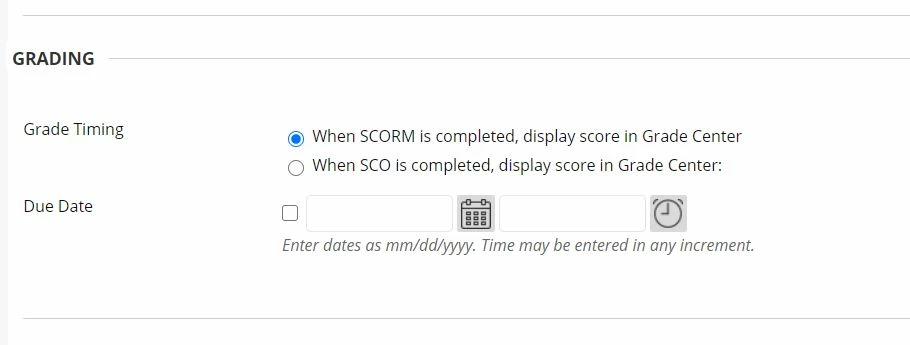
Settings on LMS (Blackboard) for uploading SCROM
  • September 16, 2020
  • 1 reply
  • 712 views

1) I am advised to set it to "When SCROM is completed...."
2) I am wondering when I publish, should the e-learning output be 1.2 or 2004? 

Thank you in advance

    This topic has been closed for replies.

    1 reply

    RodWard
    Community Expert
    Community Expert
    September 16, 2020

    This Blackboard dialog is a bit strange.  There's really no difference between a SCORM or a SCO. 


    SCO stands for Shareable Content Object and usually refers to a single SCO zip package module.


    SCORM just adds the words Reuse Model to the first acronym and is referring to the SCORM Standard rather than a specific learning object.   So, you don't refer to a multi-module course as a SCORM and the individual modules as SCOs.  A SCORM is not a parent object (course) with a SCO (module) as the child.


    Strange use of the SCORM terminology.  Are you sure this is ALL the dialog says and there are no other words AFTER the top line where it ends Grade Center?

    TE-MANAuthor
    Participant
    October 2, 2020

    Hello,

    Very appreciatative of the clarification, gives me a better understanding. 

    This will mean that it doesn't matter which option I select? 

    Nope there isn't any other words after the top line.


    TLCMediaDesign
    Inspiring
    October 2, 2020

    If this is a single SCO, use when SCO is completed.


    Also, I would suggest using SCORM Completion if the SCO itself is determing whether it is complete or not, which is almost always the case.


    Where you typed in TEST, that will be the name of the Grade Column in Blackboard. You should set the name of the SCO in the Quiz Preferences in the attached image. THis will be the name you will see in Blackboard as well as the name of the Grade column.