


Participant
May 23, 2023
Answered

zip-Datei nach Veröffentlichung für LMS zu groß

  • May 23, 2023
  • 1 reply
  • 448 views

Wir haben ein E-Learning Modul bestehend aus mehreren Kapiteln erstellt. Beim Veröffentlichen stellte sich heraus, dass die zip-Datei mit über 800 MB zu groß zum Upload ins LMS ist. Daher haben wir für die einzelnen Kapitel separate cptx-Dateien erstellt, Videos und Fotos komprimiert, ein Kapitel auch mal ohne "Erweiterte Aktionen" veröffentlicht. Nun können wir die einzelnen Kapitel zwar ins LMS hochladen, aber die zip-Dateien erscheinen uns immernoch sehr groß und es entstehen Ladezeiten beim Aufruf im LMS. Was sind die json-Dateien in dem Ordner "dr"? Ein Kapitel hat in der cptx z. B. 26 MB, in der zip 86 MB; ein anderes in der cptx 75 MB und in der zip 99 MB. Woher kommt die hohe Differenz cptx zu zip?
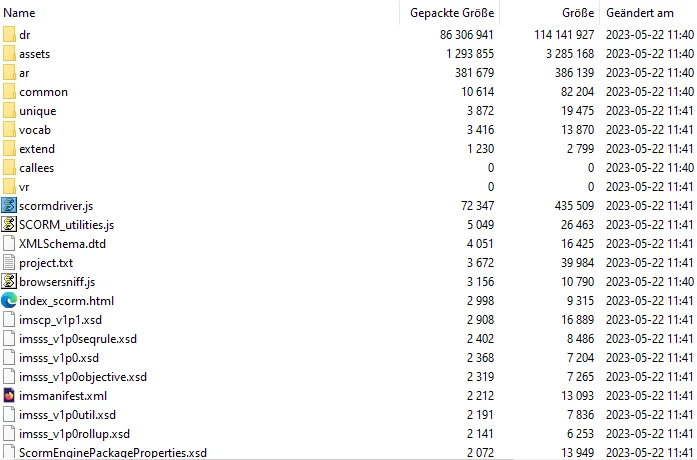
Was können wir noch machen, um unsere Dateien kleiner zu bekommen?

Vielen Dank im Voraus für die Hilfe.

 

    This topic has been closed for replies.
    Correct answer Lilybiri

    That is a very big result of the conversion. Did you resize that image in Captivate? It is something which I always avoid, I will import the image resized in Photoshop at the wanted resolution in Captivate.

    AFAIK there are no settings in Captivate to control the conversion. Some users tell that when changing the slide quality to JPEG, the conversion to JSON is not happening, but I didn't test it out personally.

    It is no problem for me if you want to write in German, I just don't dare to answer in Goethe's language because I am a perfectionist and my mastery of German grammar is rusted.

    1 reply

    Lilybiri
    Legend
    May 23, 2023

    I cannot answer in German, but I understand it rather well (Ich bin Flamen).

    JSON is used for the bitmap images.  That conversion is happening on publishing, hence the difference in size. A first tip to reduce file size is to replace bitmap images by SVGs whenever possible. I see in your screenshot that this is a project with lot of images, most probably bitmap. Avoid resizing images in Captivate but use a graphics editor, and when possible, use instances of the same image. Some users told that changing the quality setting

    BTW you can have Captivate calculate the estimated filesize using the Project Info panel:

    Use the master slides whenever possible to have images as backgrounds, if you want that image for multiple slides. Maybe this is already your approach.

    Advanced actions will not increase file size a lot, although replacing them by Shared actions, and reusing variables once helped me in a consultancy job to reduce a project to half its size.

    Indeed, in this case the problem is for sure not with audio nor video clips which are of course very heavy compared with images and text. 

    Participant
    May 24, 2023

    Thank you for the tips. For one chapter we already changed the pictures to svg, especially the icons we used. But there was no change regarding the size of the zip file. My colleague also deleted the jpgs no longer in use and master templates which are not used.
    Curious for us, in the file "dr" are no longer json files (only one) but pngs. And now, we know which pictures cause the high size. But which settings in Captivate are the reason for, that we receive from a 1.5 MB picture a 35 MB one?

    Lilybiri
    LilybiriCorrect answer
    Legend
    May 24, 2023

    That is a very big result of the conversion. Did you resize that image in Captivate? It is something which I always avoid, I will import the image resized in Photoshop at the wanted resolution in Captivate.

    AFAIK there are no settings in Captivate to control the conversion. Some users tell that when changing the slide quality to JPEG, the conversion to JSON is not happening, but I didn't test it out personally.

    It is no problem for me if you want to write in German, I just don't dare to answer in Goethe's language because I am a perfectionist and my mastery of German grammar is rusted.