May 4, 2019 3:56 PM UTC
Question

Character Animator Lip Sync Problem

Hello,

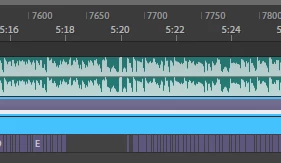
After this month with new update Character Animator's Lip Sync not work very well. As in pictures some places jumping, no visemes.

by the way sounds is clear , no background noise or audio!

For repair these places  i press record(while Stereo Mix open) than missing viseme fixed. But it makes me Tired always always fix missing visemes. Please help me

again by the way before was great work and i tried another characters. it my  game channel Бабушка Шошо Игры - YouTube

Amy_Wong​Woojin​Debbie​clawson​mghalpin​Jochem van Dieten​Marilynlee17​theblair​azilaga​Character Animator​Character Animator (2.1) new features (video)​@

This topic is closed to new replies. Start a new post to keep the conversation going.

6 replies

christineavatar
Legend
May 4, 2019 10:59 PM UTC

I found an answer to the problem I was having which seems similar to yours. I found it in a 'New Features - April 2017' on youtube . It starts at 19:35 and gives information about how to work with the updated visemes.

New Features - April 2017 (Adobe Character Animator CC Beta) - YouTube

Translate
May 5, 2019 6:59 AM UTC

Thank you Sir but i not use live stream. i  work on audio.

Translate
May 4, 2019 9:32 PM UTC

Please solve it with new update. My all triggers  not works 1.5

Translate
alank99101739
Legend
May 4, 2019 10:44 PM UTC

Could you perhaps upload the audio file?  With an audio file others can try to repeat what you have seen. A few people have mentioned Lip Sync not working as well - sample files would help prove/confirm it. dtull-adobe​ often has a look at problems.

Translate
May 5, 2019 6:59 AM UTC

i tried version 1.5 and 2.0. these version good works. They can take samples my video channel. I sure version 2.0.1 will be problem

Translate
May 4, 2019 9:00 PM UTC

I tried version 1.5 it works pretty well. Please next time check about something not broke in new version!

Translate