newg76460400
Participant
March 12, 2020
Question

Help I have No camera access on Character Animator CC 2018: MacBook Pro mid 2012 on Catalina 10.15

  • March 12, 2020
  • 8 replies
  • 4192 views


I have read through a lot of posts about this and nothing seems to solve the problem.

I only have the one built in camera on the macbook pro. It works with programs like photobooth no problem.

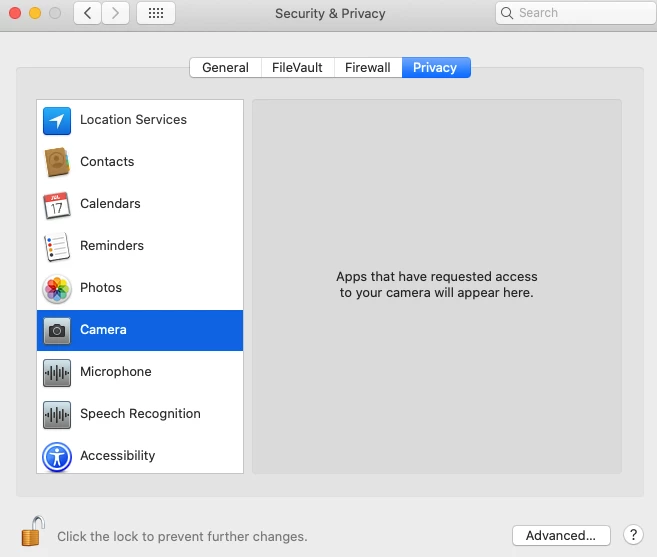
CA does not show up in camera privacy settings at all. See screeshot.

 Switch to default camera and switch to next camera have both been tried in CA with no success.

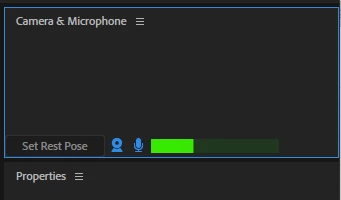
Camera and mic icon in CA are both blue so they are active. Audio/mic works fine in CA


How do I give CA access to my camera? When I first started the program I may have denied access to the camera I'm not sure. But there must be a way to go in and give access if I have mistakenly done that.


Any insight would be greatly appreciated.

Thank you in advance.


    This topic has been closed for replies.

    8 replies

    Inspiring
    March 19, 2020

    Have you tried creating a new user account and testing this? If it works then there's something local to your account that's causing an issue, rather than an issue with Character Animator. 

    Adobe Employee
    March 18, 2020

    Character Animator CC 2018 is pretty out of date at this point.  There have been several improvements to the camera code since then. Can you try Character Animator 2020 and see if that works better for you?

    Participating Frequently
    March 19, 2020

    Unfortunately not.

    Adobe Employee
    March 19, 2020

    Were you able to try Character Animator CC 2020 and found that the camera still does not work?  Or were you not able to try Character Animator CC 2020 for some other reason?

    Inspiring
    March 18, 2020

    Yeah, if everything was working your camera would be listed in that menu. Your preferences are located in your ~/Library/Application Support/Adobe/Character Animator/[VERSION] folder. 3.2 is the latest release.


    You can try renaming that 3.2 folder to something else temporarily. The next launch of CH will create a fresh set of preferences, but if that doesn't work, just try reinstalling. It really won't take that long. This isn't something that was missed in development, you're just experiencing an issue, and these things can be hard to diagnose wihtout being in front of the machine.

    Participating Frequently
    March 19, 2020

    That didn't work. As you can see from the screenshot CA says "only one camera detected" when switching back and forth through the menu. So the camera is is being detected by CA however it is not displaying anything.


    Participating Frequently
    March 18, 2020

    @davidarbor here is my menu. Macbook pro runninng catalina 10.15.3. Tried all options to get the camera working. "switching" doesn't work. I only have one camera and no other program has issues with it. No other programs are running that are using the camera.  Is there not something in preferences that says "grant/allow camera access to CA"? Seems very odd to me that this would be overlooked in development. Or a preferences file that I can just delete to solve this problem? Thank you


    DanTull
    Adobe Employee
    Adobe Employee
    March 20, 2020

    The 2018 version is quite old now and predates a substantial revamp of the camera code which should behave much better on 10.14 and later (better participation in the permissions handling introduced in recent macOS versions, for example). If you can update to that version, I think it will help, but maybe your situation prevents that somehow?


    Hope that helps.


    DT

    Inspiring
    March 18, 2020

    Can you post a screenshot of the hamburger menu (the three vertical lines) in the "Camera & Microphone" panel?

    If your camera is selected in that menu then reinstalling is worth a shot. Character Animator is not a large program and it takes only few moments to uninstall and not that long to reinstall. You won't lose your preferences, as long as you choose the correct option when uninstalling.

    Participating Frequently
    March 18, 2020

    If there are any Adobe staff on here that have a solution other than uninstalling and reinstalling the software please let us know.  There has to be an easy solution to give CA access to a built in Mac camera.

    Participating Frequently
    March 13, 2020

    I got it working by just uninstalling the Character Animate and then re-install it again. Just make sure to approve access to camera and mic.

    newg76460400
    Participant
    March 15, 2020

    thank you.  jeez I hope that's not the only way to fix the issue...seems like there should be a very quick fix rather than uninstalling and reinstalling software

    Participating Frequently
    March 13, 2020

    I have the exact same problem.