
Participating Frequently
January 21, 2021
Answered

Calendar Responses — how to disable?

  • January 21, 2021
  • 1 reply
  • 236 views

Hopefully an easy question here and I'm simply missing something in how I have things set up. Using Adobe Connect and Event Management to handle registrations, approved participants receive a calendar item they can plug into Outlook. 


My problem is that I'm now receiving Outlook emails every time they "accept" the calendar invite -- I can't seem to figure out how or where to turn this off so I'm not getting confirmation emails to my address. 


Any help? 


Thank you!


Tim
    This topic has been closed for replies.
    Correct answer Jorma_at_CoSo

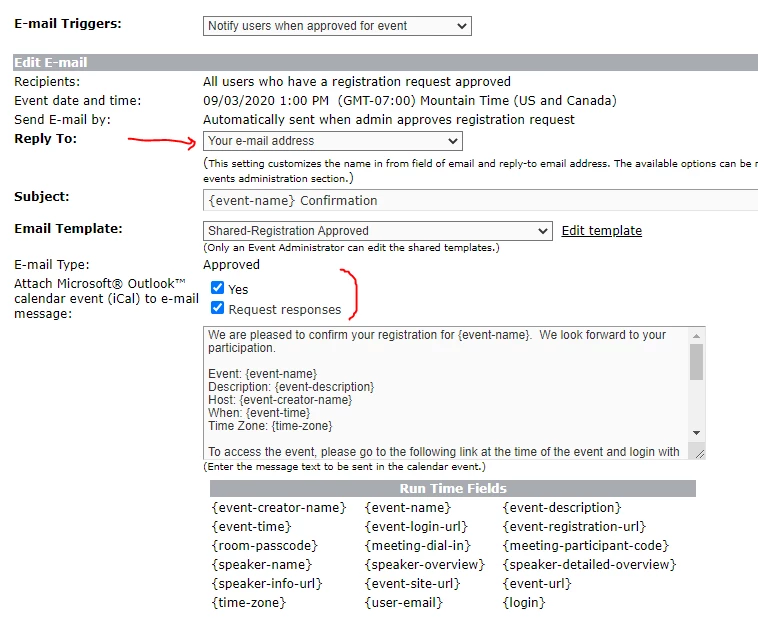
    If you look at the emails for the event, specifically the Registration Approved email you will see the option to attach the ical attachment and ask for a response. You will also see an option to set the reply to email to an email other than your own. 


    Updating these settings to what you need/want should resolve the issue.

    1 reply

    Jorma_at_CoSo
    Jorma_at_CoSoCorrect answer
    Legend
    January 23, 2021

    If you look at the emails for the event, specifically the Registration Approved email you will see the option to attach the ical attachment and ask for a response. You will also see an option to set the reply to email to an email other than your own. 


    Updating these settings to what you need/want should resolve the issue.