
Can I set Connect meeting background as a WebPage that contains live links?
We're looking to harness the Adobe Connect meeting functionality by using it as a kind of a customers portal, where the user can (among other things) retrieve reports relating to their workflow.
PRESENT STATE
Our organisation has a Report Web Application that lists reports (in pdf) that are mailed out to our customers. The administrator assistant generates reports from an https page from the Report Web Application.
FUTURE STATE (hopefully!)
1. Our organisation administrator sets up as many meetings in Connect as there are customers. Each customer has only one meeting. None of the other customers can see the others' meetings.
2. On entry to the Connect meeting, the customer will be able to access the Report Web Application as a webpage and download the reports she requires
My big questions here:
1. Can we publish a webpage (with live links) in Connect?
2. We'd like to encrypt the Connect meeting room webpage for best possible security. Is it possible to encrypt (https) some meetings but not others? If so, what extra things do we need to do this. PKI Infrastructure?
3. Report Web Application is encrypted, will that make a difference to displaying t within an Adobe Connect meeting?
4. Is there any problem if the clicking a Report Web Application links generates a pdf.?
Other information:
-The Connect server is housed in our network if that makes any difference.
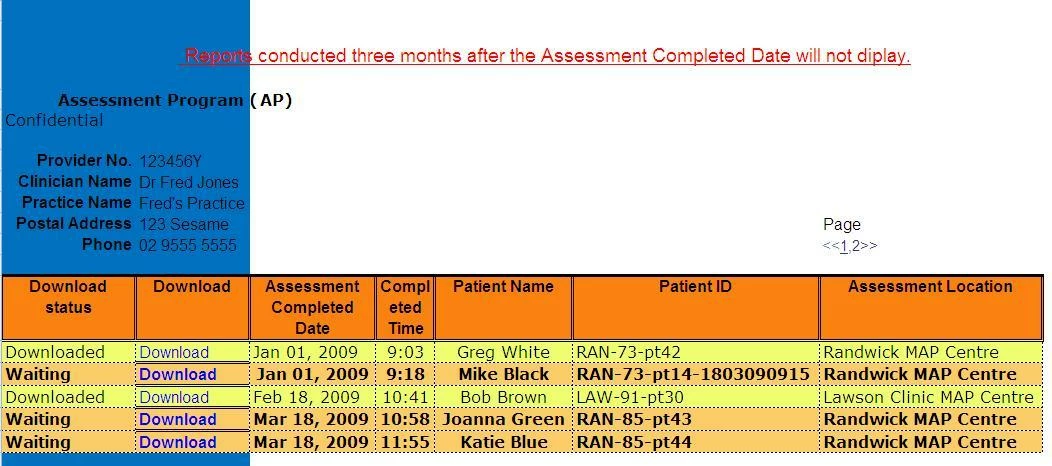
-The Web Reporting Application is pictured below. Clicking the 'Download' link will generate\display a pdf
-It will most likely need to be an encrypted webpage
That's all for now. Phone me if you like...I'd appreciate it!
Adam Sives
Business Analyst
Black Dog Institute
ph: 612 9382 9256
cel: 61 414 519 899
skype: zdzm71


 AdChoices