


Feb 5, 2021 5:22 PM UTC
Question

User limit for this account has exceeded

Hi, I have the following plan for Adobe Connect Meeting
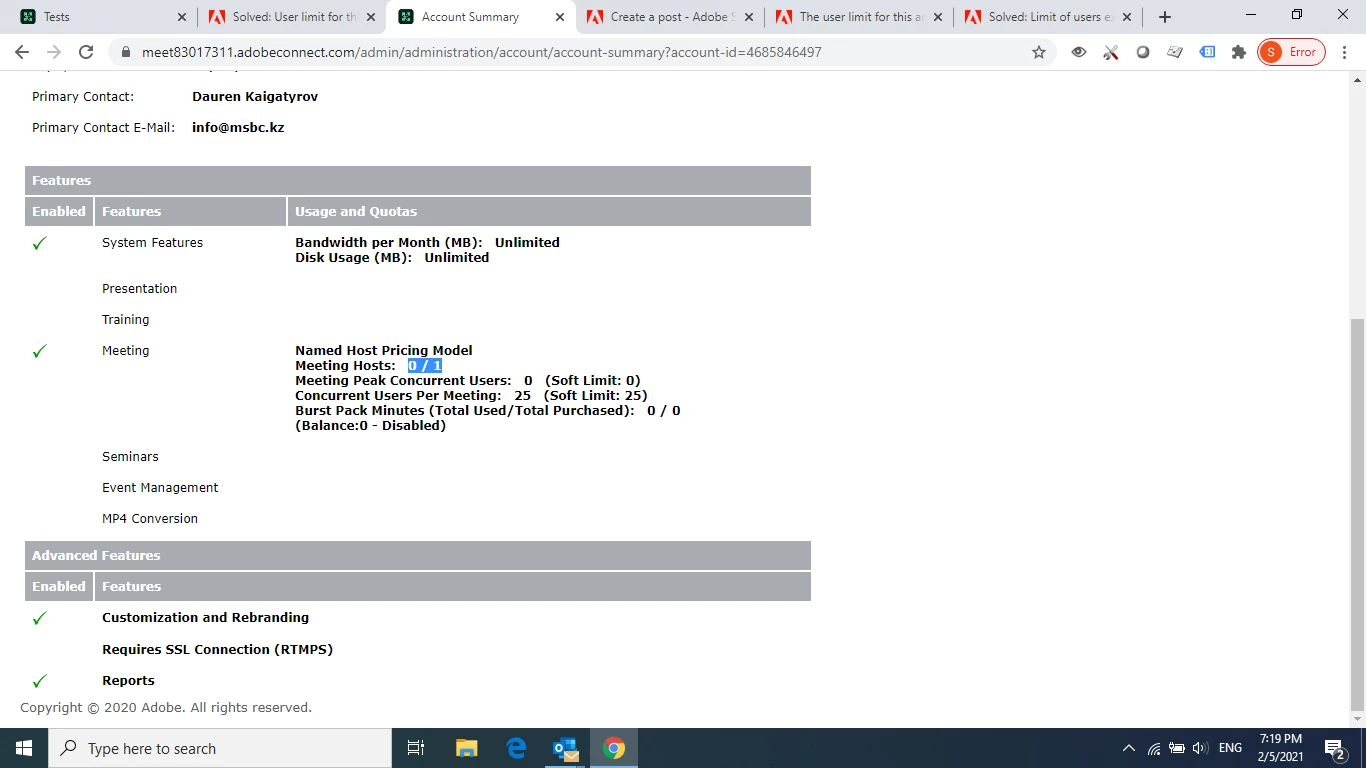
trying to arrange a meeting with 20 participants I see I can't enter the application to manage the meeting. It's the same for any user trying to enter us a guest using the link.

How can I organize the meeting ?

Thank you

    This topic is closed to new replies. Start a new post to keep the conversation going.

    11 replies

    zweigle@clarix.com
    Participating Frequently
    Feb 5, 2021 7:25 PM UTC

    Your account summary tab indicates that there are no users in the 'Meeting Host Group'

    Go to Administration>Users and Groups>Meeting Hosts and add yourself.

    Then you can create and manage meetings.

    Translate
    Walter Zweigle - Sales Account Manager | Clarix Technologies Inc. | 585-899-5300 x156 | zweigle@clarix.comAdobe Connect | Adobe Learning Manager | Adobe Acrobat Sign
    Feb 5, 2021 9:18 PM UTC

    I participate in the list - Dauren Kaigatyrov and manage meetings (I'm a host in my meetings) but participants can't visit the meeting because of the mentioned error ...


    Translate
    Feb 5, 2021 9:24 PM UTC

    If I'm wrong, pls let me know how to add my user to the Meeting Host group ...

    Translate
    Feb 5, 2021 7:14 PM UTC

    ... even the only host can't access the meeting ?

    Translate
    Feb 5, 2021 7:16 PM UTC


    Translate