Participant
April 22, 2021
Answered

Adobe Payments

  • April 22, 2021
  • 2 replies
  • 209 views

Hey everyone,


I have had a Adobe subscription for over half a year now, and I had just wanted to cancel my subscription. I am currently a university student and have realised that I personally do not have a need for any adobe software at the moment. I have been getting charged with 21.99 AUD every month and have tried to cancel my subscription, however when I try, I cannot find any button that cancels my subscription. I am not sure if its because I am a student and I am using my university email. My university allows for some free softwares which I am pretty sure allows adobe and I was just personally not knowledgeable about this at the time when applying for an Adobe subscription. If anyone could please help, it would be gladly appreciated.


Thank you.
This topic has been closed for replies.
Correct answer Nancy OShea

To avoid penalty fees, wait until your 12th month to cancel.  Set a reminder on your smart phone or Google Calendar.


1. With a browser that accepts cookies and does not have script blockers, please log-in to your account portal below to determine your current plan's expiration date.
https://account.adobe.com/plans
2. Scroll down to Contact Adobe on the same page.
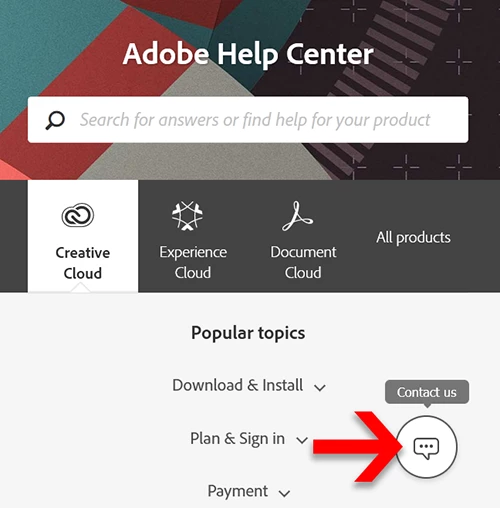
3. Online chat is available in English 24/7. See screenshot.


4. In the chat box, type AGENT followed by enter key and wait for a human.
5. Alternately, phone customer service M-F during normal business hours.
https://helpx.adobe.com/contact/phone.html


===============
How do I Cancel my Subscription?
https://helpx.adobe.com/manage-account/using/cancel-subscription.html


===============
Subscription & Cancellation Terms:
https://www.adobe.com/legal/subscription-terms.html


2 replies

Nancy OShea
Community Expert
Nancy OSheaCommunity ExpertCorrect answer
Community Expert
April 22, 2021

To avoid penalty fees, wait until your 12th month to cancel.  Set a reminder on your smart phone or Google Calendar.


1. With a browser that accepts cookies and does not have script blockers, please log-in to your account portal below to determine your current plan's expiration date.
https://account.adobe.com/plans
2. Scroll down to Contact Adobe on the same page.
3. Online chat is available in English 24/7. See screenshot.


4. In the chat box, type AGENT followed by enter key and wait for a human.
5. Alternately, phone customer service M-F during normal business hours.
https://helpx.adobe.com/contact/phone.html


===============
How do I Cancel my Subscription?
https://helpx.adobe.com/manage-account/using/cancel-subscription.html


===============
Subscription & Cancellation Terms:
https://www.adobe.com/legal/subscription-terms.html


Nancy O'Shea— Product User & Community Expert
John T Smith
Community Expert
Community Expert
April 22, 2021

To Cancel https://helpx.adobe.com/manage-account/using/cancel-creative-cloud-subscription.html
-FAQ https://community.adobe.com/t5/account-payment-plan/cancel-subscription-faq-s/td-p/11843852
-do be aware that cancelling early means paying 1/2 of the remaining time as a fee
-or cancel via Chat link https://helpx.adobe.com/contact.html?rghtup=autoOpen

Be sure to remain signed in with your Adobe ID before accessing the link
Do be aware that Adobe's staffing is impacted by the virus, so wait times are long
-make sure that your browser does NOT block ads, scripts, or pop-ups
-you must also allow 'cookies' in your web browser for the link to work


Also: beware of answering anyone who sends you a private message
-click for more information about scammers https://tinyurl.com/10791730