

ITADMINWELLLINK
Participant
June 12, 2026
Answered

Can you reset my activated devices?

  • June 12, 2026
  • 2 replies
  • 26 views

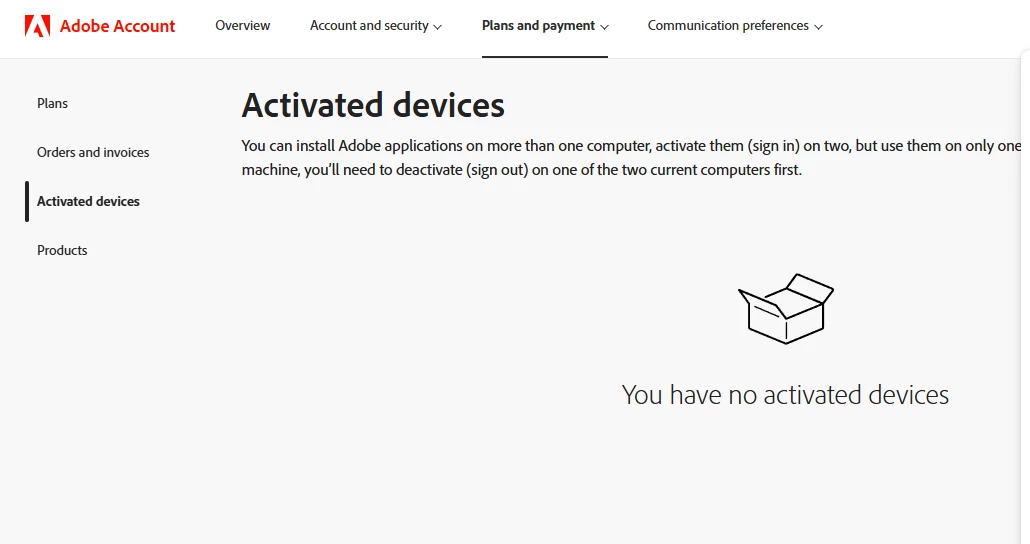
I recently installed a perpetually licensed Adobe Acrobat Pro 2020 on a new machine. I went to Products → activated devices to remove it from the old machine and I do not see any activated devices. When launching the program, I do receive a warning about not being able to use the product in 30 days. In the past there was a list here of every device. Is there a way to reset this or bring it current?


Thanks,

Theo

    Correct answer kglad

    no one, including adobe support can reset your activations.  and the download & install forum is the correct location for this thread, https://community.adobe.com/download-install-615


    the only way to regain an activation is to use a computer that has a current activation (and meets adobe’s security requirements).  see https://community.adobe.com/t5/download-install-discussions/activation-limit-reached-for-non-subscription-adobe-desktop-applications/td-p/14804413?linkId=100000376554410

    2 replies

    kglad
    Community Expert
    kgladCommunity ExpertCorrect answer
    Community Expert
    June 13, 2026

    no one, including adobe support can reset your activations.  and the download & install forum is the correct location for this thread, https://community.adobe.com/download-install-615


    the only way to regain an activation is to use a computer that has a current activation (and meets adobe’s security requirements).  see https://community.adobe.com/t5/download-install-discussions/activation-limit-reached-for-non-subscription-adobe-desktop-applications/td-p/14804413?linkId=100000376554410

    Community Expert
    June 13, 2026

    You might need to contact Adobe Support. Also, you can post this in a more suitable forum at https://community.adobe.com/p/acrobat

    -Manan