


Participating Frequently
May 4, 2025
Question

Problem renewing memberhip

  • May 4, 2025
  • 6 replies
  • 606 views

On April 15, I received an email that the membership is changing and that I can choose to pay monthly or pay annually. By default it is set to pay monthly.


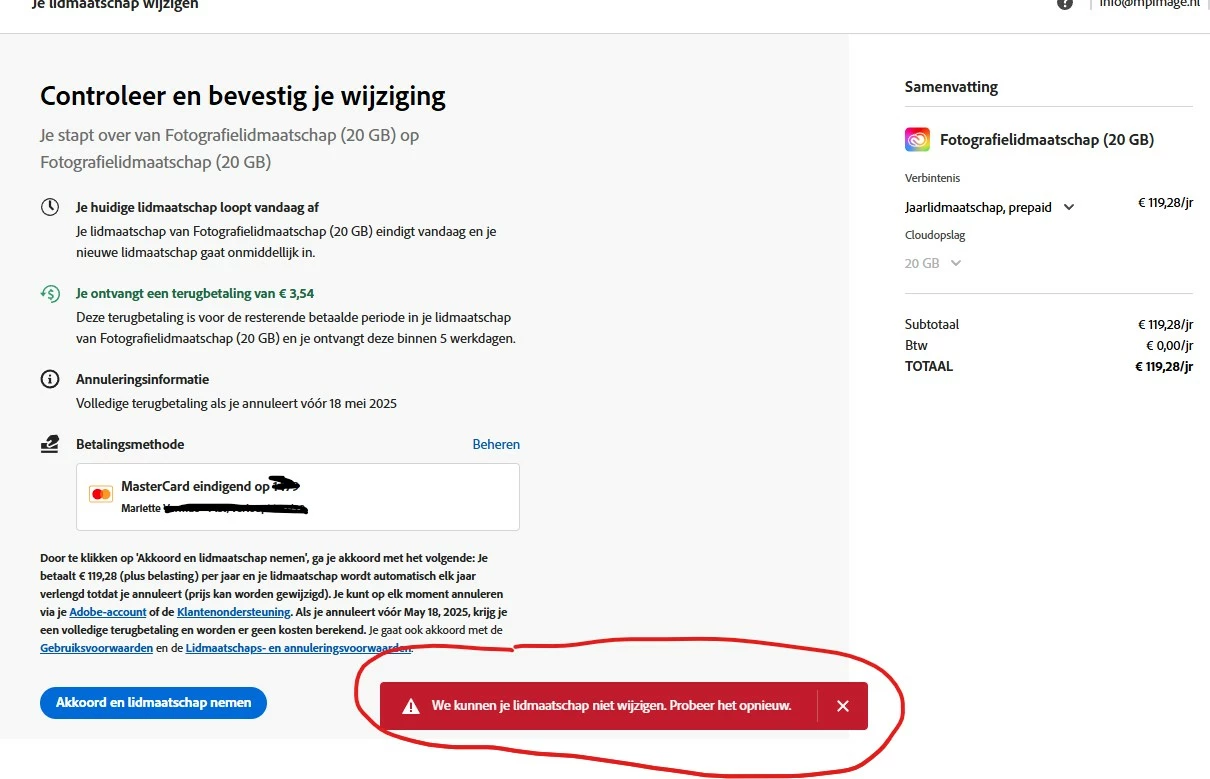
Paying annually seemed convenient, so I wanted to start indicating this in my account. However, when I click on change membership and then at the appropriate selection "Agree and take membership" I keep getting the error message that membership cannot be changed.


How can this be resolved, as the change must be transmitted by 15-05-2025. I cannot find anywhere else how to contact Adobe about this.
6 replies

Participating Frequently
May 6, 2025

Problem is just solved with an Adobe agent.

kglad
Community Expert
Community Expert
May 6, 2025

good to hear.

kglad
Community Expert
Community Expert
May 5, 2025

in the future, to find the best place to post your message, use the list here, https://community.adobe.com/

p.s. i don't think the adobe website, and forums in particular, are easy to navigate, so don't spend a lot of time searching that forum list. do your best and we'll move the post (like this one has already been moved) if it helps you get responses.


<"moved from download & install">
Participating Frequently
May 6, 2025

Thanks for the info. Indeed, I had a hard time finding what categories there were and then how to post. And since I had been looking for how to contact someone for a while, I desperately posted my message when I saw that it could be done somewhere.

Shivangi_Gupta
Community Manager
Community Manager
May 5, 2025

We appreciate you reaching out, @mari�tte_9472.

Did you try the suggestions shared by the experts above?

Also, please confirm if your payment mode has sufficient balance? 

We are here to help. 


^Shivangi

Participating Frequently
May 5, 2025

Thanks for the response. I went to work with the browsers and unfortunately none of them offer a solution. Everywhere I get the same error. Google Chrome was updated just yesterday and continues to give the problem.


Credit card is set as payment method and it has more than enough balance, also works perfectly every month so far in terms of debit for the subscription.


Only possibility I think is for an Adobe employee to take a look?

Nancy OShea
Community Expert
Community Expert
May 5, 2025

Use a modern Chrome, Firefox or MS Edge browser that allows scripts and doesn't have VPN enabled.


Nancy O'Shea— Product User & Community Expert
Participating Frequently
May 5, 2025

Thanks for the quick response! Also no VPN and all scripts are allowed.

kglad
Community Expert
Community Expert
May 4, 2025

... before doing that, make sure you're not using an opera browser and that your browser is updated.

Participating Frequently
May 5, 2025

Thanks for the quick response! I tried it in all browsers, but unfortunately the same result everywhere.

John T Smith
Community Expert
Community Expert
May 4, 2025

For account help see employee Rikk Flohr's 1st reply in this message from 2-19-25 which includes the information on how to bypass the chatbot and talk to a human
https://community.adobe.com/t5/account-payment-plan-discussions/cancelei-plano-por-engano/td-p/15163767

Participating Frequently
May 5, 2025

All the options below I have tried and still can't get it done. I am going to try these for a while to get in touch with a staff member. Super thanks!

Shivangi_Gupta
Community Manager
Community Manager
May 5, 2025

I see! I would recommend you to speak with our support team here: https://adobe.ly/43g2IZ1

They'll help you with the process.

^Shivangi