Participating Frequently
October 14, 2025
Answered

Requesting a refund after cancellation of subscription

  • October 14, 2025
  • 2 replies
  • 838 views

I subscribed to a substance painter 3D plan and later canceled it after the free trial ended because I am not using it currently. 
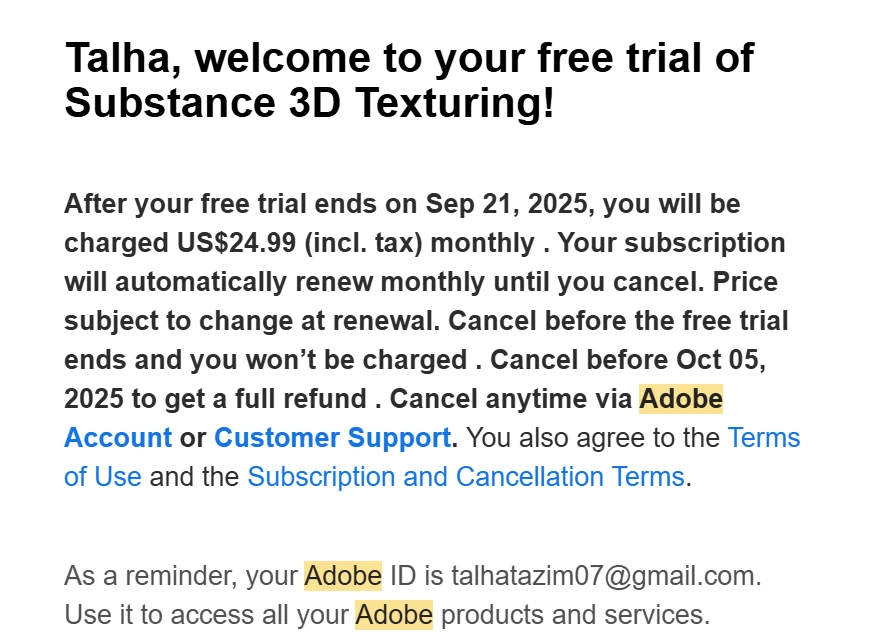
According to the cancellation policy and the email I received at the time of trial activation, I was told if I cancel my plan after the free trial ends before 5th Oct 2025, I'll get a full refund. I canceled before 5th Oct and still haven't received any refund after 10 days. 


Correct answer ShivangiGupta

📝 Thread Summary

The user explains that they subscribed to an Adobe Substance Painter 3D plan, canceled it shortly after the free trial ended, and expected a full refund based on the cancellation policy and the confirmation email they received. Despite canceling before the stated deadline, they report that no refund was issued even after waiting more than 10 days.


Community responses 

  • Community Expert (kglad) asked the user to verify the exact cancellation date shown in the confirmation email and to check their account details for payment issues or multiple subscriptions. ​
  • The user clarified that their payment was charged on October 5 and the cancellation happened on October 6, after earlier payment attempts had failed. ​1
  • Jeffrey_A_Wright (Community Manager) acknowledged the frustration and advised the user to attempt account access and support contact from a different device if the usual access path was blocked. ​​

📚Best Resolutions for similar issues

  1. Verify your cancellation timing and refund eligibility
    Check the exact purchase and cancellation dates in your Adobe account to confirm whether the cancellation falls within the applicable refund window for your plan.

    Reference: ​Cancel your Adobe subscription
  2. Check for payment or billing issues before cancellation
    If there were declined payments or outdated billing details, resolve those first, as payment issues can delay or block proper cancellation and refunds.

    Reference: ​How to fix a failed or missed payment for your Adobe subscription
  3. Review your account for unexpected or duplicate charges
    Make sure there are no additional subscriptions or unknown charges associated with your Adobe ID that could affect refund processing.

    Reference: ​Unknown charge on your bill
  4. Update and confirm billing information
    Ensure your payment method and billing address are current so that any eligible refund can be processed successfully back to the original payment method.

    Reference: ​Update credit card information and billing address

📌 For any additional questions, please start a new discussion in the Account Payment and Plan Community so the community can help you better.

2 replies

ShivangiGupta
Community Manager
ShivangiGuptaCommunity ManagerCorrect answer
Community Manager
May 7, 2026

📝 Thread Summary

The user explains that they subscribed to an Adobe Substance Painter 3D plan, canceled it shortly after the free trial ended, and expected a full refund based on the cancellation policy and the confirmation email they received. Despite canceling before the stated deadline, they report that no refund was issued even after waiting more than 10 days.


Community responses 

  • Community Expert (kglad) asked the user to verify the exact cancellation date shown in the confirmation email and to check their account details for payment issues or multiple subscriptions. ​
  • The user clarified that their payment was charged on October 5 and the cancellation happened on October 6, after earlier payment attempts had failed. ​1
  • Jeffrey_A_Wright (Community Manager) acknowledged the frustration and advised the user to attempt account access and support contact from a different device if the usual access path was blocked. ​​

📚Best Resolutions for similar issues

  1. Verify your cancellation timing and refund eligibility
    Check the exact purchase and cancellation dates in your Adobe account to confirm whether the cancellation falls within the applicable refund window for your plan.

    Reference: ​Cancel your Adobe subscription
  2. Check for payment or billing issues before cancellation
    If there were declined payments or outdated billing details, resolve those first, as payment issues can delay or block proper cancellation and refunds.

    Reference: ​How to fix a failed or missed payment for your Adobe subscription
  3. Review your account for unexpected or duplicate charges
    Make sure there are no additional subscriptions or unknown charges associated with your Adobe ID that could affect refund processing.

    Reference: ​Unknown charge on your bill
  4. Update and confirm billing information
    Ensure your payment method and billing address are current so that any eligible refund can be processed successfully back to the original payment method.

    Reference: ​Update credit card information and billing address

📌 For any additional questions, please start a new discussion in the Account Payment and Plan Community so the community can help you better.
^Shivangi
kglad
Community Expert
Community Expert
October 14, 2025

what's the date on your cancellation confirmation email?


andcheck your account, https://account.adobe.com

what's it show?

eg, any payment problems,?
more than one subscription?

Participating Frequently
October 14, 2025

Sorry, I rechecked my transactions.

I was charged for the subscription on October 5, and then I cancelled the plan on Oct 6. Since I could not cancel the subscription before Oct 5, because it kept asking me to update my payment details, after the transaction had been declined several times. 
I did not have any payment problems except that and i did not have multiple subscriptions. 

kglad
Community Expert
Community Expert
October 14, 2025

you had/have to fix payment problems before you can cancel.


anyway, did you cancel within the cancellation period?