


Inspiring
September 19, 2023
Question

Please Disable "This Adobe site doesn't match your location" on helpx pages

  • September 19, 2023
  • 19 replies
  • 7437 views

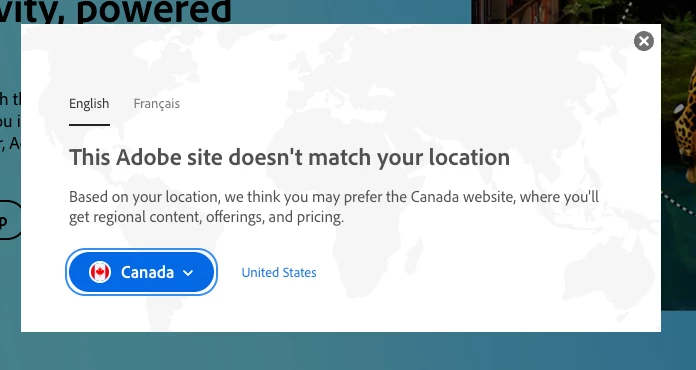
When I need to access an Adobe learning resource on their helpx site I must contend with a pop-up just about every time. For a random example I chose this page: https://helpx.adobe.com/photoshop/using/adjusting-image-sharpness-blur.html. The pop up tells me I'd prefer to use Canada as my location (I am in Canada), but why would I? I already own a licence, so I don't care about pricing. I very much doubt that there is "regional content" that I would care about since Photoshop is the same app, with the same tools, whether I'm in British Colombia, California or Mali. I'm looking for support with a specific tool that I've already purchased—I'm not in need of a sales pitch.


I'm regularly refering to these helpx sites for questions about several Adobe products (I just picked the Photoshop forum, because there doesn't appear to be a general one). I typically use Google to find the resource (it's just an old habit, but it shouldn't matter how I find the content…) I then have to click the little x before I can view the resource I've requested. This happens multiple times a day sometimes. Can Adobe please stop showing this message on support pages that are meant to help users learn use tools in apps that they've presumably already paid for?
 

19 replies

Participant
April 20, 2025

I am in Australia and the popup has been anoying me endlessley for years too. The ONLY soultion that worked for me was to set my region to United States as you suggested. Thanks!

Participant
November 27, 2024

This Adobe site doesn't match your location

I tried all the options suggested, it did not work. It appears that this fault occurs when Microsoft update.

My other laptop oks OK

It keep saying the adobe does not match the country, I double check my location as UK, downloaded Adobe several times and check that it is UK....so could adobe/microsoft sort this out. It is frustrating especially email attachment is in PDF and I have to download and open using google.

Participating Frequently
October 15, 2024

I'm getting this issue as of October '24 from the UK. It appears to affect links to https://helpx.adobe.com/


Found a workaround that works for me (might not be useful if you want help in a language other than English)
Go to  https://www.adobe.com/international/selector/ 

but instead of selecting your own region, select United States. 

click "remember this choice"

I did a ctrl+F5 on the original page and the helpx page to encourage it to get the message.


Hope that helps somebody. It's a really irritating prompt that it seems Adobe can't be bothered to sort out.


Participating Frequently
July 1, 2025

This is STILL an issue as of July 2025. Adobe clearly don't care about international customers

Tarun Saini
Community Manager
Community Manager
July 2, 2025

Hi @robin_3456,


Thanks for reporting this! To help us look into it, could you please provide the following details?

  1. Which country are you currently located in?
  2. Where was your Adobe subscription purchased (which country)?
  3. Are you seeing this popup on a specific Adobe page or across multiple pages?
  4. What exactly does the popup say or ask you to do?
  5. Have you tried selecting your country from the popup instead of closing it? If yes, did that help stop it from reappearing?


We're here to help, just need some info.


Regards,

Tarun

Kalvyn Rasquinha
Community Manager
Community Manager
July 29, 2024

Thanks for clarifying, @Are__Kay. I think I better understand the issues you're flagging.


With regard to the search example you provided: I'm not an SEO expert so I'll need to check with that team but I would hope that geo-specific pages would show up in search so if you are in Canada, New Zealand, Uruguay or Egypt, you'll get the page for your region. It's possible we need to make some config changes there.


Getting to why this is needed to being with, if you're not signed in when you land on adobe.com, we'll have to assume you're not a paid user given what we currently observe. The other consideration is showing the correct price - it would be a poor experience for someone purchasing (whether currently a paid member or not) to see pricing in a particular currency and have it switch to a different currency when they get to checkout. I'll follow up with the Help team to check whether the current geo handling can be relaxed on support pages.

jane-e
Community Expert
Community Expert
May 14, 2025
quote

It's possible we need to make some config changes there.

By @Kalvyn Rasquinha


While you consider config changes, please consider that some of us (me) are happy with the way things are now, so giving us a choice might be a good idea.


I am in the U.S. and receive this alert when I click a link that includes the country code, such as fr, nz, uk, etc.

https://helpx.adobe.com/fr/photoshop/system-requirements.html

https://helpx.adobe.com/nz/photoshop/system-requirements.html

https://helpx.adobe.com/uk/photoshop/system-requirements.html


I am happy for the alert, as the info is not always the same in the different countries.


Jane


NormanStormin
Known Participant
May 14, 2025

Thats fair. A reliable "Remember the region I want" tick box would probably work.


MInd you, I would question why core documenation information about the software is in any way different on different regions. Pricing, sure. But pretty much anything else? Should be identical.

Are__KayAuthor
Inspiring
July 29, 2024

Thanks for your reply @Kalvyn Rasquinha, but I don't think you understand the problem. Kevin's solution is at best a bad work around that sometimes works, under certain conditions. It is in no way an answer to the poor and ponderous decisions Adobe has made with regards to this issue.


Your solution might work if one is always searching for help from within Adobe.com. But that's not how a lot of consumers are finding help. We use the internet (Google, etc.) for search results. These engines naturally rank pages by relevance and don't present answers based on your region, unless you specifically enable this. Thus, when someone in Canada, New Zealand, Uruguay or Egypt asks for "Photoshop stamp tool" (in English), for example, they are directed to Adobe.com. Adobe.com is a US site, so the pop-up appears.


Yes, I could maybe fudge my regional settings and say I am in the US, and I have done so. But if I'm signed out or using another browser, etc. I get the same crappy popup user experience. Can you justify why this regional check/popup warning is necessary at all, and why I have to apply a band-aid to sort of fix it? Wouldn't be better to assume that your customer base has paid for your product and is now seeking advice. They don't want or need regional content, offerings and pricing, they just want the help content. 

NormanStormin
Known Participant
July 27, 2024

I am on:
Windows 10 22H2

Chrome 127.0.6533.72 (64bit)

Kalvyn Rasquinha
Community Manager
Community Manager
July 27, 2024

@NormanStormin I'll check with the team. Can you share your OS + version, browser + version?

Participant
May 14, 2025

Do you have a solution for this global problem? It's been going on for years now....

kglad
Community Expert
Community Expert
May 14, 2025

The country associated with your adobe id must match the store you purchase from and must match the payment address. otherwise, change what's necessary:


change your country on adobe.com, https://www.adobe.com/international/selector/


change country associated with adobe id - https://helpx.adobe.com/x-productkb/policy-pricing/change-country-associated-with-adobe-id.html


change credit card and/or billing address, https://helpx.adobe.com/manage-account/using/update-billing-information.html


change currency - https://forums.adobe.com/thread/1999694


change store - http://www.adobe.com/store_selector/storeselector.html


change adobe.com website language - https://forums.adobe.com/thread/1999693


change age - https://helpx.adobe.com/nz/creative-cloud/kb/you-eligible-cc.html

NormanStormin
Known Participant
July 27, 2024

@Kalvyn Rasquinha  Thank you but this does not work. It never has. I have my language set to English (New Zealand). Although that is not the same as region.


The pop up still appears EVERY SINGLE TIME.


And no, I'm not in incognito, nor have I turned cookies off.


It is PAINFUL every time I try to go to the Adobe help pages. 


And it creates a small amount of anger towards Adobe every time. That is not good for us as customers, nor is it good for Adobe where customers are feeling rising anger towards Adobe.


Kalvyn Rasquinha
Community Manager
Community Manager
July 27, 2024

Hi everyone. What Kevin shared previously is how you would get your preference to persist. Note that your browser should support cookies and you shouldn't be in an incognito/private browser window.


If you're signed out on adobe.com, you can use the "Change region" selector at the bottom to choose your region using this selector:

If you're signed in and on adobe.com, you can click on your avatar at the top right corner, click on "Preferences" and then use the selector there:

Participant
July 2, 2024

Is there a uBlock Origin filter that remove this annoying popup?