

Filip Z.
Participating Frequently
October 25, 2019
Answered

Bug: CC Libraries keep reinitializing

  • October 25, 2019
  • 4 replies
  • 2498 views

Hello, I have a problem with CC Libraries occuring in multiple applications (Photoshop, Illustrator, Premiere...).

Everything worked fine for months, but 2 days ago the Library window started to act up (I didn't fiddle with settings nor files, I don't know the reason why it broke just now).

CC Library keeps reinitializing, then shows the library content for 2 seconds, then refreshes, displays a generic error message (Something went wrong initializing Creative Cloud Libraries), then changes to message about the need to sign up to use libraries and automatically proceeds to showing the content again - and then the cycle continues.

Because of that the CC Libraries are completely unusable. (Creative Cloud application also shows that there is a problem with syncing libraries, but nothing specific)
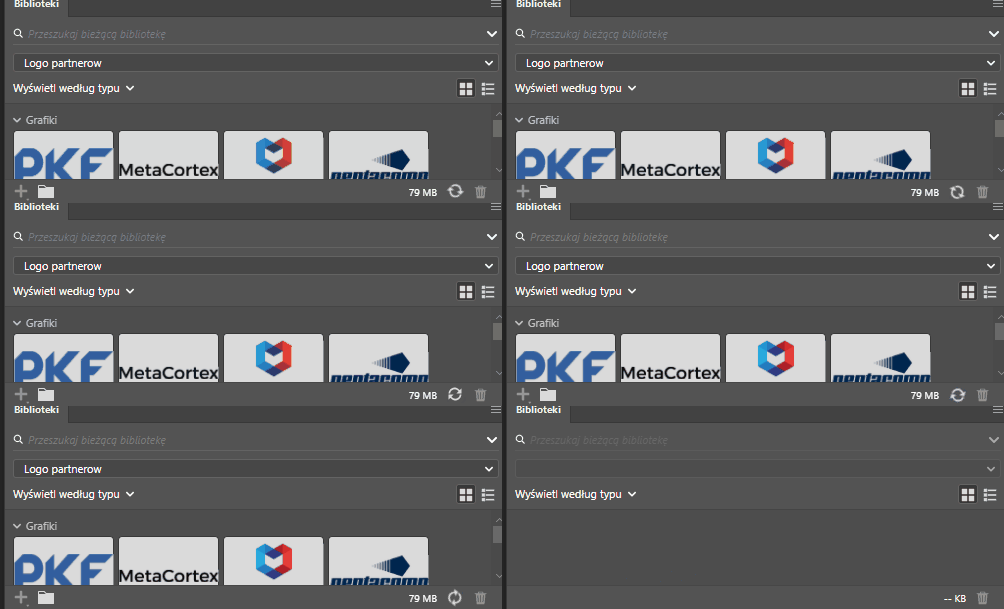


Even when I stop synchronisation in CC App, the library keeps trying to sync and reinitialize (seems like a bug on its own), completely ignoring my attempt to stay offline.

I also use the same account on another computer (both Windows) and there's no problem at all on the other device.


So far I've tried what had been suggested in these topics: 

https://helpx.adobe.com/creative-cloud/kb/creative-cloud-libraries-panel-doesn-t-load-in-desktop-products.html

https://helpx.adobe.com/creative-cloud/kb/libraries-panel-not-working.html

https://community.adobe.com/t5/Get-Started/Creative-Cloud-libraries-not-working-in-any-program/td-p/8963047

https://community.adobe.com/t5/Get-Started/Something-went-wrong-initializing-creative-cloud-libraries-CC/td-p/9974540

https://community.adobe.com/t5/Illustrator/CC-Library-panel-content-flashing-on-and-off/td-p/8905489

To sum up: I tried relaunching all CC apps (while pausing and restarting file syncing), I cleaned cache by deleting whole CCLibrary directory, I killed all Adobe related processes and tried to manually restart CCLibrary app, I reinstalled Creative Cloud app, I used a CC Cleaner to remove CC Library and then manually reinstalled it. Nothing helped me.


I'm afraid I've run out of ideas. Do you have any advice?


This topic has been closed for replies.
Correct answer adchawla81

Hi Everyone,

Sorry for the inconvenience. We have pushed an update, which will fix the issue. In case your system has not got the update and the problem persists, just sign-out and sign-in back in Adobe Creative Cloud Desktop App. This will force the update.

Thanks

4 replies

Participant
November 22, 2019

Still can't sync libraries after following all steps and having 3 different adobe employees remote in. This.is.stupid.

adchawla81Correct answer
Adobe Employee
October 28, 2019

Hi Everyone,

Sorry for the inconvenience. We have pushed an update, which will fix the issue. In case your system has not got the update and the problem persists, just sign-out and sign-in back in Adobe Creative Cloud Desktop App. This will force the update.

Thanks

Filip Z.
Filip Z.Author
Participating Frequently
October 29, 2019

Hello, Amandeep

Indeed, CC Libraries seem to work fine now. Thank you for the fix! Have a good day.

Participant
October 27, 2019

Same problem since yesterday when I have updated CC

robynt
Participant
October 27, 2019

Me too -- it started with the CC update. I noticed yesterday that now CC is telling me that my firewall is blocking the library updates, which isn't accurate. I checked the "allowed" programs in my firewall, and all Adobe/CC/library programs are included. I thought I might try blocking and then unblocking the programs and see if that resets anything, but I haven't yet. Maybe I'll try later today.


It's completely irritating though. Aside from not being able to access the libraries, which is issue enough -- CC checking for the library sync literally every 3 seconds is slowing down my computer in general. Adobe and non-Adobe programs alike. It makes my mouse pointer turn from the arrow to the circle every 3 seconds, so I'm constantly clicking on the wrong thing. The only "fix" is signing out of CC, but then, of course, that shuts down all Adobe apps for me.


Hoping those Adobe engineers fix this soon. Gonna be a long, irritating week otherwise...

robynt
Participant
October 27, 2019

Update - did try disabling firewall entirely to see if library would sync. Nope.

robynt
Participant
October 26, 2019

This is exactly the problem I have too...