
shikamu
Known Participant
March 16, 2026
Question

Can't update Creative Cloud app

  • March 16, 2026
  • 4 replies
  • 108 views

I did not see a Creative Cloud app forum so I will post this here.

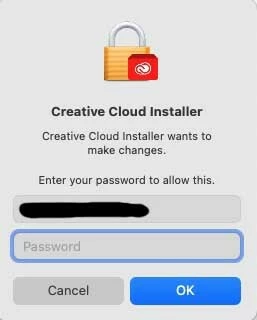
For the last few weeks when I start the Creative Cloud app it has a message at the bottom that says there is a new version available and it has an Update button.  I have seen these in the past over the years and I would click it to update.  It then has a popup asking for my Creative Cloud app password and then it updates.

For the last few weeks though I cannot update because it will not accept my Creative Cloud app password.  I know the password is correct and today I used it to log into my account on the Adobe website.  Any ideas?


    4 replies

    shikamu
    shikamuAuthor
    Known Participant
    March 19, 2026

    Update: A little while ago I started up Creative Cloud app and this time rather than having a message at the bottom that said there was an update available it instead had a message that it was updating Creative Cloud app.  After a few seconds showing how much it had downloaded the above popup appeared again and this time it accepted my Mac password with no problem.

    For the last 6 weeks or so though it showed the update available message and would not accept my password.  I had never had that problem with the Creative Cloud app over the last decade or more of using it.  In the past when it said there was an update I would click on it and it would accept my password and update.

    While on the surface one might think this is a Mac issue I have strong doubts.  Even over the last 6 weeks I have had updates to other software that required me to enter the password and there was no problem -- just as there was no problem with Creative Cloud app also previously.  A little while ago when I started it and it said it was already doing the update before it then asked for the password means that a different path in the code was executed and so this time things worked.

    kglad
    Community Expert
    Community Expert
    March 19, 2026

    glad to hear it.

    Jeffrey_A_Wright
    Community Manager
    Community Manager
    March 17, 2026

    @shikamu thanks for posting. The screenshot you included shows the Creative Cloud Desktop app requesting administrator access to complete the update process. This same dialog will occur when you apply updates to other applications on the computer.


    Please see https://support.apple.com/guide/mac-help/asked-administrator-password-mhosxlogo1438/mac for information from Apple on how to enter the password. If you are unsure of your administrator password, then see https://support.apple.com/en-us/102633 for details on how to request a password reset.

    shikamu
    shikamuAuthor
    Known Participant
    March 17, 2026

    Okay, I just now entered my Mac admin password (which I use in other contexts fairly often) and that also does not work.


    It is weird because usually when I need to enter my admin password I can just use the touch id button on my Macbook Pro.  But it does not give me that option in this case.

    Peru Bob
    Community Expert
    Community Expert
    March 17, 2026
    shikamu
    shikamuAuthor
    Known Participant
    March 17, 2026

    Should I have posted this in a different forum?  Which one?

    jane-e
    Community Expert
    Community Expert
    March 17, 2026

    @shikamu Should I have posted this in a different forum?  Which one?


    Yes, please post to Creative Cloud Services:

    https://community.adobe.com/creative-cloud-services-604


    EDIT: ​
    @shikamu , your post has been moved to Creative Cloud Services. You don’t need to repost.


    Jane