


Participant
Oct 23, 2019 1:18 PM UTC
Question

CC keeps trying to sync libraries every 5 seconds

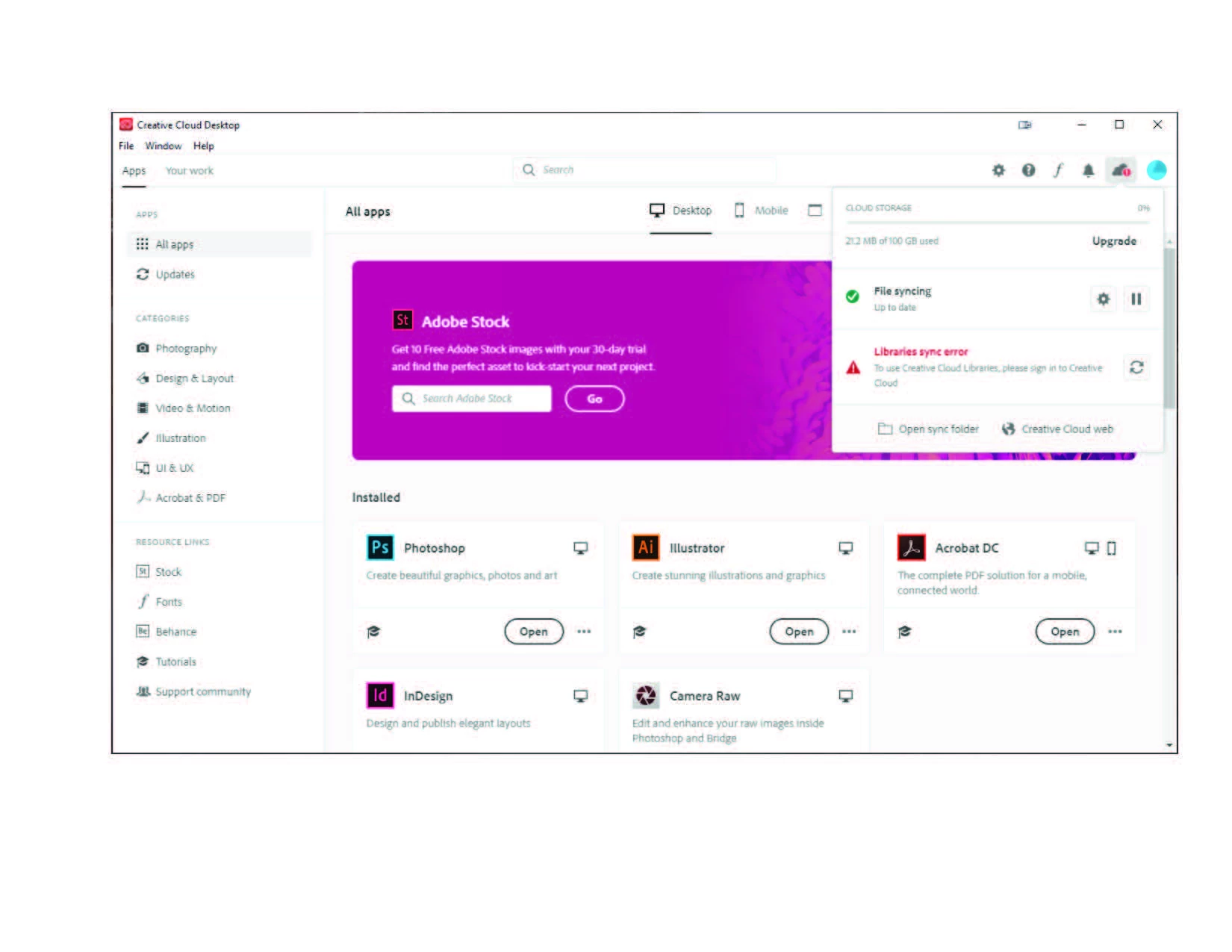
Pretty simple.  CC tries to sync my libraires every 5 seconds.  Flashes a message "Libraries sync error.  To use Creative Cloud Libraries, please sign in to Creative Cloud".  Well, I am signed in.  As soon as the message goes away, File syncing displays "up to date".  I have uninstalled CC desktop app with Abobe's tool, and reinsatlled it and I get the same thing.  I don't get it!  Pretty frustrating.  When working in ID, everytime it checks, you lose the cursor and have to start over.  The only way I get anything done is open ID and then sign out of CC.  Attached is the actual message.
This topic is closed to new replies. Start a new post to keep the conversation going.

17 replies

Just Shoot Me
Legend
Oct 27, 2019 2:27 PM UTC

Shut th CC DTA down. Set it to not start with the system. You do not need it running to use the Adobe apps you have installed.

Translate
Participant
Oct 27, 2019 2:03 PM UTC

It's happening to me too 😞 Uninstalled CC, deleted core sync etc nothing works.

Translate
Participant
Oct 26, 2019 7:40 AM UTC

Same problem here. Adobe please do something.

Translate
DustDevil505
Participant
Oct 26, 2019 4:05 PM UTC

Same here.   Noticed it this morning.   My mouse icon kept going from a pointed icon to a wait / mouse pointed icon every 3~5 seconds.   I checked my task manager and kept seeing a node.exe java script running at the same interrupt.   Logged out of the CC desktop app and it has stopped.  Hopefully it gets fixed sooner rather than later.

Translate
Inspiring
Oct 25, 2019 7:38 PM UTC

Yes, experiencing the same problem and already tried (don't bother with these, unless you want to try/waste time):

Unistalling and installing the Adobe CC Desktop app 3 times (Using the Adobe Cleaner Utility too)
Uninstalling and installing Photoshop
Deleting the CoreSync files suggested by this post: https://community.adobe.com/t5/Get-Started/Stuck-in-infinite-quot-Syncing-quot-loop/td-p/9901087
Deleting the Creative Cloud Libraries folder from AppData/Roaming/Adobe

Nothing works, and as stefan113 said, this happened exactly after the automatic update of the Creative Cloud App. And yes, it takes a lot of resources from my computer as well, making it very difficult to work with the constant processing. The only solution I found for the moment is to log out the app and work without the libraries until this is resolved. I'm pretty sure is a bug, since pretty much all issues like this happen after a mayor Windows 10 update or an Adobe update. Please, fix this bug asap, we all need our libraries!!!

Translate
Filip Z.
Participating Frequently
Oct 25, 2019 2:16 PM UTC

Same problem here, unfortunately, and it happened without any specific action on my side - probably with some CC update 😞

So far nothing worked for me. For the cursor - you can uninstall just CC Library (for example using Adobe's CC Cleaner tool) so it will be still unusable but at least it will stay offline and won't flicker nor make your cursor disappear.

But if need to use the libraries, like me, then I'm afraid I see no solution 😞

Translate
Adobe Employee
Oct 28, 2019 8:47 PM UTC

Hi Everyone,

Sorry for the inconvenience. We have pushed an update, which will fix the issue. In case your system has not got the update and the problem persists, just sign-out and sign-in back in Adobe Creative Cloud Desktop App. This will force the update.

Thanks

Translate
Inspiring
Oct 28, 2019 8:51 PM UTC

Thanks so much for the update! It started automatically today and the issue was resolved immediately. Hope it works for everyone else! Again, thanks for the quick answer and fix. Love to have my libraries back ❤️

Translate
Participant
Oct 25, 2019 7:39 AM UTC

Same problem here.

Translate
stefan113
Participant
Oct 24, 2019 4:16 PM UTC

I have the same problem. It appeared when Creative Cloud was automatically updated to version 5.0.0.354 earlier today. I get the feeling that it also takes a lot of resources from the computer. Guess it's a bug and waiting for a fix.

Translate
cultschAuthor
Participant
Oct 24, 2019 12:20 PM UTC

Thank you both.  I also have tried everything.  My next step is going to be uninstall everything and reinstall it and see what happens.  What a pain!

Translate
Lucas from H
Known Participant
Oct 24, 2019 2:04 PM UTC

It's a pain!! It paralyzed our work today since my entire team is using the Libraries. We've tried Adobe tips for this but it doesn't help. We were logging in/ logging out, reinstall and many more. No result, the problem still occurs so I suppose it's on Adobe's side. Does anyone know? Please help.

Translate
valb01
Participant
Oct 23, 2019 3:06 PM UTC

I have exactly the same Problem. I tried all suggested solutions without success: https://helpx.adobe.com/de/creative-cloud/kb/creative-cloud-libraries-panel-doesn-t-load-in-desktop-products.html


Translate
Participant
Oct 24, 2019 7:48 AM UTC

Having the exact same issue. I made a recent change to install my Adobe programs (Photoshop, Illustrator, etc) on my d: drive to save space. It seemed like my issues began shortly thereafter - so I assumed maybe my adjustment was the problem. After doing everything I could based on suggestions I read, I uninstalled absolutely everything Adobe - and reinstalled. Didn't change anything. The sync error continues and now keeps my software (I primarily use photoshop) in a persistent state of loading. The cursor is constantly switching to the loading icon every 5-ish seconds when the "Library sync error" appears. Driving me nuts, slowing down productivity dramatically and nothing I've tried has worked based on forums and suggestions. 

Translate