
Participating Frequently
May 19, 2024
Question

Creative Cloud crashes my premiere pro upon installation. Followed by an Error

  • May 19, 2024
  • 3 replies
  • 903 views

Hey! I'm trying to download Premiere Pro and CC on my computer but every time my CC finishes downloading my premiere pro it always crashes and gives me an error message. So I send report and it tells me that my Premiere Pro isn't updated despite it being Up To Date. So I decided to use the Creative Cloud Cleaner Tool. I made sure to back up some files and log it before completely cleaning it entirely. Unfortunately, this solution has failed me many times since I kept trying to use the CC Cleaner tool and the error still pops up. So I'm trying to figure out what the issue here is.
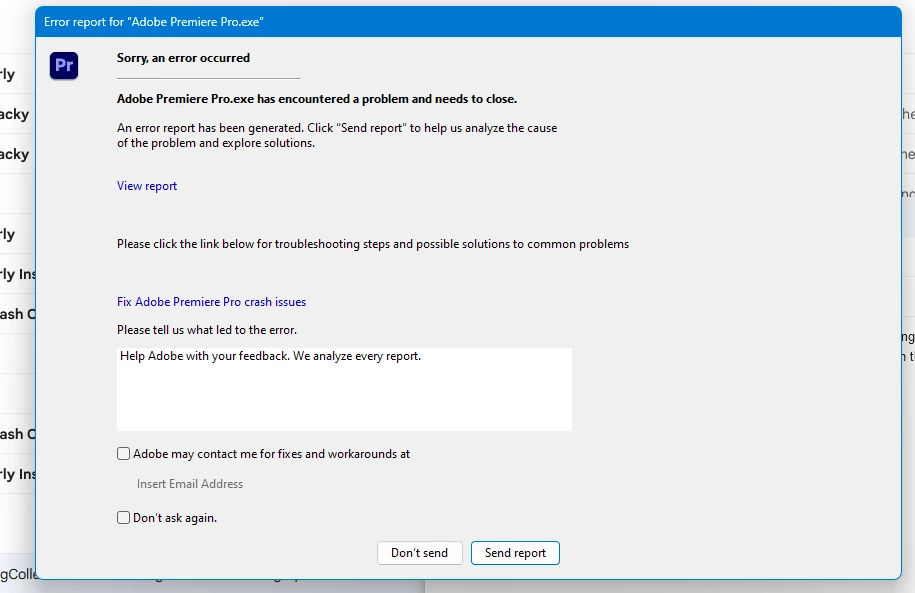
This topic has been closed for replies.

3 replies

Participating Frequently
May 19, 2024

Thanks! kglad! I got it working when I downloaded Premiere Pro from Creative Cloud!

kglad
Community Expert
Community Expert
May 19, 2024

you're welcome.

Participant
August 5, 2024

Hey kglad! It's me! The same person but on an alt account for personal workings. I am struggling with the same issue except this time and its much different! Like I tried your method of removing the preference file and then reinstalling CC through the alternative link you gave and then download premiere pro. But then that solution doesn't work because this appears again somehow. I'm getting real annoyed. Sometimes the error appears, sometimes the loading page of Premiere Pro stops and closes itself.


Sidenote: Whenever my Premiere Pro is finished installing, it opens and closes itself.

jane-e
Community Expert
Community Expert
May 19, 2024

@JoshZhang1 


Did you fill out and send the crash report, including your Adobe ID email? The Premiere Pro team means it when they say they analyze every report.


Here is the direct link for the Premiere Pro forum, where Staff is active:

https://community.adobe.com/t5/premiere-pro/ct-p/ct-premiere-pro


Jane


Participating Frequently
May 19, 2024

thanks!

kglad
Community Expert
Community Expert
May 19, 2024

make sure your computer meets premiere pro specs - https://helpx.adobe.com/creative-cloud/system-requirements.html


then, if it does, remove premiere pro's preferences file(s).


and install the cc desktop app by using the alternative download links at page bottom here, https://helpx.adobe.com/in/download-install/kb/creative-cloud-desktop-app-download.html