

johnw11453588
Participant
March 15, 2017
Answered

Download Assets from Library

  • March 15, 2017
  • 19 replies
  • 39547 views

Is it possible to download a file rather than just view it from the online portal of assets.adobe.com.

I want to be able to share my assets but these are the only options:
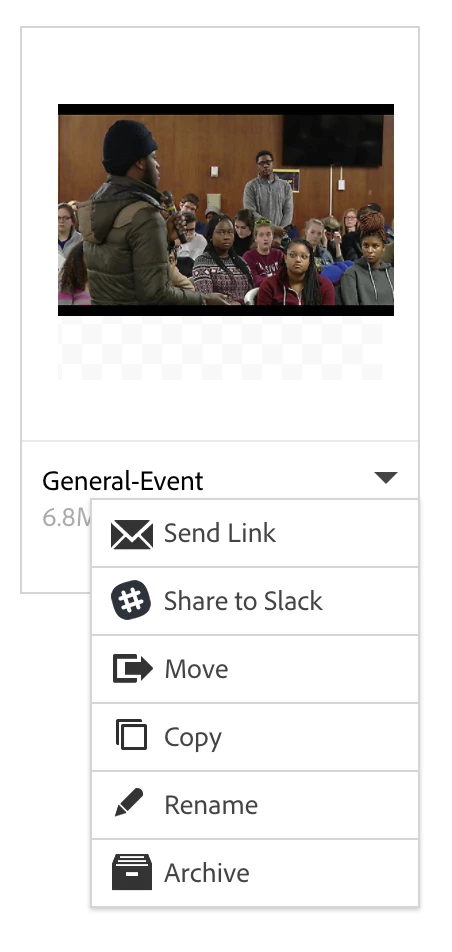
Correct answer David__B

For context, this is an asset in a library not in the "files" part of my creative cloud. I have the download option available when I am in the files. This is why I am so confused because it doesn't show up in libraries. This is in a library that I created and added this image to.


I was looking at this Share Adobe Creative Cloud files, libraries, and more and doing some testing myself. It doesn't look like there is an easy way to download an asset once it was been added to a library. I think you'd have to go through the Library panel in one of the products. If I double-clicked on a graphic asset in Photoshop in the Library panel it opened it as a document which could then be saved. That seemed like the closest option I could find.

I'd recommend not using Libraries if the download option is a requirement and go through files instead.

Adobe Creative Cloud

I agree it would be a useful to have the option and will pass on feedback to our developers.

19 replies

Participant
September 27, 2021

I occasionally found the way to download, when you hover over the asset there is a check box appearing in the top left corner.


As soon as you checked one of the files additional options show up in the top rigth side


It still remained glitchy for me because check boxes not always can be clicked but better than download filrs one by one


Participant
December 29, 2020

Well, it's December 2020 and this is still not resolved. There is NO download option in the Libraries (folders or individual items). I have a quick workaround that might help some of you although I know when you have hundreds of assets, it might not be ideal. I just opened a new document, selected all of the items in my library and dragged them into my document. Once the cursor is loaded, you can do a grid place (hold down Cmd-Shift) to place 9 items at a time. I think there's a way to change the number of rows/columns in the grid but I can't remember and 9 at a time isn't bad. You can do them very small, tiny... just so they're in there somewhere. Then I just selected them all in the Links panel and chose Copy Link(s) To... to save them all at once into an actual folder on my computer! I 100% agree that there is absolutely no reason why Adobe shouldn't have the option to download an entire library folder at once but this sure beats doing them one at a time.

Participant
November 9, 2020

mac users: (sorry window poeple but yeah...)

• Head to Top Menu (finder selected)

• Click on GO

• Hold Option, Then Click Library

• This Thread is long but (TWSSaid;)

Application Support

Adobe

Creative Cloud Libraries

LIBS

XXXXXXXXXXXX#E#E_AdobeID

creative_cloud

DCX - 

C-####bc-D#######-BLAH BALH YOU GET RIGHT

in each folder there is a folder name COMPNENTS

REMIND YOU THE NAME CONVENTION WILL NOT BE THERE ex S#itFuKS#itFukyNumbErs

drag that to your preffer location. and good luck naming them. 

Participant
November 9, 2020

sh!!t!!! dont drag it just fu$$ken copy to a safe place- what ever -do what you want is your shi˚tty life !! ugh


Participating Frequently
October 1, 2020

David, your answer is marked as 'correct' yet it does not actually address ANY of the issues we are asking about, especially since adode just updated the library to make it almost impossible to do anything with your purchased downloads outside of their 'cloud' environment. The issue remains that 'our stuff' we purchase is held hostage in their cloud and we cannot download it directly to our computers to work on. They seem to fail to understand or just don't care that we as creators keep our stuff on drives so we can access it, even when we aren't online. having to go back and forth between our drive files or main could services ie onedrive, and having to go into a seperate cloud drive which won't allow us to download our purchases to use is extremely time consuming and counterproductive. Adobe seems to just not care. So many of us have been asking for YEARS for a way to even individually download assets at least, and still they give us nothing.

Participant
September 29, 2020

Hello. I agree it would be nice to get a download link for an entire library (they are after all my files).

However in my case I already have them locally.

At this location; User/my account name/Application Support/Adobe/Creative Cloud Libraries/Libs/

I'm using mac. As far as I know this is the default setting.

Participant
October 27, 2019

I will not be renewing my Adobe Creative Cloud. This forced lock in is my #1 reason why. It's absurd and insulting that Adobe thinks it should have more control over my assets than I do.

teomath
Participant
January 2, 2020

Agreed.

I made the misstake of emigrating all my collected 1000+ reference and stock images to Adobe Libraries a few years ago. It seemed nice at first, and did work really well in Photoshop. However now when I'm starting to switch to a workflow that involves non-adobe programs, I realize that there is no way to get my own images back (short of doanloading every single image sepperatly, wich would seriously take days of work...).

I work as a concept artist and mattepainter, so having my stock images accessible is a huge deal for me.

Adobe Employee
May 14, 2019

Thanks everyone for your patience while we worked on development of this.

We have released the ability to download library elements from assets.adobe.com! Click on your library > any element inside your library > the context menu (three dots) in the top right corner > 'Download' > then select which format you would like to download.

We are still working on a few features regarding Stock element downloads. For now, to download Stock videos or the unwatermarked version of purchased stock images you can go to stock.adobe.com.

Participant
May 20, 2019

What happens then, if I have 300 assets in my library? icons, logos, backgrounds, etc  do i have to visit each one individually which takes a second or two to load and click 'Download'?

What's been done is helpful as it gives you the option of AI, JPG or PNG, but i need that, for the top level of my folder, to allow me to download everything in 1 hit! or at very least the ability, to locate an asset, and download all my selected assets in to a folder of my choosing... just a bit annoying, the alternative at this stage is i have to sit and manually go through and download what i need on a individual file basis... which is rubbish!

disappointing

user4725390
Adobe Employee
Adobe Employee
July 9, 2019

Thank you for the feedback, rickg11170753
Our team will be working on improving the experience!

Thank you,
Mariia

Adobe Employee
April 12, 2019

Hello all commenters,

We are excited to announce that this feature is currently in development and will be available on the new assets.adobe.com very soon!

As eileentorch​ mentioned, the idea of CC Libraries is to have your libraries sync across all the apps, rather than having to download them to a computer or device. This allows teams working collaboratively to have a 'single source of truth', and supports linked element workflows. But we definitely understand that for some workflows and users, downloading from the assets website is key.

Thank you for your patience and feedback, we're listening!

Molly Donohue

Web Engineer, CC Libraries and Assets

António P. - Vanguardly
Inspiring
April 23, 2019

mollyd69279248​ those are very good news, thank you very much for listening to the community

Is there any place like uservoice where we can post feature requests?

Adobe Employee
April 23, 2019

Hi apintocr​, the best place to post future feature requests is the User Voice for CC Assets and Libraries.

This is the link for that page: https://creativecloudassets.uservoice.com/forums/905290-request-features

Request Features: Hot (164 ideas) – Welcome to CC Assets Website & Libraries Feature and Bug Reporting Page

You can post new requests and also upvote existing requests, our product manager regularly reviews these and updates our feature plan where it makes sense!

Thanks, Molly

eileentorch
Participant
April 9, 2019

I believe the idea is to sync the Adobe library with the CC apps so that you can access them from the apps, rather than having to download them to your computer or device. To access them, click "save" on the files you want to access in the Adobe library. Open the app you're going to use and go to "libraries" (in Premiere Pro, it's a tab in the project panel). You can access the files within the app that way.

Here is a link on how to access files from the Adobe library from the Adobe website: https://www.adobe.com/creativecloud/libraries.html

lflegg
Inspiring
March 27, 2019

Oh dear. This is insane.

Smells of profit hunger to me. Why else would Adobe make such an incredibly simple and normal feature impossible, despite so many people wanting it?

Until I hear an explanation, I'm suspecting it's just Adobe trying to make it tat bit more inconvenient for people who might share copyrighted stock (even though, as mentioned, it's easy to do via Photoshop etc) reminds me of anti-user friendly Apple lock in, putting copyright infringement fear before user experience.

