
Inspiring
November 29, 2018
Answered

How to correctly wipe a drive with the creative cloud folder in it?

  • November 29, 2018
  • 3 replies
  • 1511 views

So I have the creative cloud folder on my computer that syncs with my online cloud. If I delete something in the folder on my computer it will also apply to my online cloud accessible via web browser and vica-versa. Considering this, how do I wipe a physical drive with the creative cloud on it without deleting all my stuff on the cloud? Is there a way to un-sync the two?
This topic has been closed for replies.
Correct answer David__B

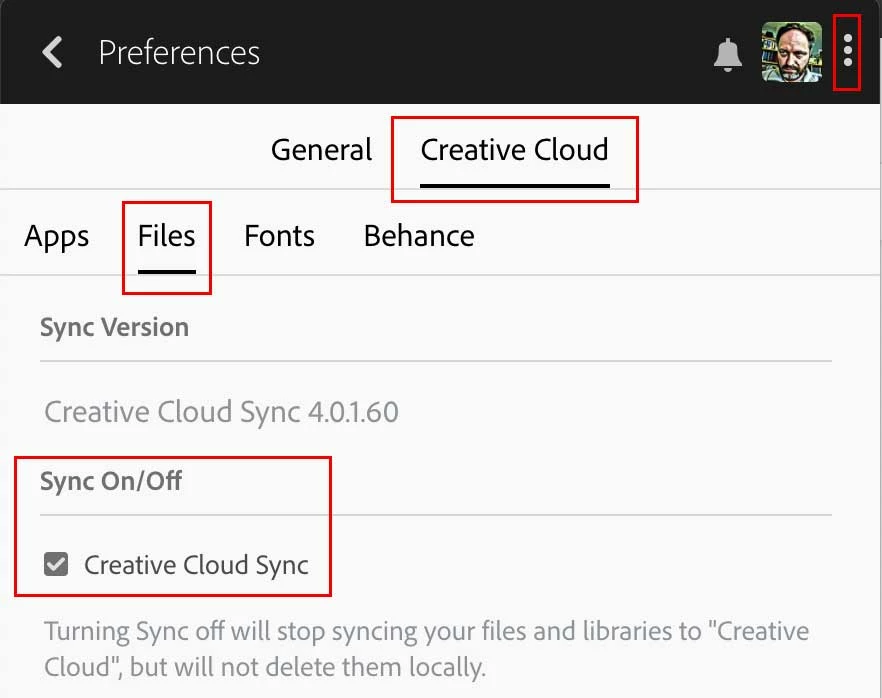
Also, you can turn sync on and off from the Creative Cloud preferences. Although sync is turned off when you sign out, it becomes re-enabled when you sign back in. When you turn it off it no longer attempts to maintain parity between the local (Creative Cloud Files) and online storage. Here is a screen shot of where to turn it on/off at. Uncheck to turn it off.

3 replies

David__B
Adobe Employee
David__BCorrect answer
Adobe Employee
November 29, 2018

Also, you can turn sync on and off from the Creative Cloud preferences. Although sync is turned off when you sign out, it becomes re-enabled when you sign back in. When you turn it off it no longer attempts to maintain parity between the local (Creative Cloud Files) and online storage. Here is a screen shot of where to turn it on/off at. Uncheck to turn it off.

Abambo
Community Expert
Community Expert
November 29, 2018

sign out of the CC! There will be no syncing any more.

ABAMBO | Hard- and Software Engineer | Photographer
kglad
Community Expert
Community Expert
November 29, 2018

Abambo

if, after signing out, and deleting the local folder/files the op some time later signs back in to the cc desktop app, will the cloud files be restored onto their local computer?

Abambo
Community Expert
Community Expert
November 29, 2018

My understanding would be yes!

A simple test would be:

  • create a dummy file synchronized!
  • sign out.
  • delete locally
  • sign in

...and look what happens.

I’m currently on my iPad. That‘s the wrong machine to try.

ABAMBO | Hard- and Software Engineer | Photographer
kglad
Community Expert
Community Expert
November 29, 2018