



Inspiring
October 11, 2021
Answered

Microsoft Visual C++ Runtime Library Error vulcanadapter.cc line 390

  • October 11, 2021
  • 6 replies
  • 112826 views

Hi there,


OS: Windows 10 Home 64 bit

CPU: 15 8300H @2.30GHz

RAM: 16 GB @1197MHz


Adobe Creative Cloud yearly subscription.


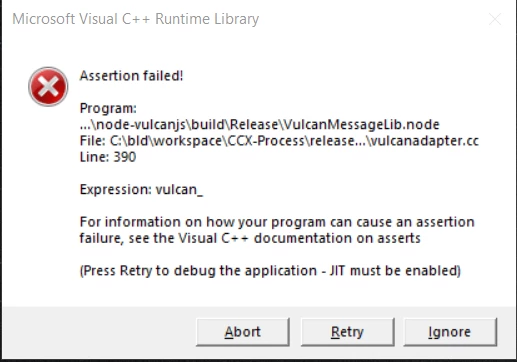
I started my computer and I was reading my emails when I received the following message error:

************************************

ASSERTION FAILED

Program...\node-vulcanjs\build\Release\VulcanMessagerLib.node

File: C:\bid\workspace\CCX-Process\release...\vulcanadapter.cc

Line 390


Expressions: vulcan_


For information on how your program can cause an assertion failure, see the Visual C++ documentation on asserts.


Press Retry to debaug the application - JIT must be enabled

************************************************


Since I did not opened any Adobe application I am not sure what is all about.


What I have noticed is that CreativeCloud it is not started and it does not start.


Without getting same error, I checked my MAC MINI with OS X 11.6, I noticed that creative Cloud does not open either. However, I am able to open Adobe applications. Nevertheless, this is the first time I am getting this error.


Any help is much appreciate it.


Everything is up-to-date.


Regards,

Sebastian
 

Correct answer Drumson

I've run into the exact same problem after using the AdobeCreativeCloudCleanerTool.exe to completely remove Creative Cloud apps.

After completion of the Cleaner-Tool there still was a residual autostart entry for the executable "CCXProcess.exe" in C:\Program Files\Adobe\Adobe Creative Cloud Experience\ - deactivating this autostart-entry and deleting the directory "Adobe Creative Cloud Experience" did the trick for me. Perhaps others should still create a system restore point before trying this.

6 replies

DrumsonCorrect answer
Participant
April 15, 2025

I've run into the exact same problem after using the AdobeCreativeCloudCleanerTool.exe to completely remove Creative Cloud apps.

After completion of the Cleaner-Tool there still was a residual autostart entry for the executable "CCXProcess.exe" in C:\Program Files\Adobe\Adobe Creative Cloud Experience\ - deactivating this autostart-entry and deleting the directory "Adobe Creative Cloud Experience" did the trick for me. Perhaps others should still create a system restore point before trying this.

kglad
Community Expert
Community Expert
April 15, 2025

thanks for that @Drumson 

Participant
January 25, 2025

I have encountered this type of problem. And I also removed it from my window 11 OS. I have encountered this problem when I uninstalled all my Adobe Apps and Adobe Cloud. I thought that I have removed it all but theres still file that keep on running everytime I restarted my window 11 Laptop. And all I did is to remove it AGAIN even if I already remove it. I used the Adobe Cleaner Tool on their website and Downloaded it. Before running the Adobe Cleaner Tool, be sure to run it as a Administrator. I have choose 1 and 7 because I want to cleanly remove all traces of Adobe Apps and Cloud in my windows 11 OS. When its all done, I restarted my Laptop and check whether the error still run. And thadaaaa...... No mre error for me. Hope this will help you also..

kglad
Community Expert
Community Expert
January 25, 2025

for others, to thoroughly clean follow the clean install steps in my previous message.

Participant
September 3, 2024

Just seen this error locally. Our solution was to check the startup applications - there were two entries for ccx-process, one switched on and one switched off.
Switching both off (so as to not start automatically) prevented the error from appearing. It also prevented 80% of the Adobe background applications loading.

Running the one application the user had a license for (Acrobat Pro) caused the usual plethora of background apps to start but did not create this error.

Participant
August 4, 2024

Same problem, really sad that this happens with the Adobe install - not cannot get this error to go away. 

kglad
Community Expert
Community Expert
August 4, 2024

@Rupinder38211666q28e 


did you update and repair each of your versions that could vbe upsated and each that could be repaired?

Participant
August 4, 2024

I am regular person, not a software engineer ... I just need the user experience to be easy. I have uninstalled all my adobe software and run the cleaner tool and still have the issue. Really very annoying. This should not be an issue on the non technical user.  

kaiji51451
Participant
June 28, 2024

when you install abobe installer, bye bye your computer memory, that thing runs 20 processes in the background, and good luck uninstalling this thing, windows cant uninstall it so adobe has built a script to uninstall it, but then your computer as many errors like the one your described when you use that custom uninstaller. Adobe is a fishy company, that could even be a virus.

AxelMatt
Community Expert
Community Expert
October 11, 2021

Please take a look here: https://community.adobe.com/t5/photoshop-ecosystem-discussions/program-modules-node-vulcanjs-build-release-vulcanjs-node/m-p/9884406


Scroll also down to the end of the thread. There are also some tipps that helped other users.

My System: Intel i7-8700K - 64GB RAM - NVidia Geforce RTX 3060 - Windows 11 Pro 25H2 -- LR-Classic 15 - Photoshop 27 - Nik Collection 8 - PureRAW 5 - Topaz Photo
sebdeaAuthor
Inspiring
October 11, 2021

Thank you. I had read that post. So far, I restarted my computer and CC had been updated. No error received.


As for uninstalling Adobe products that is not a solution. A week ago I had grant access to an Adobe engineer to fix FrameMaker instalation. The person from Adobe had uninstalled all Adobe products, clean a lot of folders and subfolders. In the end FrameMaker just installed correctly. After that I installed all Adobe products I am using from Creative Cloud.


That error is the first time I am seeing it.


At any costs, I am having a lot of issues with InDesign. I am making a list of them and post it in InDesign group.


Thank you for your time.


Kind regards,

Sebastian

Participating Frequently
March 5, 2024

It's March 2024 and I am still getting this error. Adobe - please take charge of whatever packages you need. I don't intend to start installing/uninstalling C++ libraries that I don't use because of your software that I am paying good money for.