tristanra
Participant
April 12, 2016
Answered

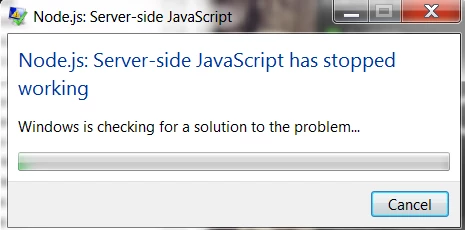
Node.js: Server-side JavaScript has stopped working.
  • April 12, 2016
  • 34 replies
  • 95400 views

Hello Everyone,

After the last Adobe Creative Cloud update. I receive this error every second that takes me out of the program I am currently in. (Indesign, Premiere, Aftereffects, Photoshop). I am currently at a stand still, where a similar problem happened less than a month ago with Error: "Evented I/O for V8 JavaScript has stopped working" .

How many problems can you cause with every update Adobe? Can you fix these before updating and how do I fix this one now since I literally slowed to a snails pace with this issue.

Thanks.
This topic has been closed for replies.
Correct answer atjain

Hi Tristan,

          We are terribly sorry for making you have to go through this. Here are some steps that should help solving the issue:

  • Open Start > Control Panel
  • Click on Programs
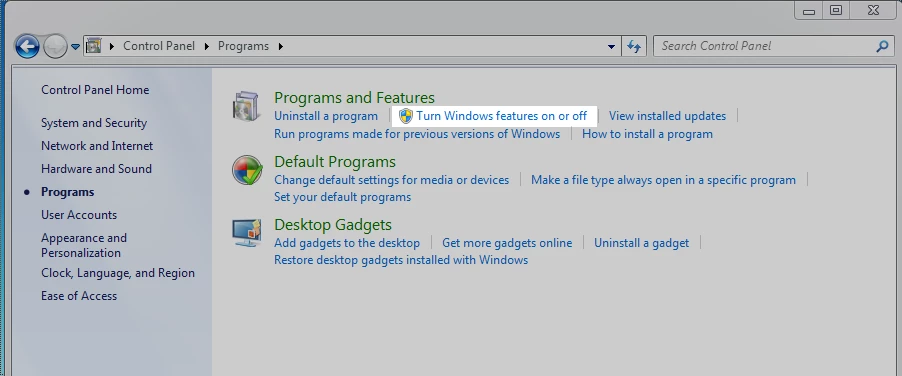
  • In the programs and features section click on 'Turn Windows Features on or off'
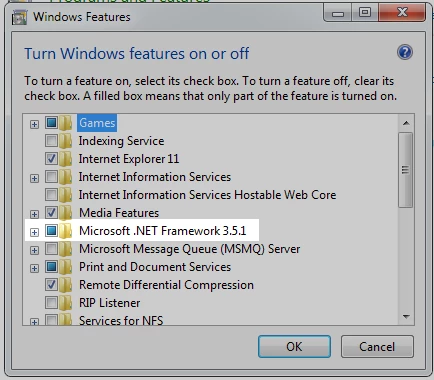
  • Make sure that Microsoft .NET Framework 3.5.1 is not unchecked (A check as well as a blue box as in the screenshot below is ok)

Please reply back to this thread in case you still face issues.

Thanks,

Atishay

Adobe CC Libraries Engineering

34 replies

Participating Frequently
October 17, 2019

none of the solution work for me, requesting adobe team to revert on this with proper final solution.

Participant
October 19, 2019

Likewise, I tried the solutions here, ones from other threads and the issue still persists. Still pops up on startup and again when opening Photoshop. Definitely not solved.

Participant
October 26, 2019

Any Solutions? The Former Solutions Here doesnt work for me.

valeriag29785009
Participant
October 13, 2019
Leave the error minimized, do not close it, minimize it and at least let me work ... since every 5 seconds it appeared!
Participant
October 2, 2019

Three years later and the issue persists. Showed up the other week again, despite being fine prior to that.

Participant
September 23, 2019

The workaround of atjain doesn"t make any difference. If tehre is no solution to the problem, why not reinstall the older version that worked fine? Win7 Problems only with Dreamweaver CC

Participant
October 30, 2019

Suddenly, overnight, my problem seems to be solved. Finaly! It was a desastrous month.


ivani36744716
Participant
September 20, 2019

Open  C:\Program Files (x86)\Common Files\Adobe\Creative Cloud Libraries\libs   and click CCLibraryUninstallHook.

That's the whole science :).


Participant
September 22, 2019
Do you mean, uninstall.. "CCLibraryUninstallHook" ?
Participant
September 16, 2019

I have done the same thing but nothing has happened. What will I do now.?

Burpitt17096389
Participant
September 13, 2019

Just had the same issue, W7 SP1 - literally started over night. My updates are not set to auto install.


FIX: Grabbed the latest node.exe from their site, v12.10 for x64, updated three versions of node.exe within the Adobe folders (Photoshop, Creativecloud libraries, and Creative cloud libraries in the common files folder - I also included the node_modules folder). This seems to have solved the issue for me. 


Adobe, I pay you good money every month for professional programs that are functional. If I have to do start doing these updates myself what is the point of me paying for your services? 


Participating Frequently
October 27, 2019

"FIX: Grabbed the latest node.exe from their site, v12.10 for x64,.."


"Thier site.." Who's site? Adobe's? Just needing some clarification... Thanks.

Participant
April 22, 2019

Thanks dude, thats worked to me

Participant
January 13, 2019

it works for me... Thank you

Participant
October 5, 2017

"not unchecked"? Seriously? A double negative? I had to stare at that for a minute to make sure I got it right.