tristanra
Participant
April 12, 2016
Answered

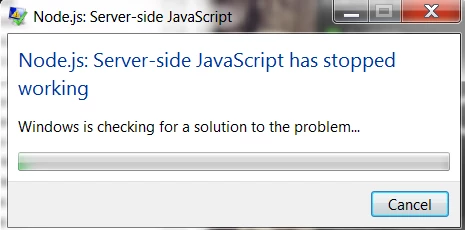
Node.js: Server-side JavaScript has stopped working.
  • April 12, 2016
  • 34 replies
  • 95400 views

Hello Everyone,

After the last Adobe Creative Cloud update. I receive this error every second that takes me out of the program I am currently in. (Indesign, Premiere, Aftereffects, Photoshop). I am currently at a stand still, where a similar problem happened less than a month ago with Error: "Evented I/O for V8 JavaScript has stopped working" .

How many problems can you cause with every update Adobe? Can you fix these before updating and how do I fix this one now since I literally slowed to a snails pace with this issue.

Thanks.
This topic has been closed for replies.
Correct answer atjain

Hi Tristan,

          We are terribly sorry for making you have to go through this. Here are some steps that should help solving the issue:

  • Open Start > Control Panel
  • Click on Programs
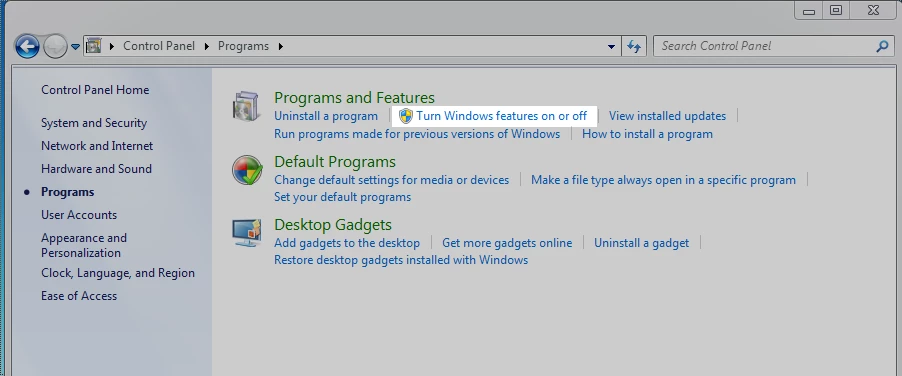
  • In the programs and features section click on 'Turn Windows Features on or off'
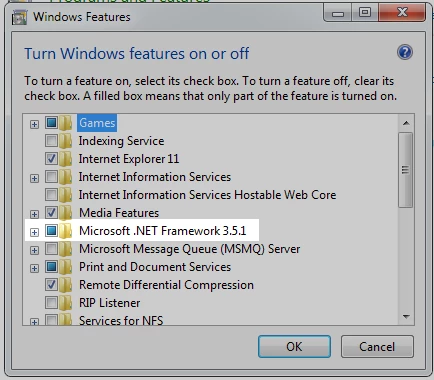
  • Make sure that Microsoft .NET Framework 3.5.1 is not unchecked (A check as well as a blue box as in the screenshot below is ok)

Please reply back to this thread in case you still face issues.

Thanks,

Atishay

Adobe CC Libraries Engineering

34 replies

Participant
February 1, 2017

This has been going on since April 2016 and it still isn't fixed? Does Adobe realize that we all paid hefty sums of money to use their products? I have lost hours of work time today, because this stupid error bollixed everything up on my system--not just Creative Cloud.

So I've applied the Microsoft .NET Framework 3.5.1 solution and things are okay--for the moment. Really, Ashitay, Adobe needs to fix this error or start reimbursing people for their lost time. Seriously!

I can smell the class-action lawsuit from here . . .

Participant
December 22, 2016

This does not work! Mine was not even checked. I did not get this error until I installed Creative Cloud, photoshop and bridge. I have restarted my computer, I checked and unchecked the windows features  box stated in the solution. I have a windows 7 and this is interrupting everything I am trying to do. Please help!!!

Silly-V
Legend
August 9, 2016

Wow, I have this happening now, and I thought it was result of me messing around with my IIS and VisualStudio, etc - and it was indirectly - as one of the things I did was uncheck that 3.5 framework button. Will try to re-check and restart..

Participating Frequently
June 29, 2016

I think the node.exe or node.js is tied to the Adobe Library somehow. All recent CC apps open with the Library as a window or tab that's opened. I have found if I save a custom layout without a Library window open, it helps stop the node error.

Miami_30513779839
Participant
May 14, 2016

try the solution on node.js error

atjain
Adobe Employee
atjainCorrect answer
Adobe Employee
May 12, 2016

Hi Tristan,

          We are terribly sorry for making you have to go through this. Here are some steps that should help solving the issue:

  • Open Start > Control Panel
  • Click on Programs
  • In the programs and features section click on 'Turn Windows Features on or off'
  • Make sure that Microsoft .NET Framework 3.5.1 is not unchecked (A check as well as a blue box as in the screenshot below is ok)

Please reply back to this thread in case you still face issues.

Thanks,

Atishay

Adobe CC Libraries Engineering

Participant
May 13, 2016

>>Make sure that Microsoft .NET Framework 3.5.1 is not unchecked (A check as well as a blue box as in the screenshot below is ok.

The box is checked... didn't fix anything.

Participating Frequently
May 13, 2016

Mine was not checked and/or blue - so I pressed on it and it became blue, and I pressed apply and reboot my computer. You can always try unchecking it. Rebooting and then manually checking it again. Hope this helps.

Pat

Spellinator
Participant
May 12, 2016

I have this same freakin' problem. I've tried renaming the executable, but no relief. What they hell Adobe???? This didn't happen until I upgraded.

Participating Frequently
May 12, 2016

the worst part is it is more frequent in the last few days - so I will speculate that adobe is working on the issue - I am probably wrong though since they have not had one iota of communication with us to even acknowledge the problem. hell of a way to run a business!

iecni
Participant
April 27, 2016

I ran into this error in Creative Cloud at one of my clients. What I found was that the error had started occurring after an version update or upgrade. Upon closer examination I found that the original version of node.exe was approximately 5.5 MB and there was a newer one in the update that was slightly over 11 MB. The environment still pointed to the older file location, so I renamed the old original node file and copied the newer version into the folder.  After that - no more errors have appeared (at least in the last several hours - and the client said they had been popping up every few minutes, at login, or opening various applications. I hope this helps.

Stan

Participant
April 27, 2016

Unfortunately, this is happening for my client on brand new installs, not upgrades, so not sure where to go from here...

Participating Frequently
May 7, 2016

I just found this tidbit (figured it might help someone more technical)

http://code.tutsplus.com/tutorials/learning-server-side-javascript-with-nodejs--net-10044

it doesn't fair well with windows or for long term connections like to all of us using adobe products. I am pretty sure that adobe isn't responding because it hasn't a clue yet how to fix the issue. you'd think they would realize that eventually they will lose customers over their programming mistakes. we'll see.

Tell me Russel can you do anything with this bit of information that may help the rest of us come up with a work around?

Pat

Participating Frequently
April 25, 2016

Why does Adobe keep releasing updates that cause more errors regarding the node. Why haven't they fixed the original problem. It used to be that downloading node.exe and replacing it fixed the error now that doesn't work anymore.

Participating Frequently
April 19, 2016

I am able to work right through the error message but it is annoying. Still using Windows7 and will as long as possible.