
Michiel metDT
Participant
December 19, 2019
Question

Sync is stuck

  • December 19, 2019
  • 11 replies
  • 3328 views

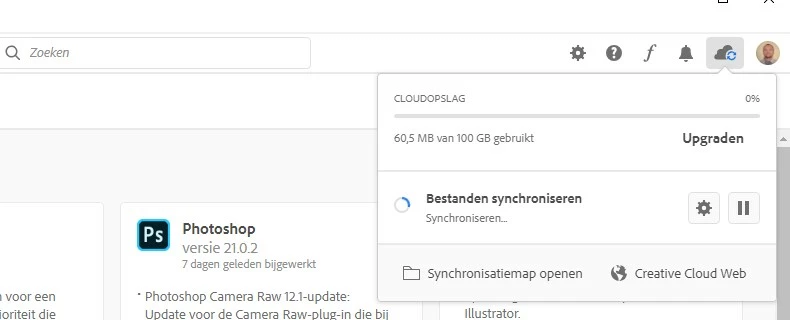
Creative Cloud Files is not syncing. It is stuck on Synchronising Files (in Dutch in the image). It keeps doing this for hours, when there are only a few small files to update. Restarting the service does not help. 


I am using

Windows Defender (no other firewall or anti-virus)

Creative Cloud 5.0.0.354

Core Sync 4.3.20.55


This topic has been closed for replies.

11 replies

Papawas
Participant
February 11, 2021

Leider das gleiche Problem... seit Monaten und keine Lösung. Die Sync Anzeige im "Creative Cloude Desktop" springt immer wieder auf den gleichen Stand und die File Icons wechseln innert Sekunden von "Häcken" auf "Sync" und zurück. Wann kommt endlich die Lösung?

Nibroc99Productions
Known Participant
February 11, 2021

Windows 10 20H2 here and I've got this exact problem as well.  Even the remote support tech couldn't solve the problem when they connected remotely to my PC to troubleshoot.  All of the exact symptoms mentioned in this thread, right down to the links being grayed out in the context menu.  File icons used to have checkmarks and "syncing" icons overlayed on them too, and now it's not showing those little status indicators on files either.  This happened out of the blue.  Anybody ever find a solution?  CC is up to date.  Tried everything under the sun and so did the support tech in the remote session.


Dahua-designer
Participant
February 12, 2021

The tech support offer any ideas of a solution or how long things will be screwed up?


Thinks will sync on my laptop (I have several shared folders with co-workers) but my desktop is stuck.

Nibroc99Productions
Known Participant
February 12, 2021

Nope.  He DID, however, move 320GB of files from my Creative Cloud SSD to my C:\\ drive.  Which was NOT cool.  He got impatient and actually left the session.  It was just...  Frustrating.  And useless.

Participant
December 7, 2020

Bumping this even though this thread is a few months old now, but wanted to add that this has started happening to me too. A solution would be fab!

MartinL_Alza
Participating Frequently
August 7, 2020

Yes. Disk activity zero, network activity zero. Yet CoreSync going nuts. Clearly a bug.

Guys... can I report one of your comments as offended? Cause otherwise I don't believe that ANYONE from Adobe will ever even slightly notice this. I tried a helpline but it was absolutelly useless. After being repeatedly transfered from one "technician" to another, reinstalled what they could, gone through all the primitive ways of solving it, they simply told me to remove all my files and adding them one after another to find out which one causes the problem.

Which is a superb solution! Curing the symptoms but not curing the source. If there is a file that cannot be processed, the application should inform the user and not stuck and throttle the CPU like some mining virus.

Anyways as I really think that this will not be solved EVER, I recommend you guys to remove all files and then sequentially adding them to find out which is causing a problem. My guess is that it's caused by some reeeeeeeealy long file name or by a file with an uncommon characters in it.

neilh34621833
Participant
August 6, 2020

Same issue here. It's just been stuck syncing for the past couple of weeks. CPU usage is pegged around 90 - 100% the entire time from Core Sync and Explorer going nuts. What's ridiculous is that I'm also showing 0% disk usage on the hard drive that I sync Creative Cloud files to while this is happening, so it's just chewing up my CPU for whatever reason.

Participant
July 25, 2020

Have with problem on Windows 10 Home 2004 as well. Out of nowhere the syncing is stuck and no solutions help at all...

August 3, 2020

Same here stuck like a rock. Adobe where is the sollution for this?

MartinL_Alza
Participating Frequently
July 12, 2020

Same problem here. Win 10, multiple devices. Frozen syncing, while the process "CoreSync.exe" is going wild.

Participant
May 16, 2020

I see that this post is old, but I am having same issue. Fonts, cloud storage, app preferences won't sync.
This is excruciating and disappointing, nothing works to fix it.

Participant
April 13, 2020

I've been having this issue for a while.


Creative cloud barely meet the quality standard that any other (even free) cloud sharing service provides. 


Syncing file via the mac creative clud is just slow and painful and it seems that it's doing somehting but it's just 100% stuck.


I had to manually upload the file from the web to make it available for my coworkers. That is the only workaround I found.


Rebooting my computer each time I have to update a file on the cloud is not really user friendly (and not always it seems to be working) 

Participant
January 24, 2020

Hi

I have pretty much same issue here. My files haven't sync for a while 😞  since the last main CC update.

Like Michiel it's stuck on "Synchronising" but nothing happen.


If I right-click on a folder or file the options "share files" are not active.


And the mini green/blue/red icons doesn't show on folders


Config :

Mac OS 10.14 Mojave

Adobe CC 5.0.0


Participant
April 9, 2020

Hello,


i have the same issue. Files stuck synchronising. 


I deleted everything on my Drive as well as on the Cloud Web App and the Archive (which was very painful, because you can't delete all items at once). Then i reuploaded all my files into the CC-Files folder but i got stuck again. It is very frustrating since i can't rely on synchronised files.


i am considering reuploading everything via the browser. I have the feeling its not working when i just put it into my folder.


I am running windows 10.


Greetings,

Max