


silver darling
Known Participant
July 30, 2021
Question

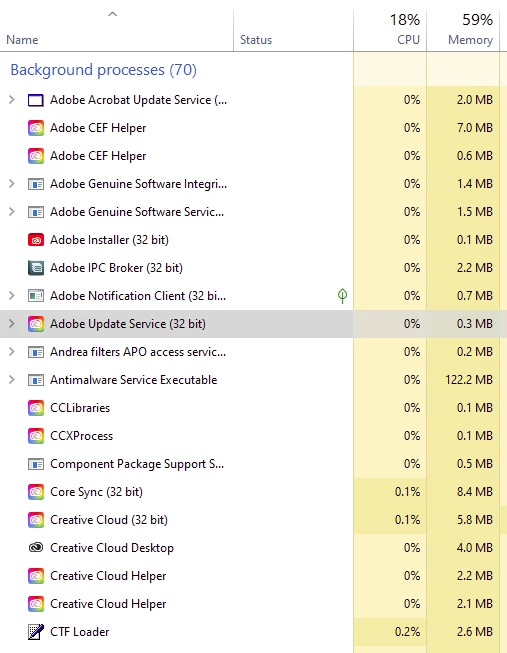
Why are there 16 Adobe processes running when no adobe apps being used ?

  • July 30, 2021
  • 2 replies
  • 697 views

Why does Adobe think it appropriate to run 16 unecessary processes when no Adobe apps are in use? This is not in any way necessary. It is an extreme waste of energy and computer resources. It shows total disregard on Adobe's part for the end user and the arrogant promotion of adobe product requirements over any other product requirements. Adobe are abusing their monopoly position to hog resources.


When will they stop it?


This topic has been closed for replies.

2 replies

Nancy OShea
Community Expert
Community Expert
September 6, 2021

Much ado about nothing, I think.

  • 0% = zero usage. 
  • 0.1 and 0.2% is minuscule. 
  • IMO, none of this is worth bursting a blood vessel over.

Also this is a user-to-user community, not Adobe technical support.


================
CONTACT ADOBE SUPPORT:
================
Online Chat: https://helpx.adobe.com/contact.html?rghtup=autoOpen
Phone M-F, during normal business hours: https://helpx.adobe.com/contact/phone.html


Nancy O'Shea— Product User & Community Expert
silver darling
Known Participant
September 13, 2021
John T Smith
Community Expert
Community Expert
July 30, 2021

How to disable a program in Windows 10 startup
-Click the 'window pane' in the very bottom left corner of the Windows desktop
-Select * Settings
-Select Apps
-Select Startup
-Select/toggle the program you want to disable/enable
-BE VERY CAREFUL WHAT YOU DISABLE SO YOU DON'T STOP WINDOWS FROM RUNNING
https://community.adobe.com/t5/creative-cloud-services/how-can-i-disable-core-sync-and-updaters/td-p/7581821

silver darling
Known Participant
September 5, 2021

Thanks but that doesnt work. All the processes are not available in start up and even when disabled they or their cronies run.  Adobe are well aware of this because it's all over the forums but neglect to change it because arrogance and $$$$.


Good software runs like this -

When i click to start it , it starts. Not before. Not after. Only when specifically instructed to by the user.

When I click to update it, it updates. Not before. Not after.  Only when specifically instructed to by the user.


All Adobe


follow up to show what happens on reboot ...


silver darling
Known Participant
September 5, 2021


ADOBE'S EMISSIONS  = THE PLANET BURNS


Why are Adobe permitted this wasteful, irresponsible software?