

Participant
October 14, 2016
Answered

E_LIC_LICENSE_SIGN_ERROR - ACSM

  • October 14, 2016
  • 25 replies
  • 14660 views

Hello, I was directed here from chat support operator. My client have a problem when try add to library acsm file. Error message like this:
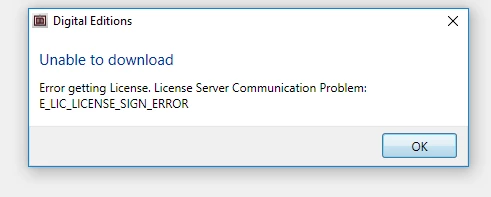
How i can resolve my client problem ?

Correct answer Nanaky

The error message indicates that there are problems when communicating the server from the vendor with the Adobe server.

25 replies

Participant
May 25, 2017

getting this error as well.

Participant
May 25, 2017

I've been getting this error, too - wonder if the server's down?

Participant
May 25, 2017

I'm getting this error as well. Seems unlikely that all of us having this problem today is a coincidence. A solution would be nice.

alyssas35410436
Participant
May 25, 2017

Same problem, on a mac trying both safari and chrome. I get this error when I try to download and open a .acsm file from my public library. Have reinstalled ADE several times, deleted and re-registered the mac, tried with several different e-books, downloaded each one multiple times and tried opening immediately, don't know what else to try. I don't understand why this question is marked "answered". The answer is no help at all.

Participant
May 25, 2017

I'm also getting this error - is there a solution we can apply?

kens10032777
Participant
May 25, 2017

I too have been directed here by the chat operator...the question above is NOT answered. How does this issue get resolved? Is this an Adobe issue that you can't fix?? I have tried to download 2 books and neither will due to this message...and now they're showing as "borrowed" but I don't have them and can't return them to the library so I'm down the amount if books I vacant borrow.

i would appreciate an answer that will FIX this issue.

Thank you

Nanaky
NanakyCorrect answer
Participating Frequently
October 14, 2016

The error message indicates that there are problems when communicating the server from the vendor with the Adobe server.

March 2, 2017

So there's no way to fix the problem? Do we wait it out?