


Participant
August 1, 2018
Answered

3D OBJ from PSD surface issues.

  • August 1, 2018
  • 3 replies
  • 826 views

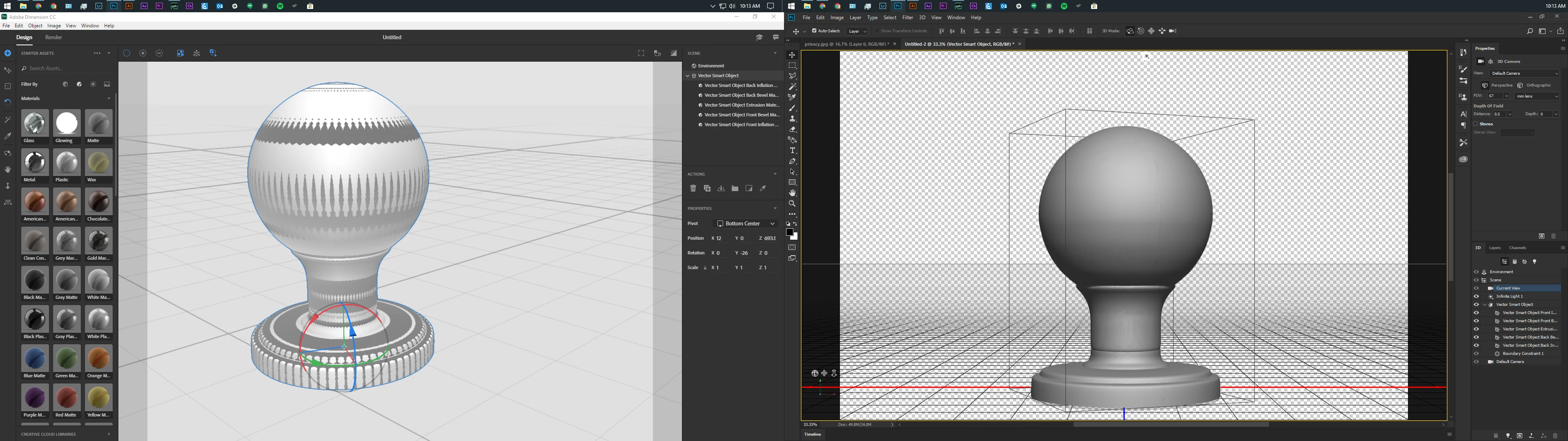
I have been trying to figure this out. I built this vector in AI, made it pixel perfect, made sure all my lines were clean, sent it to PS, did a 3D render, again made sure all of my surfaces were clean, saved as an OBJ and imported to Dimensions an what I get is very different from what I built in Photoshop. Please help.
    This topic has been closed for replies.
    Correct answer JeanetteMathews

    Can you send me the .obj file?  You can mail it to tickets@adobedimension.com.  Looks like maybe parts of the model are inside-out (the darker bits), but it's really hard to tell without seeing the model itself.

    3 replies

    Participant
    August 12, 2018

    I have the same problem with obj file... it can be fixed?

    Dropbox - cloud.obj https://www.dropbox.com/s/hqthdbygpscrkcd/Q.obj?dl=0

    Ussnorway7605025
    Legend
    August 13, 2018

    juliab44202973  wrote

    I have the same problem with obj file...

    I'd try the same fix

    Ussnorway7605025
    Legend
    August 2, 2018

    it just looks like lighting to me... the system has failed to load Dimension correctly but thats a known issue with this build and Windows so I would re-export the object from Photoshop and try again

    i.e, open it in Photoshop

    disable the infinite light and export as wavefront | obj with bmp textures

    then when you import it to Dimension, slap a new material (not glass) and see how that rendors

    JeanetteMathews
    Adobe Employee
    JeanetteMathewsCorrect answer
    Adobe Employee
    August 1, 2018

    Can you send me the .obj file?  You can mail it to tickets@adobedimension.com.  Looks like maybe parts of the model are inside-out (the darker bits), but it's really hard to tell without seeing the model itself.
