Participant
February 11, 2022
Answered

Can no generate UV's

  • February 11, 2022
  • 6 replies
  • 2973 views

Hi, i'm trying to export a UV for a project.


I drag a cube into my scene and go to Object > Export UV. I follow the promps but no UV file is created. Does anyone else have this problem?

I've tried this with a few differetn shapes and models that are available in Dimension and haven't had any luck.


I've also tried Generating the UV's before Exporting and still no file is generated. 

If you have any ideas that would be great.
Correct answer udderball

Sorry, screengrabs here


6 replies

JMathews
Community Manager
Community Manager
July 29, 2024

Hi @Webology !  I think this may be a mismatch of expectations vs what the Export UV function actually does.

It seems like you're opening the 3D file in Photoshop, which is not what the Export UV function was built for.  


You can see a full guide here:

https://helpx.adobe.com/dimension/using/exporting-model-uvs.html


The short version:

  • Use File > Export UVs
  • It will create a psd document with layers that include the UV guides (wireframe, etc)
  • You can use this psd document to create 2D graphics.
  • Then save the psd and apply it to your object back in Dimension as a decal or material texture.


Dimension is not testing any workflow where the 3D object itself is opened in Photoshop as the Photoshop 3D features are being removed.

Adobe Principal Product Manager, 3D & Immersive
halfwintr
Participant
July 29, 2024

Hey @JMathews , I could be wrong, but I think Webology's issue was with exporting UVs in general (which is what lead me to this thread). I think the whole opening a 3D file in Photoshop was Udderball's suggested hack (which you're right, seems outdated).

WebologyAuthor
Participant
July 30, 2024

Hi @halfwintr @JMathews 

Thanks for the reply, @halfwintr yes you're right. I was having an issue with exporting UVs. The PSD files weren't being created.

But this issue has seemed to have fixed itself with either a MacOS or Dimension update. I now get the PSD UV when I use the "Export UV" option.


Cheers Ari

Cheers Ari

halfwintr
Participant
July 29, 2024

I stumbled on this thread since Adobe Dimension just updated to v 4.0.2 and the tooling that worked last week is no longer working. This thread is outdated, but the suggestions lead me to an updated work around. The previous `Object » Generate UVs` menu option does nothing for me. However, `File » Export » Selected Objects UVs` is currently working on my install. I don't know what the intended difference is, but I thought I'd share that. 🤷‍♂

Inspiring
September 12, 2022

I have exactly the same problem suddenly. Been doing it all day and it's been fine. Suddenly stopped. 

Permissions are all fine.

udderball
Inspiring
February 18, 2022

I found a workaround! Not sure if it will work for everyone who has this same issue.

  1. "Generate UVs" in Dimension, but don't export UVs. 
  2. Instead, use "file" > "export" > "selected models", export OBJ
  3. In a photoshop doc, "3D" > "new 3D layer from file" > open your exported OBJ (which now includes Dimension-generated UVs)
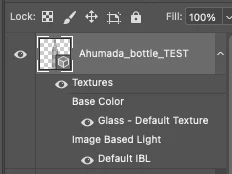
  4. In the layers panel, double click into the Base Color layer (in my attached example labeled "Glass - Default Texture"
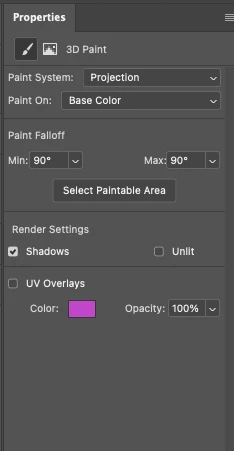
  5. In the properties panel of the PSB that opens, check "UV overlays" (now you'll see if it worked)
  6.  "3D" > "create painting overlay" > "wireframe"
  7. Now you have a layer which includes the UV map. You can then export this as a JPEG and use it for matching your art/graphics to the object
udderball
udderballCorrect answer
Inspiring
February 18, 2022

Sorry, screengrabs here


udderball
Inspiring
February 18, 2022

I'm having this same issue, and have triple checked my Mac's user permissions so Drive has full access.

Ussnorway7605025
Legend
February 11, 2022

the parametric shapes don't have a Uv until you convert them

https://helpx.adobe.com/dimension/using/work-with-basic-shapes.html


as for no file showing up, that sounds like your Mac has permission issues on the output folder i.e, you may need to give Adobe Dimension permission to put files there