The Artworker
Known Participant
December 10, 2019
Answered

Can't get Translucency to create transparent objects

  • December 10, 2019
  • 2 replies
  • 4037 views

I'm trying to make a transparent wrapper in Dimension so you can see the contents within. The wrapper has a Decal applied so I can't use the transparency setting. A search tells me to use the translucency setting.

In the Design window playing with this parameter gives me the look I want is rather crudely rendered. However when I do a proper render the wrapper just ends up white opaque.


What am I doing wrong and while I am at it can someone give me some decent settings for a crear plastic wrapper with relections on it?


I'm using Dimension 1.1.1 which is the highest version my Mac supports.


Thanks! 

This topic has been closed for replies.
Correct answer Ussnorway7605025

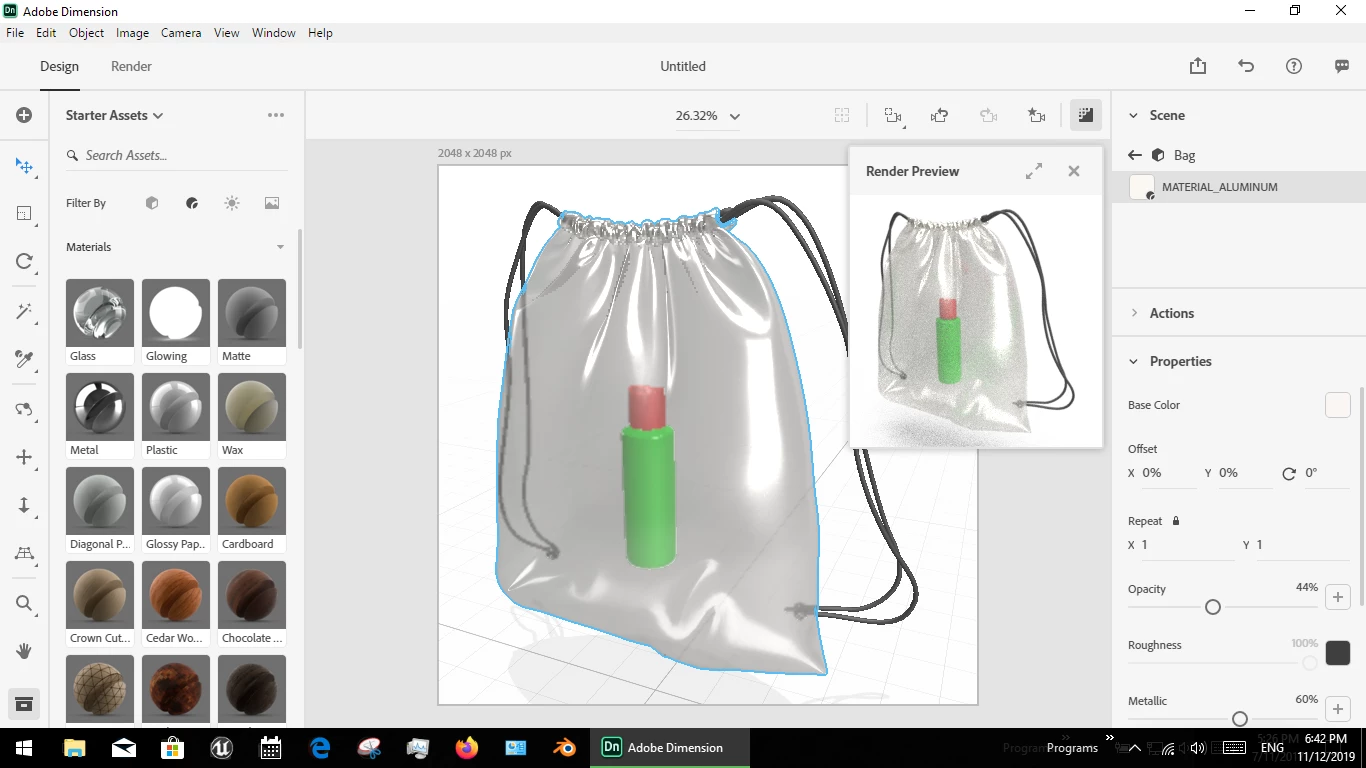
MATERIAL_ALUMINUM should be in V1.1 and that makes a good 'transparent wrapper' if you set opacity to 44-55% and matalic to 40-60%


[A search tells me to use the translucency setting.]

translucency is a different thing mate, white is the default inner colour but other colour and no-colour i.e, blank pixels also work well for some senarios... the new Dimension builds have major issues with blank pixels so you are better off with V1.1 sometimes

2 replies

Ussnorway7605025
Legend
August 15, 2020

To be clear, transparency is rendored correct in version 1 of Dimension because it's using the NVIDIA system


Apple Mac is fighting with NVIDIA so Adobe moved with them to untested new drivers which means transparency stopped rendoring from version 2 onwards i.e you dig up old threads = out dated information


People who have current version of Dimension should use an opacity map to work around is limitations until Apple Mac gets off their backs and sorts their drivers... Don't hold your breath!

Ussnorway7605025
Ussnorway7605025Correct answer
Legend
December 11, 2019

MATERIAL_ALUMINUM should be in V1.1 and that makes a good 'transparent wrapper' if you set opacity to 44-55% and matalic to 40-60%


[A search tells me to use the translucency setting.]

translucency is a different thing mate, white is the default inner colour but other colour and no-colour i.e, blank pixels also work well for some senarios... the new Dimension builds have major issues with blank pixels so you are better off with V1.1 sometimes

Inspiring
August 14, 2020

Greetings


Have you ever successfully tried to make a decal applied to an object and make the  object disappear in rendering, but keep the decal opaque?  I see a lot 'solved' notations on this question, but although everyone has suggestions, I have never seen one actually 'do it'/ thanks

Ares Hovhannesyan
Community Expert
Community Expert
August 14, 2020

Here is a capture for transparent cube with decal applied on it surface for Dn latest drop in render preview mode. It possible to implemt in Dimension